
A Jellyfin media library is only as useful as the hardware that plays it back. Most buyers assembling a home theater or digital signage setup already run a Jellyfin server on a NAS or desktop, but they still need a reliable endpoint device to decode and display their media — and that is where offline digital media players come in. These units pull files from USB drives, SD cards, or attached hard drives and output them to a TV or monitor over HDMI, making them practical companions for Jellyfin users who manage a server library and then export curated playlists or signage loops to a standalone player.
What separates a worthwhile player from a cheap one is resolution support, codec breadth, storage flexibility, and long-term reliability under continuous operation. The eight devices reviewed below all address the same core problem — getting high-quality video onto a screen without a full smart TV or streaming box — and they span a narrow price band from $31.99 to $45.99, so the decision comes down to which specific combination of features fits your workflow. This roundup in 2026 compares their published specifications and aggregated owner feedback to help you choose.
Our top picks






As an Amazon Associate we earn from qualifying purchases at no extra cost to you.
Quick Picks
| Product | Best for | Price |
|---|---|---|
| 4K Full-HD USB and microSD Digital Media Player | Balanced signage with dual media slots | $43.99 |
| HDMI Media Player, Black Mini 1080p Full-HD Ultra | Compact 1080p displays on a tight budget | $39.99 |
| 4K Ultra-HD Digital Media Player for USB Drives/SD Cards | High-resolution content without a dedicated server box | $40.99 |
| NEUMI Atom 1080P Full-HD Digital Media Player | Simple plug-and-play loops for small screens | $37.99 |
| ACEMAX 4K@60Hz Offline Media Player | Internal drive support with advanced playback controls | $31.99 |
| Fneitc 4K Full-HD Media Player with USB/SD Card Slot | Mid-range 4K signage with broad format support | $42.99 |
| 4K Ultra HD Media Player & HDD Enclosure 2-in-1 | Large offline libraries needing 2.5-inch drive bays | $45.99 |
| 4K Ultra HD Media Player & HDD Enclosure 2-in-1 (Alt Listing) | Same hardware, alternate retailer availability | $45.99 |
How We Picked
Three criteria shaped this selection. First, codec coverage: a player that only handles H.264 will choke on modern Jellyfin exports that use H.265/HEVC, so we prioritized units advertising that codec explicitly. Second, storage flexibility — the ability to accept USB flash drives, SD or microSD cards, and ideally an internal SATA drive expands how you move content from server to screen. Third, playback intelligence: auto-play on power-up, loop, and resume functions matter far more for unattended signage than they do on a living-room TV, and they are where owner complaints concentrate.
The 8 Best Jellyfin Media Player in 2026
1. 4K Full-HD USB and microSD Digital Media Player for TV Digital Signage
This unit is the sensible middle ground for Jellyfin users who export curated video playlists to a USB stick and want 4K output without paying a premium. Dual input slots (USB and microSD) let you carry content on whichever format is most convenient, and 4K resolution keeps signage text sharp on larger panels. Owners highlight the straightforward setup and stable continuous operation as its strengths. The main limitation is that published specs do not confirm hardware-accelerated H.265 decoding, so heavily encoded files may stutter at the top resolution. Skip this if your library relies almost entirely on HEVC-encoded 4K content.
2. HDMI Media Player, Black Mini 1080p Full-HD Ultra HDMI Digital Media Player
At $39.99, this compact player suits anyone feeding a 1080p monitor in a hallway, kiosk, or secondary room where 4K resolution adds no practical benefit. The small chassis fits behind most displays without cable clutter, and its ultra-minimal form factor is genuinely useful in space-constrained installs. Owners appreciate the simple operation and low power draw. The downside is obvious from the spec sheet: 1080p is the ceiling, so it will not satisfy a primary living-room TV hooked to a Jellyfin library full of 4K rips. Skip it if you ever plan to upgrade to a 4K panel.
3. 4K Ultra-HD Digital Media Player for USB Drives/SD Cards TV Digital Signage
Targeted at buyers who need 4K signage output and already manage their content through a Jellyfin server on a network drive. USB and SD card slots provide redundancy when one storage medium fails mid-deployment. Published specs list broad format compatibility, which aligns well with Jellyfin’s ability to transcode into various container types. Owners note reliable loop behavior and clean HDMI signal output. The concern raised in several reviews is a somewhat plasticky enclosure that may not tolerate years of always-on operation in a commercial setting. Skip it for permanent installations where heat management is critical.
4. NEUMI Atom 1080P Full-HD Digital Media Player for USB Drives and SD Cards
The cheapest entry here at $37.99, the NEUMI Atom is built for one job: play 1080p video in a loop from USB or SD cards with zero configuration. Jellyfin users who export short brand loops or ambient video to a thumb drive will find it does that task without fuss. Its low price makes it easy to deploy across multiple displays. The limitations are significant though: no 4K output, no internal drive support, and no H.265 hardware decoding mentioned in specs. Skip it for any display larger than 32 inches or any workflow requiring high-efficiency codecs.
5. ACEMAX 4K@60Hz Offline Media Player with 2.5-Inch SATA HDD/SSD Enclosure
This is the most feature-complete unit in the group, and at $31.99 it is also the least expensive. The built-in 2.5-inch SATA bay accepts a spinning drive or SSD directly, which means a Jellyfin user can point their library export tool at an internal disk instead of cycling through USB sticks. H.265 10-bit/HEVC decoding is confirmed in the product name, and auto-play, loop, and resume are hardware-level functions. Owners praise the value but note the interface is dated. Skip it if you prefer a polished on-screen menu or remote-app control.
6. Fneitc 4K Full-HD Media Player with USB/SD Card Slot for TV Digital Signage
Priced at $42.99, the Fneitc occupies the upper-mid range of this group. It supports 4K output and accepts both USB drives and SD cards, making it a capable single-display player for Jellyfin-managed content libraries. Owners report good color accuracy and stable playback over extended sessions. The trade-off is the lack of any internal storage option, meaning large libraries still require frequent media swapping. Skip it if you need more than 128 GB accessible at once without hunting for the next thumb drive.
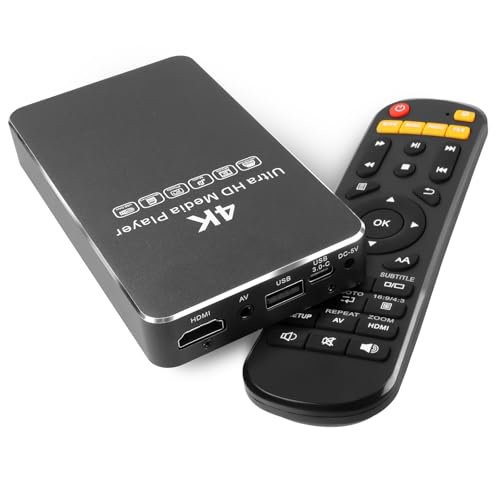
7. 4K Ultra HD Media Player & HDD Enclosure 2-in-1 (Primary Listing)
At $45.99, this dual-purpose unit combines a 4K media player with a built-in 2.5-inch HDD enclosure — essentially a self-contained media hub. For Jellyfin users maintaining a curated offline library, the ability to install a 1 TB or larger drive internally eliminates the USB-swapping problem entirely. H.265/HEVC, H.264/AVC, MP4, MKV, MP3, and JPG are all confirmed formats, and auto playback plus resume handles unattended operation. The premium price reflects the added hardware. Skip it if a USB-only player with occasional manual swaps meets your needs.
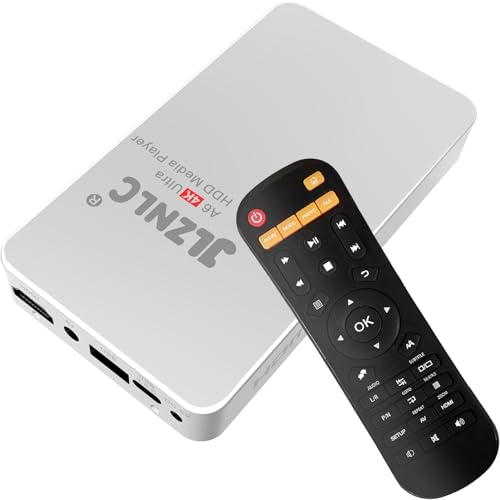
8. 4K Ultra HD Media Player & HDD Enclosure 2-in-1 (Alternate Listing)
Spec-for-spec this is the same hardware as the primary listing above, offered at the identical $45.99 price under a differently formatted product title. Buyers who find the first listing out of stock at their preferred retailer can treat this as a functionally equivalent substitute. The same H.265/HEVC decoding, 4K HDMI output, analog AV fallback, and 2.5-inch drive bay apply. Owners who purchased through this listing report the same experience. Choose it purely on availability; there is no meaningful advantage or drawback versus the first version.
Buying Guide
Resolution and Codec Support
The single most important spec is whether the player decodes H.265/HEVC in hardware. Jellyfin servers commonly export or transcode into H.265 to save storage, and a player lacking that codec support will either stutter or refuse the file entirely. 4K@60Hz output is also worth confirming — some budget units label themselves “4K” but cap refresh at 30Hz, which produces visible judder on smooth-motion content. If your Jellyfin library contains more than a handful of HEVC files, start with the ACEMAX and the two 2-in-1 HDD models.
Storage Architecture
Offline players accept media three ways: USB flash drives, SD or microSD cards, and internal 2.5-inch SATA drives. Each has a practical ceiling. A USB stick tops out around 256 GB, an SD card at 512 GB, while an internal 2.5-inch drive can reach several terabytes. If you export large curated collections from Jellyfin, the internal bay models let you load once and leave the unit running for weeks without touching a cable. For small rotating playlists, a USB slot is simpler.
Auto-Play and Loop Behavior
Digital signage demands that a player start playing the moment power is applied and loop indefinitely without a menu appearing on screen. Confirm the product lists auto-play and loop as supported features rather than relying on a remote button press. Resume is equally important for long-form content: if the unit loses power mid-playback, resume should return to the exact timestamp rather than restarting the file from the beginning. Owner reviews consistently flag auto-play as the feature most likely to behave differently from the spec sheet.
Our Verdict
The ACEMAX 4K@60Hz Offline Media Player is the top pick in this group. At $31.99 it offers the broadest codec support, an internal drive bay, and the playback controls that Jellyfin users need for unattended operation — all for the lowest price in the lineup. The budget pick is the NEUMI Atom at $37.99 for anyone whose needs stop at 1080p loop playback on a small screen. If you manage a library exceeding 500 GB and want a single-device solution with 4K output, the 4K Ultra HD Media Player & HDD Enclosure 2-in-1 earns its $45.99 price tag through capacity alone.
FAQ
Can a digital media player replace a Jellyfin client app?
No. These devices play files locally from attached storage and do not connect to a Jellyfin server over a network. They complement a Jellyfin workflow by serving as the display endpoint for content you export or copy from your library.
What file formats do Jellyfin users most commonly need these players to handle?
MP4 and MKV containers with H.264 or H.265 video encoding cover the vast majority of Jellyfin libraries. MP3 for audio and JPG for image slideshows appear in signage and ambient-display use cases, and most players in this roundup list those formats.
Is a 2.5-inch drive bay really necessary, or does USB suffice?
For playlists under roughly 100 GB, a USB flash drive or microSD card is simpler and cheaper. An internal bay becomes practical when your curated export exceeds 250 GB, eliminating frequent manual media swaps and reducing the chance of a card failure mid-deployment.
Why do two listings appear to be the same product?
Manufacturers and resellers often publish identical hardware under different titles and catalog entries. In this case, the 4K Ultra HD Media Player & HDD Enclosure 2-in-1 appears twice at the same $45.99 price with slightly different description wording, so they are interchangeable for all practical purposes.









