Our Short List of 3

- View on Amazon: https://www.amazon.com/dp/B076MHKTFH
All 4 Picks at a Glance
| Product | Specs | Action |
|---|---|---|
| BenQ TH671ST |
| Check price on Amazon |
 BenQ TH575 |
| Check price on Amazon |
 Optoma GT2000HDR |
| Check price on Amazon |
 ViewSonic PX701-4K |
| Check price on Amazon |
Our Top Picks
As an Amazon Associate we earn from qualifying purchases.
Playing a game on a projected image changes the feel of a room. A large image pulls you into the action, and split-screen play becomes comfortable instead of cramped. The catch is that a projector built only for films can feel sluggish with a controller in your hands.
This guide compares four projectors sold on Amazon US that state gaming features on their product pages: the BenQ TH671ST, the BenQ TH575, the Optoma GT2000HDR and the ViewSonic PX701-4K. Two are 1080p models built around low input lag and high brightness, one is a compact short-throw laser model, and one steps up to 4K resolution with a 240Hz mode and a 4.2ms lag figure. All specifications below come from the product pages for the exact models and ASINs shown.
Start with the how-to-choose section if terms such as input lag, throw ratio and refresh rate are new to you. Then compare each model, use the table for a side-by-side view, and check the questions at the end for setup points such as screen distance, sound options and which HDMI mode to use for the fastest play.
Disclosure: This article contains affiliate links. If you buy through these links, we may earn a commission at no additional cost to you.
How to Choose a Projector for Video Games
Input lag comes first
Input lag is the delay between pressing a button and seeing the result on screen, measured in milliseconds. Lower is better for games. A figure around 16ms at 1080p and 60Hz is a common gaming benchmark, while models that support higher refresh rates can state lower figures, such as 8.3ms at 1080p and 120Hz or 4.2ms in a 240Hz mode. Check the exact pairing on the product page, because the lowest number applies only in its stated mode.
Refresh rate and resolution together
Refresh rate, shown in hertz, is how many times the image updates each second. A console or PC must also send that frame rate for you to benefit. Resolution decides detail: 1080p, written as 1920 by 1080, is the native resolution of three models here, while the ViewSonic PX701-4K projects a 4K UHD image at 3840 by 2160. Some 1080p projectors accept a 4K signal and downscale it, which the pages describe as 4K supported or 4K HDR input. That is different from native 4K projection, so read the wording carefully if sharp text and fine detail matter most to you.
Throw distance and room layout
Throw ratio tells you how far the projector sits from the screen for a given image size. Short-throw models, such as the TH671ST with a 0.69 to 0.83 throw ratio and the GT2000HDR with a short-throw laser design, make a large image from close to the wall, which suits small rooms and keeps players from walking through the beam during a match. Standard-throw models need more distance, which suits a dedicated room with seating behind the projector. Check the image size range, zoom and keystone correction on the page: keystone can square the picture when the projector sits at an angle, although a straight, centred setup gives the cleanest image and, on many models, the lowest lag.
Brightness, contrast and light source
Brightness is listed in lumens. Higher figures hold up better when some room light stays on, which is common for social gaming, sports games and family play. The models here range from 3,000 to 3,800 lumens in their page titles and specifications. Contrast ratio and colour coverage shape how dark scenes and team colours look; the TH671ST states 10,000 to 1 contrast and over 92 percent Rec.709 coverage in its full specifications. Light source matters for upkeep: lamp models list lamp life in hours and use replaceable lamps, while the laser model here is built around a long-life laser light source with no lamp changes in normal use.
Connections and sound
Count the HDMI inputs and check their version and features. Two HDMI inputs let you keep a console and a PC or streaming device connected without swapping cables. Note the built-in speaker wattage for casual play, and check for audio outputs if you plan to use a soundbar or headphones.
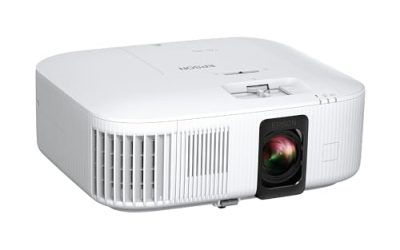
BenQ TH671ST
The BenQ TH671ST is a 1080p short-throw gaming projector with a stated gaming mode for low input lag action, 3,000 lumens of brightness and a built-in speaker. BenQ page material describes 16ms low input lag with a microsecond DMD response time, and frames the model around console gaming on a large Full HD image.
Resolution is 1080p at 1920 by 1080, with support listed up to WUXGA reduced blanking, and the page describes HDR details on the projected image in its manufacturer material. Brightness is 3,000 ANSI lumens, the native contrast ratio is listed as 10,000 to 1, and display colour is listed as 1.07 billion colours with over 92 percent Rec.709 coverage. The light source is a 240W lamp, with life listed as 4,000 hours in Normal mode, 10,000 hours in Economic and SmartEco modes, and 15,000 hours in LampSave mode.
The short-throw lens is the practical highlight. The throw ratio is 0.69 to 0.83, described as a 100-inch image at 1.5 metres, with a 1.2 times zoom and vertical keystone adjustment of plus or minus 40 degrees. Clear image size is listed from 60 to 120 inches diagonally, with an overall image range of 30 to 300 inches. That makes the TH671ST a strong fit for a small room, a bedroom wall or a setup where the projector must sit on a coffee table close to the screen while players sit behind it.
Connections include two HDMI inputs, one with MHL support, a PC D-Sub input, a monitor output, USB Type A with power supply, audio in and audio out on 3.5mm jacks, and an RS232 port. The built-in speaker is 5W. Picture modes listed include Bright, Vivid TV, Cinema, Sport, Game and two user modes, plus 3D. BenQ LumiExpert is included, which the page describes as detecting ambient light and adjusting the image automatically. The unit weighs 5.9 pounds and measures 11.65 by 4.6 by 9.5 inches, so it is easy to move between rooms or store when not in use.
Choose the TH671ST if you need a big image in a short distance, you play mainly at 1080p, and you want a light, movable projector with a stated game mode and two HDMI inputs.
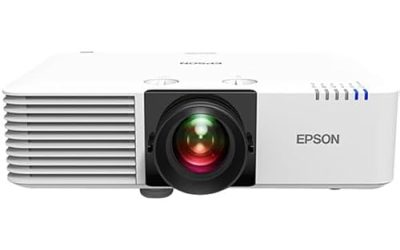
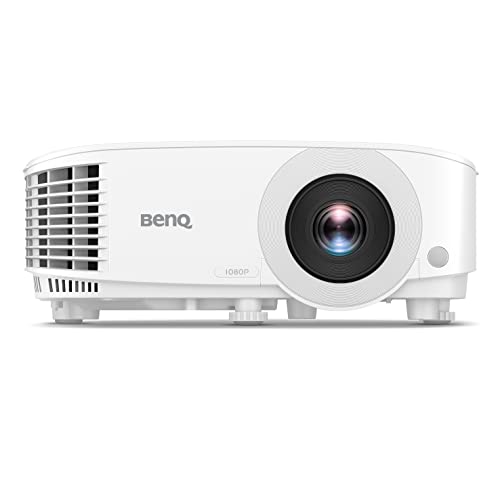
BenQ TH575
The BenQ TH575 is a 1080p indoor gaming projector with 3,800 lumens, a stated 16.7ms low latency figure, an enhanced game mode and dual HDMI inputs. It is the brightest model in this group by its page title figure, which suits rooms where some light stays on during play.
BenQ describes the TH575 as a low input lag projector for console gaming, stating 16ms at 1080p and 60Hz response in its product description material, with the title specification listed as 16.7ms at 1080p and 60Hz. The page comparison material also references an 8.3ms figure at 1080p and 120Hz for models in this family context, so confirm the mode you plan to use on the product page for this exact model before ordering. The enhanced game mode is presented as fine-tuning the image for gaming, and the projector is 3D ready with auto vertical keystone correction for setup.
Brightness is listed as 3,800 lumens, and BenQ page material describes an improved 15,000 to 1 contrast ratio for this model compared with its predecessor. Throw is standard rather than short, with a 1.1 times zoom, so plan more distance between the projector and the wall or screen than with the TH671ST or GT2000HDR.
In the package, BenQ lists the TH575 projector, a remote control and a power cable. Dual HDMI inputs cover a console plus a second source, such as a gaming PC or a streaming device, without cable swapping between sessions. For players who game in a shared living room during the day, the high brightness figure and the game mode are the main reasons to pick this model over a dimmer cinema-focused alternative.
Choose the TH575 if your room is not fully darkened, you play at 1080p on console, and you want a standard-throw projector with the highest stated brightness in this guide.
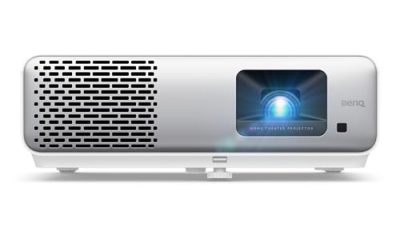
Optoma GT2000HDR
The Optoma GT2000HDR is an ultra-compact short-throw Full HD laser projector. Optoma and retailer material for this model describe it as a home theatre and gaming projector with 1080p resolution, 4K HDR input support, a short throw that can produce a 100-inch image from close to the wall, and low input lag figures stated for gaming and simulator use.
The light source sets it apart from the two BenQ lamp models. A laser source avoids lamp replacement in normal use, and coverage of this model states a laser life figure of 30,000 hours. Brightness is described at 3,500 lumens in simulator and retailer material for the GT2000HDR, and the throw ratio is described as 0.496, which is shorter than the TH671ST, so the projector can sit very close to the screen. For a small room, a golf simulator bay or a setup where ceiling mounting is not possible, that very short throw is the deciding feature.
Input lag for this model is stated at 8.6ms in gaming and simulator coverage tied to the product listing, which places it between the standard 60Hz figures and the 240Hz figure of the ViewSonic model in this group. Connections described for the GT2000HDR include two HDMI ports and a 15W built-in speaker, which is the strongest built-in speaker figure described in this group and helpful for a compact setup without separate audio. The compact body also suits moving the projector between a living room and a simulator space.
Because several figures for this model come from listing summaries and coverage rather than a single full specification table, open the product page for this ASIN and confirm the lag, brightness and throw figures for the exact listing before ordering, especially if you are building a fixed simulator installation around a specific screen distance.
Choose the GT2000HDR if you want the shortest throw and a laser light source in a compact body, for a small room or simulator setup where the projector must sit close to the image.
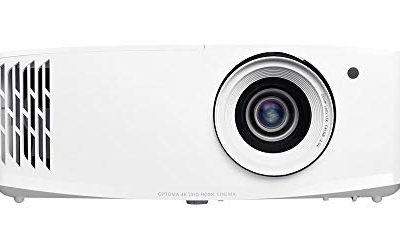
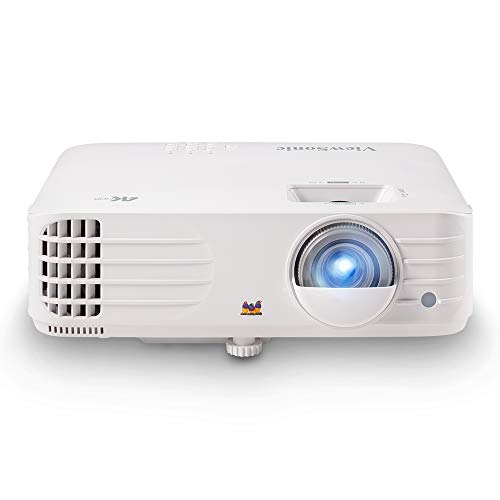
ViewSonic PX701-4K
The ViewSonic PX701-4K is a UHD 4K projector with 3,200 lumens, a 240Hz refresh figure, a 4.2ms lag figure, HDR support, auto keystone and dual HDMI inputs. It is the only native 4K resolution model in this group, and its page title pairs that resolution with the fastest stated gaming figures here.
Resolution is 4K UHD at 3840 by 2160, with HDR support listed in the title specification. The 240Hz and 4.2ms figures describe the high-refresh gaming mode for compatible sources, typically at a lower input resolution from a PC, while 4K play runs at standard console and PC frame rates for this class. Read the product page mode table carefully so you know which combination of resolution, refresh rate and lag applies to your console or graphics card. For a gaming PC that can send a high frame rate, this model gives you a path to very low stated lag without giving up a 4K image for films and slower games.
Brightness is listed as 3,200 ANSI lumens, with a 12,000 to 1 contrast ratio described in listing summaries for this model, and a 1.5 to 1.6 throw ratio range in those summaries, which is a standard throw needing more room distance than the short-throw models. Optical zoom and keystone tools, including warping support described in coverage of this model, help fit the image when the projector cannot sit perfectly square to the screen. Dual HDMI inputs cover two sources.
The PX701-4K uses a lamp light source, so lamp life and replacement belong in your long-term planning, unlike the laser GT2000HDR. In return, you get the sharpest image in this group for text-heavy games, strategy titles and 4K video between gaming sessions.
Choose the PX701-4K if you want a native 4K image plus a stated 240Hz, 4.2ms gaming mode for a compatible PC, and you have the room distance a standard-throw projector needs.
Comparison Table
| Model | Resolution | Stated gaming figure | Brightness | Throw | Light source |
|---|---|---|---|---|---|
| BenQ TH671ST (B076MHKTFH) | 1080p, 1920 by 1080 | 16ms low input lag stated, game mode | 3,000 lumens | Short, 0.69 to 0.83 | Lamp, life up to 15,000 hours in LampSave |
| BenQ TH575 (B0B4QV9YV6) | 1080p | 16.7ms at 1080p and 60Hz listed | 3,800 lumens | Standard, 1.1 times zoom | Lamp |
| Optoma GT2000HDR (B0C5BBCXRK) | 1080p, 4K HDR input | 8.6ms stated in listing coverage | 3,500 lumens described | Very short, 0.496 described | Laser, 30,000 hours described |
| ViewSonic PX701-4K (B08L9SM2DK) | 4K UHD, 3840 by 2160 | 4.2ms and 240Hz in title specification | 3,200 lumens | Standard, 1.5 to 1.6 described | Lamp |
Lag figures apply only to the stated resolution and refresh combination with game mode active, so confirm the mode table on the product page before ordering.
Frequently Asked Questions
Do I need a screen, or can I use a wall?
All four projectors can form an image on a flat, light-coloured wall, and many players start that way. A dedicated screen gives a smoother surface, more even brightness and a defined border, which helps with focus and contrast, especially for the 4K PX701-4K. If you use a wall, choose the flattest, lightest section available and keep the projector square to it to avoid heavy keystone correction.
Which model is best for a small room?
The Optoma GT2000HDR has the shortest throw described in this group, followed by the BenQ TH671ST, so both make large images from close to the wall. Measure your room, decide your image size, and compare those figures with the throw ratio on the product page before ordering. The TH575 and PX701-4K need more distance and suit larger or dedicated rooms.
Will these projectors work with my console?
Each model lists HDMI inputs and gaming positioning for console play. The TH671ST page material names earlier consoles such as PS4, Nintendo Switch and Xbox One X, reflecting its original release period, while the TH575 is described for console gaming and the PX701-4K and GT2000HDR list modern HDMI connectivity with 4K signal support. For a current console, confirm the HDMI version and the supported refresh modes on the product page for the exact ASIN, and use the game mode input where the page directs you.
Why does the lowest lag figure not apply at 4K?
Lag and refresh are linked. The lowest figures, such as 4.2ms at 240Hz on the PX701-4K title specification, describe a high-refresh mode that a source sends at a compatible resolution, while a 4K image at 60Hz involves more data per frame and carries a higher lag figure. Product pages state each pairing separately. Decide whether you value 4K detail or the lowest lag for competitive titles, and set the mode to match the game you are playing.
Lamp or laser: which should I choose?
Lamp models, the TH671ST, TH575 and PX701-4K, list lamp life in hours and will need a replacement lamp over a long ownership period. The laser GT2000HDR describes a 30,000-hour laser life with no lamp changes in normal use. If the projector will run daily for games, sports and films, the laser model simplifies upkeep. If you play a few sessions a week, a lamp model lamp life measured in thousands of hours still covers years of typical use.
Can I use the built-in speakers for games?
Yes, for casual play. The models here describe built-in speakers from 5W on the TH671ST to a 15W description on the GT2000HDR. Dialogue and menu sounds are clear at close range, while action games gain a lot from a soundbar or headphones connected through the audio output or your console.
Conclusion
Match the projector to your room and your source first, and the picture will follow. Pick the BenQ TH671ST for a proven 1080p short-throw setup with a stated game mode in a small room. Pick the BenQ TH575 for the highest stated brightness in this group, for 1080p console play in a room with some light. Pick the Optoma GT2000HDR for the shortest throw and a laser light source in a compact body, well suited to small rooms and simulator bays. Pick the ViewSonic PX701-4K for a native 4K image and the fastest stated gaming mode here, for a PC or console in a dedicated space.
Before ordering, confirm the lag mode table, throw distance for your screen size, and the HDMI specification for your console or PC on the product page for the ASIN you chose.
More from Amazon
Programs that pair well with the guide above. Offers and eligibility are set by Amazon and may change.
Free shipping on eligible items, Prime Video and more. Eligible new members can start with a free trial.
Start a Prime free trialAd-free music streaming. Eligible new subscribers can start with a free trial.
Try Music Unlimited freeA Prime membership for ages 18-24 with a trial period. Eligibility is set by Amazon.
See Prime for Young AdultsAudiobooks and podcasts to listen to on the go. Eligible new members can start with a free trial.
Try Audible freeAs an Amazon Associate we earn from qualifying purchases.