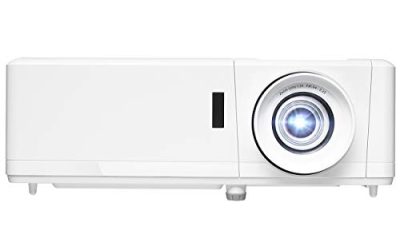
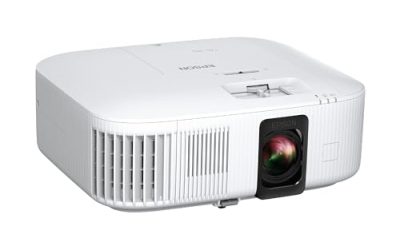
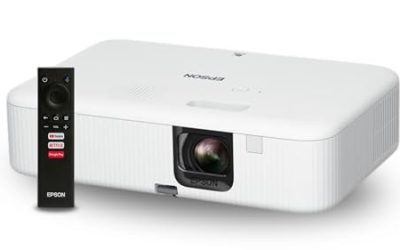
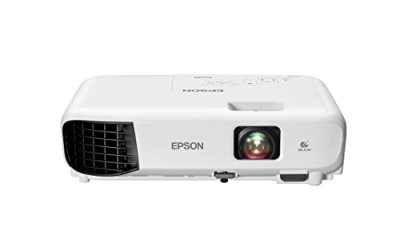
Key takeaways
- Searching for the best videp projectors for churches? Discover how brightness, throw distance, resolution and placement shape a clear sanctuary image.
As an Amazon Associate we earn from qualifying purchases.
Introduction
When people search for the “best videp projectors for churches”, they are usually looking for one thing above all else: a bright, readable image that every seat in the room can see. A church projector has a harder job than a home theatre projector. It must cut through daylight from tall windows, stay sharp on lyrics and scripture text, and run reliably through long services, week after week.
This guide explains how to choose a video projector for a church sanctuary, chapel, fellowship hall, or multi-purpose room. You will learn which specifications actually matter, how room size changes the answer, and how to avoid the most common buying mistakes. No single model suits every congregation, so the focus here is on the decision itself: brightness, resolution, throw distance, light source, and installation.
Why Church Projectors Are Different From Home Projectors
A home theatre projector works in a dark room, at a short distance, for a small audience. A church projector works in almost the opposite conditions.
First, sanctuaries are bright. Tall windows, skylights, and house lighting all compete with the projected image. A projector that looks stunning in a dark living room can look washed out at ten in the morning on a Sunday. Brightness, measured in lumens, matters more here than in almost any other setting.
Second, the audience is large and spread out. People sit close to the screen and far away, at wide angles, in pews and balcony seats. Text must stay readable from the back row, which means resolution and contrast matter as much as brightness.
Third, the content is mixed. A service may show song lyrics, scripture passages, sermon slides, video clips, and a live camera feed, all in the same hour. Lyrics and text demand sharp edges and strong contrast. Video demands good colour and smooth motion. A projector that handles only one of those jobs will disappoint.
Finally, reliability matters. A church projector may run for several hours every Sunday, plus midweek rehearsals, funerals, weddings, and community events. A model built for occasional movie nights may not be built for that duty cycle, and a failed lamp or overheating unit during a service is a problem no congregation wants.
Brightness: The First Number to Get Right
Brightness is the single most important specification for a church projector, and it is also the most misunderstood.
Manufacturers list brightness in lumens, but not all lumen ratings are measured the same way. ANSI lumens are the most widely trusted standard. Some portable and budget models advertise LED lumens or light source lumens, which can look far higher on paper than the ANSI figure. When comparing models, compare ANSI lumens to ANSI lumens, and treat any number without a stated standard with caution.
As a rough guide, consider the size of the room and the amount of light you cannot control:
- Small chapels and meeting rooms seating up to about 100 people, with curtains or blinds, can often work well with 3,000 to 4,000 ANSI lumens.
- Mid-size sanctuaries seating 100 to 300 people, with some daylight, generally need 4,000 to 5,500 ANSI lumens.
- Large sanctuaries seating more than 300 people, or rooms with large windows and bright house lighting, often need 5,500 ANSI lumens or more, and may need two projectors or a very large screen.
Screen size matters too. The same brightness spread across a 200-inch image looks far dimmer than across a 120-inch image. If your congregation sits far from the screen, you need a large image, and a large image needs more lumens to stay vivid.
One practical tip: measure your room at the brightest time you hold services. If sunlight falls directly on the screen wall, no reasonable projector will overcome it, and the fix is a different screen position, window covering, or an ambient light rejecting screen, not simply a brighter projector.
Resolution: Readable Text From the Back Row
Resolution describes how many pixels make up the image, and it decides whether text stays crisp at a distance.
For most churches, 1080p, also called Full HD, is the sensible minimum. It keeps lyrics and scripture readable on a large screen, and it matches the output of most laptops, cameras, and streaming devices used in worship. Lower resolutions can look acceptable for video, but small text becomes fuzzy, and fuzzy lyrics distract a congregation.
Higher 4K resolution brings extra sharpness, and it is worth considering for large sanctuaries where the screen is very big or the back row is far away. It also helps when the projector shows detailed graphics or a live camera feed. The trade-off is cost: 4K models with high brightness are considerably more expensive than 1080p models, and the benefit is smaller on modest screen sizes.
Whatever resolution you choose, match it to your source. A 4K projector fed by an old laptop outputting a low-resolution signal will not look any better than a 1080p projector fed the same signal. Check that your computer, switcher, and cables can all carry the resolution you plan to use.
Throw Distance and Lens Options
Throw distance is the distance between the projector and the screen, and it is one of the most common causes of installation problems.
Every projector has a throw ratio, which relates distance to image width. A long-throw projector needs a long room to make a big image. A short-throw projector can make a large image from a few feet away, which is useful in small rooms or where a ceiling mount far from the screen is impractical. An ultra short throw projector sits just inches from the wall, but it needs a special screen and a very flat wall to avoid distortion.
Before buying, measure three things: the distance from the planned mount point to the screen, the width of the image you need, and the height of the ceiling. Then use the manufacturer’s throw calculator, available on most projector makers’ websites, to confirm that the model can produce your image size from your distance. Do not assume. A projector with the wrong throw ratio may produce an image that is too small, too large, or impossible to focus.
Lens shift and zoom also matter. Optical zoom lets you adjust image size without moving the mount. Vertical and horizontal lens shift let you move the image up, down, or sideways without tilting the projector, which avoids the keystone distortion that comes from angling a projector. For a permanent ceiling installation, generous lens shift is worth paying for, because it makes alignment far easier.
Light Source: Lamp, Laser, or LED
Church projectors use one of three light sources, and the choice affects running costs and maintenance.
Traditional lamp projectors are usually the least expensive to buy, and they offer strong brightness for the price. Their lamps, however, dim over time and need replacing after a few thousand hours. For a church running several services a week, that can mean a new lamp every year or two, plus the labour of changing it at height.
Laser projectors cost more up front, but their light source lasts far longer, often rated for twenty thousand hours or more, and brightness stays more consistent over that life. They also start instantly, with no warm-up time, which is convenient when a service runs to a tight schedule. For a permanent installation that will run for years, a laser projector often works out cheaper over its whole life.
LED projectors are compact and quiet, and their light source also lasts a long time, but most LED models are less bright than lamp or laser models of similar size. They suit small rooms and portable use better than large sanctuaries.
For a permanent sanctuary installation, laser is usually the strongest long-term choice. For a portable projector carried between rooms, a lamp or LED model may make more sense.
Connectivity and Everyday Operation
A church projector is part of a system, not a standalone device. Check connectivity before you buy.
HDMI is the standard connection for laptops, cameras, and media players. Look for at least two HDMI inputs, so a laptop and a camera feed can stay connected at once. If the cable run from the sound desk or media booth to the projector is long, more than about 25 feet, a standard HDMI cable may struggle. In that case, plan for an HDMI extender over network cable, an optical HDMI cable, or a wireless presentation system, and budget for it as part of the installation.
Other useful features include a network port for remote monitoring, which lets a technician check lamp hours or switch the projector on from another room, and a 12-volt trigger or RS-232 port for integration with a control system. Built-in speakers are rarely sufficient for a sanctuary, since the sound system already handles audio, so do not pay extra for powerful internal speakers.
Ease of use matters as well. Volunteers often operate the system, so a projector with a clear remote, a simple input menu, and reliable auto source detection will cause fewer problems on a Sunday morning than a model with a complicated menu system.
Matching the Projector to Your Room
Different rooms need different projectors. Use the room as your starting point, not the catalogue.
A small chapel or classroom, seating fewer than 100 people, is the most forgiving setting. A bright 1080p projector, a screen of 100 to 120 inches, and controlled lighting will serve it well. Portability may matter here if the same projector moves between rooms.
A mid-size sanctuary, seating 100 to 300 people, is the most common case. Aim for 1080p or better, at least 4,500 ANSI lumens, and a screen large enough that the back row can read lyrics comfortably. A good rule is that the screen height should be about one sixth of the distance to the farthest seat. Ceiling mounting is almost always better than a table, because it keeps the projector out of the way and the image clear of heads.
A large sanctuary or auditorium, seating more than 300 people, is a professional installation. You will likely need 6,000 ANSI lumens or more, possibly two projectors with edge blending for a very wide image, or a large LED wall as an alternative. At this scale, involve an installer who can measure the room, calculate throw distances, and plan cable runs before anything is purchased.
A fellowship hall or multi-purpose room has different demands again: the projector may be used for films, presentations, and community events, in a room with windows on several sides. Brightness and easy setup matter most, and a portable screen or a retractable ceiling screen may suit the room better than a fixed screen.
Installation Mistakes to Avoid
Most church projector problems are installation problems, not product problems. These are the mistakes that appear most often.
Mounting the projector too close to the screen is the first. A projector placed on a table at the back of the room may be too far away, while a ceiling mount placed without checking the throw ratio may be too close. Measure first, then choose the mount position.
Ignoring ambient light is the second. A screen placed opposite a large window will always struggle. If possible, place the screen on a wall that receives no direct sunlight during services, and use blinds or curtains on the nearest windows.
Using a white wall instead of a screen is the third. A painted wall can work in a pinch, but a proper screen reflects light evenly, improves contrast, and gives a defined edge that helps the eye. For rooms with ambient light, an ambient light rejecting screen can make a visible difference, though it costs more than a standard white screen.
Forgetting the cable run is the fourth. A projector needs power and signal, and both must reach a ceiling mount safely and neatly. Plan cable routes before the mount goes up, and use proper cable management so that nothing hangs loose above the congregation.
Finally, skipping a test run is the fifth. Before the first service with a new projector, test it at the actual service time, with the lights as they will be, and with the actual laptop and content you will use. Problems found on a Saturday are easy to fix. Problems found during the opening song are not.
Projector Types at a Glance
| Projector type | Best for | Key strengths | Main limits |
|---|---|---|---|
| Bright lamp projector, 1080p | Mid-size sanctuaries on a budget | Strong brightness for the price, wide model choice | Lamp replacements, warm-up time |
| Laser projector, 1080p or 4K | Permanent sanctuary installs | Long light life, steady brightness, instant on | Higher purchase cost |
| Short-throw projector | Small rooms, tight spaces | Large image from a short distance | Needs careful placement, limited zoom |
| Portable LED projector | Fellowship halls, portable use | Compact, quiet, long light life | Lower brightness, small-room use only |
| High-brightness large-venue projector | Sanctuaries over 300 seats | Very bright, interchangeable lenses | Professional install, higher cost |
Frequently Asked Questions
How many lumens does a church projector need?
It depends on room size and light. Small, dim rooms can work with 3,000 to 4,000 ANSI lumens. Mid-size sanctuaries with some daylight usually need 4,000 to 5,500 ANSI lumens. Large or very bright sanctuaries often need 5,500 ANSI lumens or more. Screen size matters too: a bigger image needs more lumens to stay bright.
Is 1080p enough for a church, or do we need 4K?
For most churches, 1080p is enough. It keeps lyrics and scripture readable and matches most laptops and cameras. Consider 4K for a large sanctuary with a very big screen or a long distance to the back row, where the extra sharpness is visible. Make sure your sources and cables can carry a 4K signal, or the extra resolution will go to waste.
Should a church buy a laser projector or a lamp projector?
A laser projector usually suits a permanent installation better, because its light source lasts much longer, brightness stays steadier, and it starts instantly. A lamp projector costs less to buy and can be the right choice for a tight budget or portable use, but plan for lamp replacements and the cost of changing them at height.
Where should the projector be mounted in a sanctuary?
A ceiling mount is usually best. It keeps the projector out of the way, avoids shadows from people walking past, and gives a clear line to the screen. Check the throw ratio before choosing the mount point, and make sure the mount can hold the projector’s weight with a safety margin. A table is acceptable for portable or temporary use, but it is rarely ideal for a permanent setup.
Do we need a screen, or can we project onto a wall?
A proper screen is worth it. It reflects light evenly, improves contrast, and gives the image a clean edge. A white wall can work temporarily, but it often has uneven paint, texture, and colour that soften the image. In a bright room, an ambient light rejecting screen can improve the picture noticeably.
Conclusion
The best video projectors for churches are not the brightest or the most expensive models on the market. They are the models that fit the room: bright enough to beat the daylight, sharp enough for the back row to read lyrics, placed at the right distance, and reliable enough to run service after service. Start by measuring the room, the light, and the distance to the farthest seat. Choose brightness and resolution from those numbers, favour a laser light source for a permanent install, and plan the mount, screen, and cables as carefully as the projector itself. A congregation notices a clear, readable image every week. It rarely notices the brand name on the box, and that is exactly how it should be.
More from Amazon
Programs that pair well with the guide above. Offers and eligibility are set by Amazon and may change.
Free shipping on eligible items, Prime Video and more. Eligible new members can start with a free trial.
Start a Prime free trialAd-free music streaming. Eligible new subscribers can start with a free trial.
Try Music Unlimited freeA Prime membership for ages 18-24 with a trial period. Eligibility is set by Amazon.
See Prime for Young AdultsAudiobooks and podcasts to listen to on the go. Eligible new members can start with a free trial.
Try Audible freeAs an Amazon Associate we earn from qualifying purchases.