
Our Short List of 3

- Specs: NVIDIA GeForce GTX 1650; 4GB GDDR6 memory; 1785 MHz memory clock; 2 fans; PCIe 3.0 interface; HDMI 2.0 and DisplayPort 1.4a; IP5X dust resistance; Auto-Extreme Technology; GPU Tweak II software
- Best for: A quiet, straightforward 1080p build with no extra power cable.
- Watch out for: The 4GB of memory limits texture settings in newer games at high detail.

- Specs: NVIDIA GeForce GTX 1660 Super; 6GB GDDR6 memory; 14 Gbps memory speed; 1815 MHz boost clock; 3 DisplayPort 1.4 and 1 HDMI 2.0b; Dual-fan cooling; VR Ready; 8-pin power connector; 450W power supply recommended
- Best for: Players who want the highest frame rates and the most texture headroom here.
- Watch out for: Availability was listed as limited in late November, so confirm the listing shows a new unit before ordering.
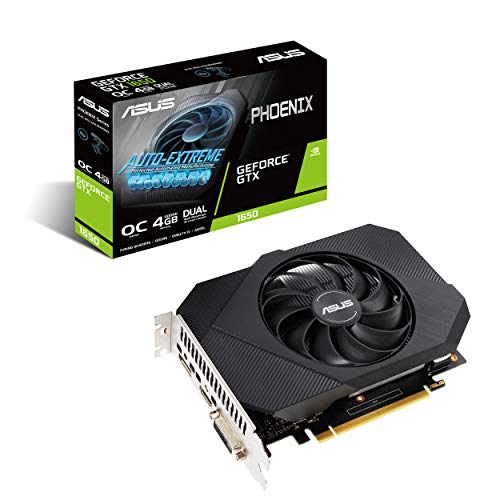
- Specs: NVIDIA GeForce GTX 1650; 4GB GDDR6 memory; 1635 MHz memory clock; 1 Axial-tech fan; PCIe 3.0 interface; DVI, DisplayPort, and HDMI outputs; Maximum resolution 7680 x 4320; Dual ball fan bearings
- Best for: Small cases and prebuilt desktops where a dual-fan card will not fit.
- Watch out for: A single fan works harder under load, so case airflow matters more with this card.
All 3 Picks at a Glance
| Product | Specs | Action |
|---|---|---|
| ASUS Dual GeForce GTX 1650 OC |
| Check price on Amazon |
| MSI GeForce GTX 1660 Super Ventus XS OC |
| Check price on Amazon |
| ASUS Phoenix GeForce GTX 1650 OC |
| Check price on Amazon |
Key takeaways
- The best 3rd party gtx graphics cards from ASUS and MSI bring factory overclocks, dual-fan cooling and 4GB or 6GB of memory to budget 1080p builds today.
Third-party GTX cards are the quiet workhorses of budget PC building, taking NVIDIA’s GTX 1650 and GTX 1660 Super chips and wrapping them in custom coolers, factory overclocks, and compact boards that fit cases the reference designs never could. The choice is rarely about raw power alone, since every card here plays the same 1080p games, but about cooling, size, memory, and the power supply already sitting in the case. A well-chosen partner card runs cooler, lasts longer, and costs less than the newer generation for the same frame rates at this resolution.
This guide covers partner cards from ASUS and MSI that are still listed on Amazon US, from a compact single-fan GTX 1650 to a dual-fan GTX 1660 Super with more memory. It suits builders putting together a first gaming PC, owners reviving an older desktop, and anyone who wants smooth 1080p play without a large card or a new power supply. Every card below was chosen from the name and specifications shown on its Amazon page.
Quick Picks
As an Amazon Associate we earn from qualifying purchases
| Product | Best for | Key spec from title |
|---|---|---|
| ASUS Dual GTX 1650 OC | Balanced 1080p gaming | 4GB GDDR6, 1785 MHz, dual fan |
| MSI GTX 1660 Super Ventus XS OC | Fastest card in this group | 6GB GDDR6, 1815 MHz boost, dual fan |
| ASUS Phoenix GTX 1650 OC | Small cases and tight builds | 4GB GDDR6, 1635 MHz, single fan |
How to Choose
GTX 1650 Versus GTX 1660 Super
The GTX 1660 Super is the stronger chip in this group, with 6GB of GDDR6 memory and a wider memory interface that keeps textures sharp at higher settings. The GTX 1650 uses 4GB of GDDR6 and suits 1080p play at medium settings, which covers most popular games comfortably. Buyers who play competitive titles at high frame rates or want headroom for newer releases should lean toward the 1660 Super. Those building the cheapest capable PC will find the 1650 does the job for less, especially in esports titles that run well on modest hardware. The price gap is modest, so the choice comes down to how demanding the games are.
Cooling and Case Size
A dual-fan card spreads heat across a larger heatsink and runs quieter under load, which suits a mid-tower case with room to spare. A single-fan card like the ASUS Phoenix fits small cases and prebuilt desktops where a long card simply will not go, though it works harder and runs warmer. Measure the case before ordering, since a card that is a few millimetres too long is a card that goes back. Check the slot width too, because a two-slot cooler can block the slot below it in a compact board. A backplate protects the board during installation and adds rigidity in a case that moves often.
Memory and Power Supply
Memory size decides how much texture data the card holds at once, and 6GB gives the 1660 Super more room for detailed settings than the 4GB on the GTX 1650 cards. Power needs are modest across this group, with the GTX 1650 cards drawing their power from the motherboard slot alone and the 1660 Super needing a single 8-pin connector and a 450W supply. Confirm the power supply has the right connector and enough wattage before buying, since a missing cable stops a build cold. The GTX 1650 cards here need no extra power, which makes them the safest upgrade for a modest supply.
Outputs and Multi-Monitor Use
The ports on the back of the card decide which monitors connect and at what refresh rate, so count them before ordering. DisplayPort carries high refresh rates for gaming monitors, while HDMI suits televisions and standard displays. A card with DVI covers an older second monitor without an adapter. Buyers who run two screens should check that the card has the right mix of outputs, and that the main gaming monitor connects over DisplayPort or HDMI at its full refresh rate. A high refresh rate monitor only shows its speed over DisplayPort or HDMI at full bandwidth, so the cable matters too.
The 3 Best Options
ASUS Dual GeForce GTX 1650 OC
- Specs: NVIDIA GeForce GTX 1650; 4GB GDDR6 memory; 1785 MHz memory clock; 2 fans; PCIe 3.0 interface; HDMI 2.0 and DisplayPort 1.4a; IP5X dust resistance; Auto-Extreme Technology; GPU Tweak II software
- Best for: A quiet, straightforward 1080p build with no extra power cable.
- Watch out for: The 4GB of memory limits texture settings in newer games at high detail.
The ASUS Dual GTX 1650 OC is the balanced pick in this group, pairing a factory overclock with a dual-fan cooler that keeps the card quiet during long sessions. Its 4GB of GDDR6 memory and 1785 MHz memory clock handle 1080p gaming at medium to high settings, and the card draws its power from the motherboard slot, so no extra power cable is needed. IP5X dust resistance protects the fans from dust, and the card carries HDMI 2.0 and DisplayPort 1.4a outputs for a modern gaming monitor. For a first build or a quiet upgrade to an older desktop, this is the easiest card to live with.
MSI GeForce GTX 1660 Super Ventus XS OC
- Specs: NVIDIA GeForce GTX 1660 Super; 6GB GDDR6 memory; 14 Gbps memory speed; 1815 MHz boost clock; 3 DisplayPort 1.4 and 1 HDMI 2.0b; Dual-fan cooling; VR Ready; 8-pin power connector; 450W power supply recommended
- Best for: Players who want the highest frame rates and the most texture headroom here.
- Watch out for: Availability was listed as limited in late November, so confirm the listing shows a new unit before ordering.
The MSI GTX 1660 Super Ventus XS OC is the fastest card in this guide, with 6GB of GDDR6 memory running at 14 Gbps and a boost clock of 1815 MHz. That extra memory and bandwidth show up as smoother frame rates and sharper textures at 1080p, and the card stays comfortable at higher settings than the GTX 1650 models. Three DisplayPort 1.4 outputs and one HDMI 2.0b port support multi-monitor setups for work and play, and the dual-fan cooler keeps temperatures in check during long sessions. The card is VR Ready and needs a single 8-pin power connector with a 450W supply, which most modern units provide.
ASUS Phoenix GeForce GTX 1650 OC
- Specs: NVIDIA GeForce GTX 1650; 4GB GDDR6 memory; 1635 MHz memory clock; 1 Axial-tech fan; PCIe 3.0 interface; DVI, DisplayPort, and HDMI outputs; Maximum resolution 7680 x 4320; Dual ball fan bearings
- Best for: Small cases and prebuilt desktops where a dual-fan card will not fit.
- Watch out for: A single fan works harder under load, so case airflow matters more with this card.
The ASUS Phoenix GTX 1650 OC is the compact card in this group, using a single Axial-tech fan to fit small cases and slim prebuilt desktops where a dual-fan card cannot go. It still carries 4GB of GDDR6 memory and a factory overclock, with a 1635 MHz memory clock, and it offers DVI, DisplayPort, and HDMI outputs for a mix of old and new monitors, so nothing on the desk needs an adapter. The card supports resolutions up to 7680 x 4320, which covers high-resolution desktop work and photo editing alongside gaming. For a small-form-factor build or a tight upgrade, the Phoenix is the card that actually fits.
Which One Fits Your Situation
First Gaming PC on a Budget
A first build should be simple, and the ASUS Dual GTX 1650 OC is the simplest here because it needs no extra power cable and runs quietly in a standard mid-tower case. Its dual fans and factory overclock give solid 1080p performance without extra setup. Pair it with a modest processor and a fast SSD, and the result is a capable gaming PC that leaves budget for the monitor and the games.
Competitive Play at High Frame Rates
Players who chase high frame rates in competitive games should choose the MSI GTX 1660 Super, since its 6GB of GDDR6 memory and higher boost clock deliver the smoothest motion in this group. The extra memory keeps textures sharp at higher settings, and the dual-fan cooler holds temperatures steady during long matches. Check that the power supply has an 8-pin connector and 450W of capacity before ordering, since the card needs both.
Reviving an Older Desktop
An older desktop with a small case and a modest power supply is exactly where the ASUS Phoenix GTX 1650 OC earns its place. Its single-fan design fits where dual-fan cards cannot, and it draws power from the motherboard slot, so no power supply upgrade is needed. The DVI output also covers an older monitor without an adapter. Measure the case length first, then enjoy a machine that plays modern games again.
A Second Monitor and Everyday Work
Buyers who game on one screen and work on another should weigh outputs alongside speed, and the MSI card leads here with three DisplayPort outputs plus HDMI. The ASUS Dual covers a standard two-screen setup with HDMI and DisplayPort, while the Phoenix adds DVI for an older second display. Match the ports to the monitors already on the desk, and the card will serve both play and work without adapters.
Common Mistakes
- Buying a card that is too long for the case and discovering it only after opening the box.
- Forgetting to check whether the power supply has the 8-pin connector the 1660 Super needs.
- Choosing a GTX 1650 for high-detail 1440p play and then blaming the card for low frame rates.
- Ignoring the monitor connection and ending up with a card that lacks the right output.
- Ordering a renewed or used listing by mistake instead of a new retail card.
Frequently Asked Questions
Is a GTX 1650 still good enough for 1080p gaming?
Yes, a GTX 1650 handles most popular games at 1080p on medium to high settings, and esports titles run smoothly at high frame rates. Newer demanding games need lower settings to stay smooth, and the 4GB of memory limits texture detail. For a budget build or a first gaming PC, the card remains a capable and affordable choice.
What power supply do these cards need?
The GTX 1650 cards in this guide draw power from the motherboard slot and need no extra connector, so a standard 300W supply is enough. The GTX 1660 Super needs a single 8-pin connector and a 450W supply. Check the existing power supply for the right connector and wattage before ordering any card. The 1660 Super needs a 450W supply.
Can I use one of these cards in a small prebuilt desktop?
The ASUS Phoenix GTX 1650 OC is the best fit for a small case, since its single-fan design is compact and it needs no extra power cable. Measure the available length inside the case and confirm the slot is free first before buying. Dual-fan cards need more room and better airflow, so they suit larger cases.
Do these cards support two monitors?
Yes, all three cards support more than one display. The MSI 1660 Super offers three DisplayPort outputs plus HDMI, the ASUS Dual offers HDMI and DisplayPort, and the Phoenix adds DVI for an older monitor. Connect the main gaming monitor over DisplayPort or HDMI to get its full refresh rate. The MSI card leads with three DisplayPort outputs for the widest mix.
More from Amazon
Programs that pair well with the guide above. Offers and eligibility are set by Amazon and may change.
Free shipping on eligible items, Prime Video and more. Eligible new members can start with a free trial.
Start a Prime free trialAd-free music streaming. Eligible new subscribers can start with a free trial.
Try Music Unlimited freeA Prime membership for ages 18-24 with a trial period. Eligibility is set by Amazon.
See Prime for Young AdultsAudiobooks and podcasts to listen to on the go. Eligible new members can start with a free trial.
Try Audible freeAs an Amazon Associate we earn from qualifying purchases.









