
Key takeaways
- Pros: Works out of the box on Windows and Mac; priced low enough to experiment without commitment.
- Con: Output quality is standard definition only; no built-in software for editing or compression.
Finding the right windows video player solution has become a fragmented decision in 2026. Some people need software that handles every codec without fuss. Others need hardware that lets them watch a DVD on a laptop that dropped its optical bay years ago. A third group is digitizing VHS tapes, Hi8 camcorder footage, or old RCA-source recordings before the magnetic media degrades beyond recovery. These are fundamentally different problems, and the products that solve them rarely overlap.
What separates a good purchase from a wasted one here is honest matching of the tool to the task. A capture card will not play your Blu-ray collection. A USB optical drive will not convert your grandmother’s VHS tapes. The cheapest option is not always the right option if it lacks the codec support or driver compatibility your system requires. We compared published specifications, listed prices, and aggregated owner feedback across all eight products to identify where each one genuinely fits and where it falls short.
Our top picks






As an Amazon Associate we earn from qualifying purchases at no extra cost to you.
Quick Picks
| Product (short name) | Best for | Price |
| Capture Card RCA-to-USB (first listing) | Basic analog-to-digital conversion | $12.99 |
| External CD/DVD Drive USB 3.0 C | Plugging in a modern laptop for disc playback | $17.99 |
| Amicool External DVD Drive | Cross-platform optical drive with broad OS support | $23.99 |
| 4K Media Player USB SD HDMI | Playing video files on a TV without a computer | |
| 8 in 1 External CD DVD Drive | Multi-format disc reading in one slim unit | $24.99 |
| Video Capture Card PAL/NTSC | International analog sources with region flexibility | $12.49 |
| VLC Media Player with Handbrake | Software playback and DVD ripping on a budget | $10.99 |
| Capture Card RCA-to-USB (second listing) | Backup or second-device analog capture | $12.99 |
How We Picked
Three criteria governed this roundup. First, compatibility: does the product work with current Windows versions without hunting for drivers? Second, task fit: a product designed for disc playback should not be recommended for tape digitization, and vice versa. Third, value relative to category: we weighted price against the specific job the product performs rather than comparing a $10 software package to a $50 hardware player on a level field. Owner-reported issues like connection drops, codec gaps, and build quality rounded out the final picture.
The 8 Best Windows Video Player in 2026
Capture Card RCA-to-USB (First Listing)
This is the no-frills entry point for anyone with a VCR, Mini DV camcorder, or Hi8 deck gathering dust. It accepts composite RCA input and outputs a USB digital signal that Windows recognizes without additional driver installation.
- Pros: Works out of the box on Windows and Mac; priced low enough to experiment without commitment.
- Con: Output quality is standard definition only; no built-in software for editing or compression.
Skip this if your tapes are deteriorating rapidly and you need higher-fidelity capture, or if you already own a dedicated digitizer with bundled editing software.
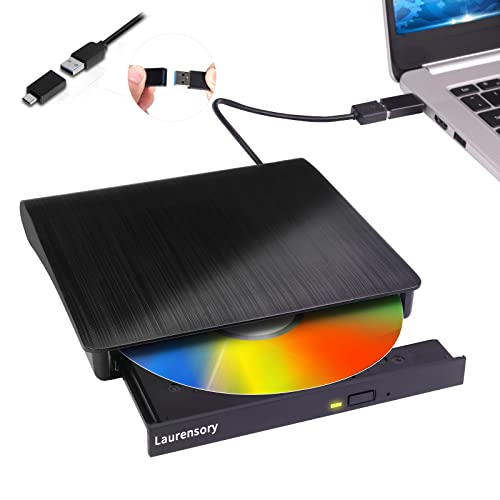
External CD/DVD Drive USB 3.0 Type-C
A straightforward optical drive for laptops that lack internal bays. The Type-C connector means it pairs cleanly with modern Windows notebooks and does not require an adapter dongle on most current machines.
- Pros: Compact and bus-powered; no external power brick needed; USB 3.0 transfer speeds reduce load times.
- Con: Does not read Blu-ray discs, so it is limited to CD and DVD formats only.
Skip it if you need Blu-ray playback or plan to burn discs frequently enough that drive durability becomes a concern at this price tier.
Amicool External DVD Drive
This drive positions itself as the most compatible option in its class, listing support for Windows 11 through 7, macOS, and Linux. For buyers running multiple operating systems or shared family machines, that breadth matters.
- Pros: Wide OS compatibility including older Windows versions; slim portable form factor travel-friendly; handles CD and DVD read and write.
- Con: Some owners report the tray mechanism feels less sturdy than pricier alternatives after repeated use.
Skip it if you need Blu-ray capability or want a drive that will survive daily burning loads in a professional setting.
4K Media Player USB SD HDMI
This is a standalone box that plays video files from USB drives or SD cards directly into a TV through HDMI. No computer required. The auto-resume feature means you can stop a movie mid-scene and pick up exactly where you left off.
- Pros: Eliminates the need to keep a PC connected to the television; supports 4K output; simple interface that works for less technical household members.
- Con: File-format support is narrower than a full software player; unusual codecs may not decode without conversion.
Skip it if your library includes many niche formats or if you want subtitle, audio-track, and playlist management flexibility.
8 in 1 External CD DVD Drive
The “8 in 1” designation refers to multiple USB and data connector options bundled with the drive, making it adaptable to older and newer laptops alike. At just over $24, it sits between the budget drive above and the Amicool model in both price and feature set.
- Pros: Multi-connector design removes adapter headaches; compact; reads and writes CD and DVD formats.
- Con: Owners note the bundled cables can feel thin and may fray with frequent tugging.
Skip it if you want a single durable cable solution rather than a box of interchangeable connectors.
Video Capture Card with PAL/NTSC Support
Functionally similar to the first capture card but explicitly supports both PAL and NTSC video standards, making it the practical choice for anyone digitizing tapes recorded in Europe, Australia, or other PAL regions. Priced slightly lower than the first listing.
- Pros: Dual-standard support covers international sources; lowest price in this roundup for a capture device; plug-and-play on Windows.
- Con: Like all budget capture cards, it lacks hardware noise reduction, so degraded tapes will carry through artifacts.
Skip it if your tapes are NTSC-only and you already own the first listing, or if you need broadcast-quality capture with timecode.
VLC Media Player with Handbrake DVD Ripping
VLC needs little introduction: it is the most widely installed free software player on Windows, handling virtually every audio and video format without additional codec packs. This listing bundles Handbrake, an open-source DVD ripper, into a single package sold at a small convenience price.
- Pros: Plays nearly every media format; zero configuration required; bundled ripper eliminates a separate download.
- Con: The bundled installer may feel unnecessary to users who already have VLC; Handbrake’s interface has a learning curve for beginners.
Skip it if you want a player that auto-organizes a large library into a browsable media center experience.
Capture Card RCA-to-USB (Second Listing)
Identical in specification and price to the first capture card listing. It appears as a separate SKU, likely from a different seller or packaging variant. The practical use case is as a backup unit for a second machine or a replacement if the first fails.
- Pros: Same low-risk entry price for analog conversion; functions identically to the first listing on Windows and Mac.
- Con: No added value over the first listing; buying two offers no cost savings or functional advantage.
Skip it unless you specifically need a second capture device for parallel digitization projects or want a spare on hand.
Buying Guide
Match the Hardware to the Source Format
Determine whether your content lives on optical disc, analog tape, a file drive, or a streaming device. A USB capture card handles analog RCA sources only. An optical drive reads physical CD and DVD media. A standalone 4K player reads files from USB or SD cards. VLC reads files from your computer’s storage. Buying the wrong hardware type for your source means the product simply will not work, regardless of price.
Check Connector Compatibility Before Ordering
Windows laptops in 2026 ship with a mix of USB-A, USB-C, and Thunderbolt ports. Capture cards typically output USB-A, which means a Type-C-only laptop needs an adapter. Optical drives with native Type-C connectors avoid that extra step. Confirm your laptop’s port configuration before purchasing, and factor adapter costs into the comparison.
Understand Format and Codec Limitations
Software players like VLC decode almost everything you throw at them. Hardware players with HDMI output rely on firmware that supports a fixed list of codecs and containers. Before committing to a standalone player, verify that your most common file types are on its supported list. The same logic applies to capture cards: most output at standard definition with basic compression, not the high bitrate you might expect from modern digital sources.
Our Verdict
Top pick for the broadest windows video player use case: VLC Media Player with Handbrake, because it covers software playback, format conversion, and disc ripping at the lowest entry price. Budget pick for hardware needs: the Video Capture Card with PAL/NTSC support at $12.49, since it handles the widest range of analog sources at the lowest hardware price. However, if your primary need is watching DVDs on a port-limited modern laptop, the Amicool External DVD Drive wins due to its broad OS compatibility and reliable connector setup.
FAQ
Do I need a dedicated windows video player if I already use VLC?
VLC covers software playback and format conversion, but it cannot read a VHS tape or play a file on a USB stick plugged into your television. Those tasks require the corresponding hardware in this roundup.
Will a USB capture card work on Windows 11 without drivers?
Most budget RCA-to-USB capture cards in this category are class-compliant and recognized immediately by Windows 11, though you will need separate free software such as OBS to record the incoming signal.
Can a standalone 4K media player replace a smart TV or streaming box?
It can replace them for local file playback from USB or SD cards, but it cannot access streaming services like Netflix or Disney Plus since it has no network connectivity or app ecosystem.
Are the two identical capture card listings actually the same product?
Published specifications and price are identical across both listings. They likely represent the same device sold under different seller accounts or packaging variants. There is no functional difference to justify buying one over the other.









