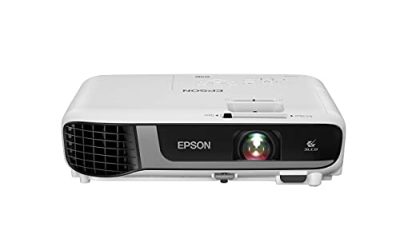
Our Short List of 3

- Best for: Living rooms and family spaces that are never fully darkened.
- 3-chip 3LCD, native 1080p resolution
- 3,400 lumens colour brightness and 3,400 lumens white brightness
- 16,000:1 contrast ratio
- Built-in speaker
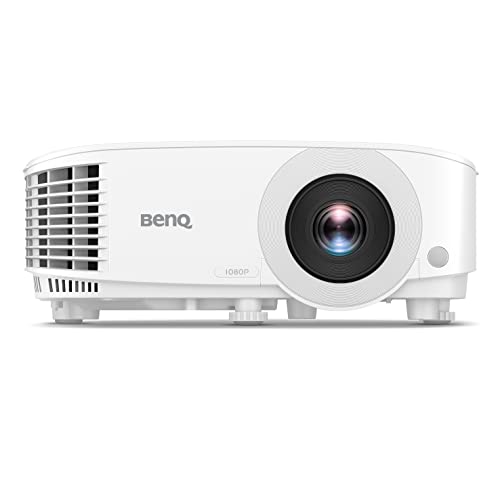
- Best for: Households that alternate between movies and console gaming on one screen.
- 1080p DLP projection
- 3,800 lumens brightness
- 16.7ms low latency with Enhanced Game Mode
- Dual HDMI inputs, 3D Ready

- Best for: Film fans with a darkened, dedicated viewing room who prioritise colour accuracy.
- 1080p HDR LED home theater projector
- DCI-P3 and Rec.709 wide colour gamut
- 2,200 lumens
- 8.3ms input lag at 120Hz
All 4 Picks at a Glance
| Product | Specs | Action |
|---|---|---|
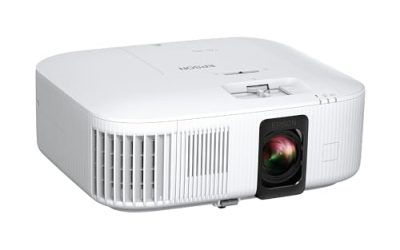
| Epson Home Cinema 1080 |
| Check price on Amazon |
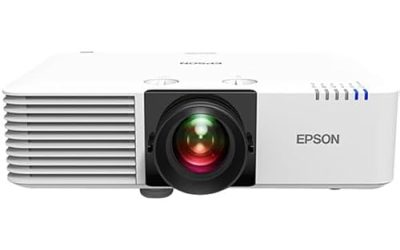
| BenQ TH575 |
| Check price on Amazon |
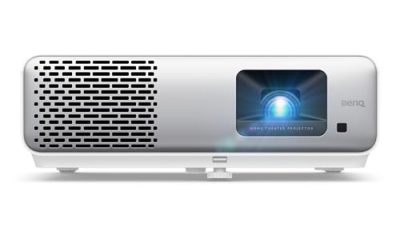
| BenQ HT2060 |
| Check price on Amazon |
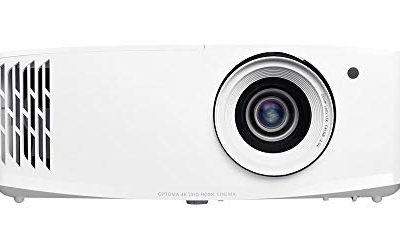
 Optoma HD146X |
| Check price on Amazon |
Key takeaways
- Compare four value 1080p home theater projectors from Epson, BenQ and Optoma for bright living rooms, gaming nights and dedicated movie spaces.
Choosing an affordable home theater projector is really a decision about your room, not about a spec sheet. A model that looks perfect in a darkened den can wash out in a living room with lamps and windows, while a bright living-room pick can feel harsh in a dedicated movie space. The sensible route is to match native 1080p resolution, listed brightness and throw flexibility to the space you actually watch in, rather than paying for resolution or features the room cannot use.
This shortlist suits three kinds of buyers: living-room viewers who never fully darken the space, households splitting time between films and big-screen gaming, and film fans building a modest dedicated room. Each model below was chosen from its Amazon listing name and specifications — panel type, lumen rating, input lag figure and port set — so the differences that matter are the ones printed on the product page.
Quick Picks
As an Amazon Associate we earn from qualifying purchases.
| Product | Best for | Key spec |
|---|---|---|
| Epson Home Cinema 1080 | Rooms that are not fully darkened | 3,400 lumens colour and white brightness, 3LCD |
| BenQ TH575 | Movie nights plus big-screen gaming | 3,800 lumens, 16.7ms Enhanced Game Mode |
| BenQ HT2060 | Dedicated movie room colour | DCI-P3 and Rec.709 colour gamut, LED light source |
| Optoma HD146X | A simple one-cable setup | 3,600 lumens, Enhanced Gaming Mode at 16ms |
How to Choose
Match brightness to the light in your room
Lumens decide whether the image holds up once curtains, lamps and daylight enter the picture. A dedicated room with controlled light can look rich at the lower end of the range, while an open-plan living room needs the strongest output you can get in this class to keep colours from greying out. Compare both figures where a listing separates colour brightness from white brightness, because equal numbers on both, as on the Epson below, usually mean colour stays saturated at full output instead of only whites looking bright.
Decide between 3LCD and DLP panels
The panel technology shapes the picture character more than most buyers expect. Three-chip 3LCD designs like the Epson produce colour and white brightness in step and never show rainbow artefacts. Single-chip DLP models from BenQ and Optoma tend to look crisp and contrasty, and they power most low-latency gaming modes in this tier. A small number of viewers notice brief colour fringing on DLP during fast pans, so if you know you are sensitive to it, the 3LCD route is the safer choice; otherwise DLP is a perfectly good path.
Check input lag if a console shares the screen
A projector that feels cinematic for films can feel sluggish with a controller in hand, so gamers should read the latency figure in the listing title before anything else. The BenQ TH575 quotes 16.7ms with its Enhanced Game Mode, the Optoma HD146X lists 16ms in its gaming mode, and the BenQ HT2060 goes further at 8.3ms at a 120Hz refresh. Those numbers put all three in responsive territory for casual and mid-level play, while a model with no stated gaming figure is better treated as a movies-first device.
Plan the throw, zoom and sound before mounting
Projectors are placement devices as much as picture devices. A 1.3x zoom and vertical lens shift, both listed on the HT2060, forgive imperfect mounting positions; a 1.1x zoom on the TH575 demands you measure the throw distance against your screen size first. Port count matters too: dual HDMI inputs let a streamer and a console stay connected, while a single input means adding a switch or a receiver. Finally, treat built-in speakers as a starting point — a soundbar or receiver completes any of these setups.
The 4 Best Options
Epson Home Cinema 1080
- Best for: Living rooms and family spaces that are never fully darkened.
- 3-chip 3LCD, native 1080p resolution
- 3,400 lumens colour brightness and 3,400 lumens white brightness
- 16,000:1 contrast ratio
- Built-in speaker
Living rooms and family spaces that are never fully darkened.
The single built-in speaker is a convenience, not a cinema soundtrack, so budget a place in the setup for a soundbar or external audio.
The Home Cinema 1080 is the pick for rooms that refuse to go dark. Its 3-chip 3LCD engine lists 3,400 lumens of colour brightness and the same 3,400 lumens of white brightness, a pairing that keeps colours vivid when ambient light competes with the image. The 16,000:1 contrast ratio is modest on paper, yet at this output level the picture stays watchable for sport, streaming and films in a lived-in space. Dual HDMI inputs, a built-in speaker and auto picture skew correction make it the most forgiving model here to set up on a coffee table or ceiling mount.
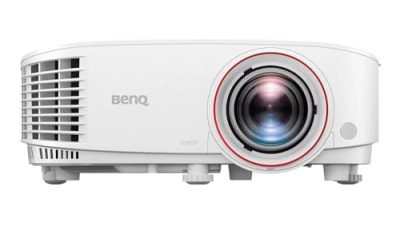
BenQ TH575
- Best for: Households that alternate between movies and console gaming on one screen.
- 1080p DLP projection
- 3,800 lumens brightness
- 16.7ms low latency with Enhanced Game Mode
- Dual HDMI inputs, 3D Ready
Households that alternate between movies and console gaming on one screen.
The 1.1x zoom offers little placement forgiveness, so confirm your throw distance against the intended screen size before drilling a ceiling mount.
The TH575 splits its personality between film nights and game nights, and the listing backs both halves. Its 1080p DLP engine is rated at 3,800 lumens, the highest figure in this group, and the Enhanced Game Mode quotes 16.7ms of input lag for responsive big-screen play. Rec.709 colour keeps streamed films looking natural rather than oversaturated, while dual HDMI ports, 3D readiness and auto vertical keystone simplify setup. The standard throw and 1.1x zoom mean placement needs measuring first, but once positioned it covers the widest range of uses here.
BenQ HT2060
- Best for: Film fans with a darkened, dedicated viewing room who prioritise colour accuracy.
- 1080p HDR LED home theater projector
- DCI-P3 and Rec.709 wide colour gamut
- 2,200 lumens
- 8.3ms input lag at 120Hz
Film fans with a darkened, dedicated viewing room who prioritise colour accuracy.
Current availability signals for this ASIN conflict, so confirm a live featured offer for the exact ASIN on the product page before ordering.
The HT2060 is the film-first model in this group, built around colour rather than raw output. Its LED light source covers the DCI-P3 and Rec.709 gamuts, so graded cinema content keeps the deep reds and greens that narrower-gamut projectors flatten. At 2,200 lumens it wants a properly darkened room, where its HDR support can do its work. Placement is the easiest here thanks to vertical lens shift, 2D keystone and a 1.3x zoom, and gamers are not forgotten either: the listing quotes 8.3ms at 120Hz. S/PDIF output makes adding external audio straightforward.
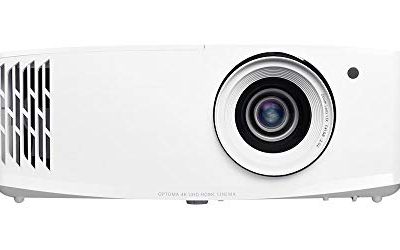
Optoma HD146X
- Best for: First-time projector buyers running one source in a moderately lit room.
- Full HD 1080p DLP single-chip design
- 3,600 lumens brightness
- Enhanced Gaming Mode, 16ms response time
- Full 3D support
First-time projector buyers running one source in a moderately lit room.
Availability signals for this ASIN are dated, so confirm a live featured offer for the exact ASIN before ordering; also note the single HDMI input if you plan to connect several sources.
The HD146X keeps things simple: a bright single-chip DLP picture, a gaming mode, and one cable between source and screen. Its 3,600 lumens handle living-room light respectably, and the Enhanced Gaming Mode lists a 16ms response time that suits casual console play on a big image. Full 3D support is there for the discs that use it. With a single HDMI input, this is the model for a one-source setup — a streamer stick or a console — where the appeal is turning it on and watching rather than managing a rack of devices.
Which One Fits Your Situation
Your living room never gets properly dark
Choose the Epson Home Cinema 1080. Equal colour and white brightness at 3,400 lumens means sport, streaming and films stay saturated under lamps and through curtains, and the 3LCD design sidesteps rainbow artefacts entirely. Its auto skew correction also forgives a slightly off-centre coffee-table placement, which suits rooms where a permanent mount is not an option.
Movie nights keep turning into game nights
The BenQ TH575 was built for this household. Its 16.7ms Enhanced Game Mode keeps controller input feeling direct, the 3,800-lumen output covers mixed lighting, and dual HDMI ports mean the console and the streamer stay plugged in. If your gaming leans competitive and the room is dark, the HT2060’s 8.3ms at 120Hz is the alternative worth weighing.
You have a dedicated room and care about film colour
Pick the BenQ HT2060. In a light-controlled space its LED engine and DCI-P3 coverage deliver the most cinema-like colour in this group, and lens shift plus a 1.3x zoom make dialling in the image straightforward. Its lower brightness is a non-issue once the room is dark, and S/PDIF gives your receiver a clean audio feed.
You want the simplest possible first setup
The Optoma HD146X keeps the decision small: one HDMI cable, a bright 3,600-lumen picture and a gaming mode if you want it. It suits a single streamer or console in a room with manageable light. Just accept the single input as the trade-off, and plan on a switch or receiver later if the source count grows.
Common Mistakes
- Shopping by lumens alone, without matching the figure to how much light your room actually lets in.
- Buying a mini portable or a business presentation projector for films, then wondering why contrast and colour disappoint.
- Mounting the projector before checking throw distance and zoom range against the screen size.
- Expecting built-in projector speakers to replace a soundbar or receiver for film soundtracks.
- Paying for a 4K model when your seating distance and screen size mean 1080p already looks sharp.
Frequently Asked Questions
Is 1080p enough for a home theater projector?
For most screen sizes and seating distances in this class, yes. A native 1080p image on a 100-inch screen viewed from a typical sofa distance looks sharp, and the money saved versus 4K buys better brightness, colour or audio instead. Resolution only becomes the weak point with very large screens or unusually close seating.
How many lumens do I actually need?
It depends on the room rather than the screen. A darkened dedicated room works well around the 2,200-lumen level of the HT2060, while living rooms with lamps and windows benefit from the 3,400 to 3,800 lumens listed on the Epson and BenQ TH575. When a listing separates colour and white brightness, compare both figures.
Can these projectors handle gaming?
Three of the four list dedicated gaming figures: the TH575 at 16.7ms, the HD146X at 16ms in its Enhanced Gaming Mode, and the HT2060 at 8.3ms with a 120Hz refresh. Those numbers suit casual and mid-level console play comfortably. The Epson lists no gaming latency figure, so treat it as the movies-and-streaming option.
Do I need a proper screen, or will a wall work?
A smooth, matte white wall gives a watchable image and is a reasonable starting point, especially with the brighter models here. A dedicated screen still improves matters: it evens out texture, sharpens perceived contrast and gives the picture clean borders. If the budget forces a choice, buy the projector first and add the screen later.
More from Amazon
Programs that pair well with the guide above. Offers and eligibility are set by Amazon and may change.
Free shipping on eligible items, Prime Video and more. Eligible new members can start with a free trial.
Start a Prime free trialAd-free music streaming. Eligible new subscribers can start with a free trial.
Try Music Unlimited freeA Prime membership for ages 18-24 with a trial period. Eligibility is set by Amazon.
See Prime for Young AdultsAudiobooks and podcasts to listen to on the go. Eligible new members can start with a free trial.
Try Audible freeAs an Amazon Associate we earn from qualifying purchases.