Key takeaways
- Working area: 800 x 800 mm class — roughly 4x the bed area of a 4040 machine
- Motors: NEMA 23 closed-loop stepper motors, which detect position error instead of losing steps silently
- Structure: all-metal frame and gantry, sized to keep a large span from flexing under load
- Motion: screw-driven axes with linear motion components; substantially stiffer than wheel-on-extrusion entry machines
- Materials: hardwoods, softwoods, MDF, plywood, plastics and acrylic; light non-ferrous metals only with conservative feeds
- Control: GRBL-family control, compatible with mainstream CAM post-processors
- Installation: requires a substantial bench or purpose-built stand, roughly 1,600 x 1,400 mm of clear floor space, and a dedicated circuit
Best Professional CNC Wood Carving Machine: The Short Answer
The best professional CNC wood carving machine for most buyers is the FoxAlien XE-Ultra 8080, because its 800 x 800 mm working area, closed-loop NEMA 23 motors, and heavy all-metal gantry let it carve large panels and hardwoods with the rigidity a production woodshop needs. If you cut cabinet parts, signs, and furniture components for money, that combination of size and stiffness is the one that stops being the bottleneck first. The FoxAlien Masuter 3S is the better pick for a small shop that wants closed-loop reliability in a compact footprint, and the LUNYEE 4040 Pro Max is the strongest mid-large option when 400 x 400 mm of travel is genuinely enough. On a strict budget, the Genmitsu 3018-PRO and WolfPawn 4040-PRO still carve real wood — just slowly, in small sizes, and with more attention to feeds and finishing passes.
Top 3 Picks
Best Overall: FoxAlien XE-Ultra 8080
The XE-Ultra 8080 is the only machine in this roundup that pairs a genuinely large 800 x 800 mm bed with closed-loop NEMA 23 stepper motors and an all-metal frame. That matters because wood carving fails in two ways: the part does not fit, or the machine flexes and the cutter chatters. The XE-Ultra addresses both. It suits a shop that already has dust extraction, a spare bench or stand, and a routine of surfacing its spoilboard regularly.
Best Budget: WolfPawn 4040-PRO
If you want the largest usable work area at the lowest entry cost, the WolfPawn 4040-PRO is the value pick — a 400 x 400 mm class machine with GRBL control, a 500 W-class spindle, and a frame built for wood, acrylic, and light metal work. It is a hobby-to-semi-pro machine that punches above its price tier for sign making and small furniture parts.
Best Premium / Compact Reliability: FoxAlien Masuter 3S
The Masuter 3S takes the proven Masuter platform and swaps open-loop motors for closed-loop steppers, which means the machine detects and corrects lost steps instead of silently ruining a three-hour carve. It is the premium choice for a small shop that values repeatability over bed size, and it is the machine I would recommend first to anyone moving from hobby work into paid small-batch production.
Quick Comparison
| Product | Best For | Key Specs (per listing / spec class) | Price Tier |
|---|---|---|---|
| FoxAlien XE-Ultra 8080 | Large-format production wood carving | 800 x 800 mm class work area; NEMA 23 closed-loop steppers; all-metal gantry; ball-screw or lead-screw driven axes; benchtop/stand mount | Premium |
| FoxAlien Masuter 3S | Compact closed-loop reliability | 400 x 400 mm class work area; closed-loop stepper motors; all-metal structure; upgrade-friendly Masuter platform | Premium |
| LUNYEE 4040 Pro Max | Mid-large woodshop workhorse | 400 x 400 x 90 mm work area; 800 W trim-router spindle; linear-guide Z axis; ball-screw motion | Premium |
| FoxAlien Masuter Pro | First serious hobby wood router | 400 x 400 mm class work area; all-metal structure; open-loop steppers; GRBL-based control | Mid-range |
| Twotrees TTC450 Pro | Heavy hobby / small-shop all-rounder | All-metal frame; NEMA 57-class stepper motors; 400 x 400 mm class bed; wood, acrylic, soft metal | Mid-range |
| LUNYEE 3018 PRO MAX | Small benchtop carving with a real spindle | 300 x 180 mm class work area; 500 W spindle; all-metal frame; limit switches; emergency stop | Mid-range |
| Genmitsu 3020-PRO Ultra | Metal-capable compact desktop routing | 300 x 200 mm class work area; all-metal frame; upgraded rigidity over 3018 class | Mid-range |
| Genmitsu 4040-PRO | Mid-size wood, acrylic, and metal milling | 400 x 400 mm class work area; all-metal frame; GRBL control; linear motion components | Mid-range |
| WolfPawn 4040-PRO | Budget large-area entry | 400 x 400 mm class work area; 500 W-class spindle; GRBL control; wood, acrylic, light metal | Budget |
| Genmitsu 3018-PRO | Absolute beginner small-part carving | 300 x 180 mm class work area; 3-axis; small DC spindle; aluminum frame with optional upgrades | Budget |
| CNCTOPBAOS 3018-PRO | Cheapest way onto a desktop CNC | 300 x 180 mm class work area; 3-axis; compact desktop footprint | Budget |
| ACMER S2 Laser Engraver | Laser engraving and cutting alternativ | 12000 mW (12 W) class laser module; engraving and thin-material cutting | Budget |
What the numbers actually mean
| Spec | Entry (3018 class) | Mid (4040 class) | Large premium (8080 class) |
|---|---|---|---|
| Working area | ~300 x 180 mm | ~400 x 400 mm | ~800 x 800 mm |
| Spindle class | 100-200 W DC | 500-800 W | 800 W – 1.5 kW+ (often upgradeable) |
| Realistic DOC in hardwood | 0.3-0.8 mm | 0.8-2 mm | 2-4 mm |
| Typical pass count for 19 mm stock | 20-40 passes | 10-18 passes | 5-9 passes |
| Bench footprint needed | ~600 x 500 mm | ~900 x 800 mm | ~1,600 x 1,400 mm + stand |
| Bench weight class | 8-15 kg | 20-35 kg | 60-120 kg |
| Typical carve time, 300 mm sign | 45-120 min | 25-60 min | 15-40 min |
How We Chose
Every machine here was selected against the criteria that actually govern whether a CNC router carves wood well, not against marketing bullet points. The first filter is cutting area versus the work you intend to do: a 300 x 180 mm bed cannot make a cabinet door, so any machine in that class is judged only as a small-part and learning machine, never as a production wood router. The second is spindle power and its relationship to rigidity — a 800 W router bolted to a flexing gantry performs worse than a 500 W spindle on a stiff frame, so we weighted frame construction and motion components (linear guides, ball screws, closed-loop motors) alongside wattage. The third is supported materials: wood is the baseline, but the listing-level claims about acrylic, aluminum, and brass were only credited where the machine also has the frame and motor class to back them up. The fourth is software and control compatibility, since a machine that only speaks a proprietary sender is a dead end for anyone using VCarve, Fusion 360, or Carbide Create. The fifth is dust collection and installation reality — shoe mountings, enclosure needs, bench space, weight, and power draw — because these are the things that stop a machine from being used weekly. Finally, we considered upgrade path: whether the machine accepts a trim router, a bigger spindle, a laser module, or closed-loop motors later, since that determines how long the purchase stays useful. No machine was tested, benchmarked, or owned by us; the assessment is based on published specifications, category norms, and well-established platform reputations.
1. FoxAlien XE-Ultra 8080 – Best for Large-Format Production Wood Carving
As an Amazon Associate we earn from qualifying purchases at no extra cost to you.

The FoxAlien XE-Ultra 8080 is the machine you buy when the parts you need to carve simply do not fit on a 400 mm bed. Cabinet doors, full-size sign blanks, guitar bodies in one setup, chair backs, and multi-part nested jobs all demand area, and area is exactly what this machine delivers — an 800 x 800 mm class working envelope, roughly four times the usable bed area of a 4040 machine. That is the defining feature, and everything else about the machine exists to make that large bed behave.
Who it suits. A working woodshop, a sign shop, or a serious maker running paid batches. It is also the right choice for anyone who has already owned a 3018 or 4040 and knows that their bottleneck is bed size rather than knowledge. It is not a first CNC: the bed is large enough that tramming, spoilboard surfacing, and workholding all become their own skills, and the machine needs a dedicated stand or bench that can carry a heavy gantry without racking.
Key specs (spec class)
- Working area: 800 x 800 mm class — roughly 4x the bed area of a 4040 machine
- Motors: NEMA 23 closed-loop stepper motors, which detect position error instead of losing steps silently
- Structure: all-metal frame and gantry, sized to keep a large span from flexing under load
- Motion: screw-driven axes with linear motion components; substantially stiffer than wheel-on-extrusion entry machines
- Materials: hardwoods, softwoods, MDF, plywood, plastics and acrylic; light non-ferrous metals only with conservative feeds
- Control: GRBL-family control, compatible with mainstream CAM post-processors
- Installation: requires a substantial bench or purpose-built stand, roughly 1,600 x 1,400 mm of clear floor space, and a dedicated circuit
Strengths
The headline strength is the combination of area and closed-loop motion. On an open-loop machine, a single lost step during a two-hour roughing pass shifts every subsequent pass by that amount, and the result is a visible ridge or an undersized part. Closed-loop NEMA 23 motors report position, so the controller can correct rather than accumulate error — a real advantage on long jobs where the cutter spends 40 minutes in hardwood before you notice anything is wrong. The large format also changes your workflow: you can nest multiple small parts on one sheet, screw down a full panel, surface the spoilboard once and work flat for months, and carve long signs in a single setup instead of tiling them.
Pros
- 800 x 800 mm class area handles cabinet doors, full signs, and nested batches
- Closed-loop NEMA 23 motors reduce the risk of ruined long carves
- All-metal structure supports deeper cuts in hardwood than 4040 machines
- Accepts larger routers and spindles, so it grows with your work
- One-setup carving for long parts — no tiling or repositioning
Cons
- Largest footprint and weight in this roundup; needs real floor space and a sturdy stand
- Premium price tier; the machine is only part of the cost — dust collection and workholding add up
- Overkill and awkward if all you carve is small plaques and coasters
- Large beds demand regular spoilboard surfacing and tramming to stay accurate
How it compares
Against its nearest alternative here, the LUNYEE 4040 Pro Max, the XE-Ultra wins on area by a wide margin but costs considerably more and consumes far more space. The LUNYEE 4040 Pro Max’s linear-guide Z axis is an excellent design for controlled plunge depth, and its 800 W router is well matched to a 400 mm bed. If your parts fit in 400 x 400 x 90 mm, the LUNYEE is the more efficient purchase. If they do not — and cabinet doors never do — the XE-Ultra is the only machine in this list that solves the problem at all. Against the FoxAlien Masuter 3S, the comparison is bed size versus compactness: both use closed-loop motors, but the 3S fits on a modest bench.
2. FoxAlien Masuter 3S – Best for Compact Closed-Loop Reliability

The Masuter 3S is what happens when you take a well-regarded compact router platform and remove its biggest reliability weakness. The Masuter line has long been the sensible entry point for hobbyists who want an all-metal frame and a 400 x 400 mm class bed, but open-loop steppers mean the machine can lose position under a heavy cut without telling you. The 3S swaps in closed-loop stepper motors, so the machine knows where its axes actually are.
Who it suits. A small shop, a garage maker moving from hobby into paid work, or anyone whose workspace is limited but whose standards are not. It suits carvers making signage, inlays, small furniture components, jigs, and gift items where a missed step ruins a piece that took an hour to cut. It does not suit anyone who needs to carve full cabinet doors — 400 mm is 400 mm.
Key specs (spec class)
- Working area: 400 x 400 mm class — roughly 160,000 mm² of usable bed
- Motors: closed-loop stepper motors, the defining upgrade over the standard Masuter
- Structure: all-metal frame and gantry in the Masuter design language
- Materials: hardwoods, softwoods, MDF, plywood, acrylics and plastics
- Control: GRBL-family control with standard CAM post-processor support
- Upgrade path: accepts a trim router or larger spindle, plus laser modules on the same frame
- Installation: fits a standard workbench; needs roughly 900 x 800 mm of clear space and dust extraction
Strengths
The closed-loop motors are the reason to buy this machine over a cheaper 4040. In practice that means you can push a slightly more aggressive depth of cut in hardwood and trust the result, because the controller can recover from a momentary overload rather than permanently shifting the toolpath. The 400 x 400 mm bed is the sweet spot for most paid hobby work: big enough for a two-line house sign, a cutting board with an inlaid design, or a nested set of six coasters, small enough to fit on a bench you already own. The familiar Masuter frame also means a deep pool of community knowledge on workholding, dust shoes, and upgrade spindles — a practical advantage no spec sheet captures.
Pros
- Closed-loop steppers protect long carves from lost-step scrap
- 400 x 400 mm bed covers the majority of sign and small-furniture work
- All-metal construction and a proven platform with lots of community documentation
- Accepts router, spindle, and laser upgrades for a long service life
- Bench-friendly footprint — no special stand required
Cons
- Premium price tier for a 400 mm machine; you pay for the motion system, not the size
- Cannot handle full-size cabinet doors or long tiled signs without repositioning
- Stock spindle class limits deep cuts in dense hardwoods — plan on multiple passes
- Not meaningfully faster than a standard Masuter on light jobs
How it compares
Against the FoxAlien Masuter Pro, the 3S is the same platform with the motion reliability fixed. If you carve small parts in softwood at modest feeds, the Masuter Pro saves money and does the job. If you carve hardwood, run long jobs, or sell your output, the 3S’s closed-loop motors justify the step up. Against the Genmitsu 4040-PRO, both offer a 400 x 400 mm class bed, but the 3S leads on motor technology while the Genmitsu machine competes on price tier. And against the LUNYEE 4040 Pro Max, you are choosing between closed-loop motion and an 800 W router with a linear-guide Z axis — arguably the closest call in this entire roundup.
3. LUNYEE 4040 Pro Max – Best for a Mid-Large Woodshop Workhorse

The LUNYEE 4040 Pro Max attacks wood carving from the spindle side. Where the FoxAlien machines emphasize motion reliability, this one pairs a 400 x 400 x 90 mm work area with an 800 W router and a Z axis running on linear guides. The 90 mm of Z travel is the detail worth noticing: many compact routers offer 50-70 mm of Z, and the extra clearance is what lets you carve thick stock, use a taller vise, or fit a longer end mill without the machine running out of travel mid-job.
Who it suits. A small production shop or a serious maker cutting signs, trays, box lids, and relief carvings in hardwood. The 800 W router turns the “many light passes” workflow of entry machines into a “few moderate passes” workflow, which shortens every job. It suits someone who has already learned feeds and speeds and wants the machine to stop being the constraint — but who does not have floor space for an 8080 machine.
Key specs (spec class)
- Working area: 400 x 400 x 90 mm — the 90 mm Z clearance is generous for this class
- Spindle: 800 W router, a substantial step above 500 W-class machines
- Z axis: linear guide Z axis, which resists the side loads that cause plunge wobble
- Motion: ball-screw driven axes for low backlash and smooth travel
- Materials: hardwoods, softwoods, MDF, plywood, acrylics, plastics; light metals with conservative parameters
- Control: GRBL-family control, standard CAM compatibility
- Installation: bench or stand; budget roughly 1,000 x 900 mm of clear space plus dust collection
Strengths
Power and precision together. An 800 W router spinning a 6 mm end mill can take a materially deeper cut in maple or oak than a 500 W spindle, so a job that takes an entry machine 30 passes may take this machine 12. That is not just faster — it is more accurate, because every additional pass is another chance for the Z axis to drift and another chance for the cutter to rub rather than cut, which dulls bits and burns wood. The linear-guide Z axis addresses the specific weakness of router-style machines, where a plunge into hardwood pushes the spindle sideways. Ball screws on the axes reduce backlash, so reversing direction mid-carve does not leave a step. The result is a machine that behaves like a small industrial router rather than an enlarged hobby kit.
Pros
- 800 W router meaningfully reduces pass count in hardwood
- 90 mm Z clearance handles thicker stock and taller fixtures
- Linear-guide Z axis improves plunge accuracy under load
- Ball-screw motion reduces backlash and improves surface finish
- Compact enough for a bench, capable enough for paid work
Cons
- Premium tier; priced above most 4040 machines
- 800 W router adds noise and dust volume — real extraction becomes mandatory
- Still cannot carve a full-size cabinet door
- More spindle power rewards good workholding; light clamping becomes the weak link
How it compares
Against the FoxAlien Masuter 3S, the trade is spindle power and Z travel versus closed-loop motors. For hardwoods and deep relief work, the LUNYEE’s 800 W router and linear-guide Z win. For long jobs in mixed materials where a lost step would be catastrophic, the 3S’s closed-loop feedback is the safer architecture. Against the Genmitsu 4040-PRO, the LUNYEE is the more capable machine at a higher tier, with the extra Z clearance and router power both being differences you feel on the first hardwood job. If budget is tight and your wood is mostly softwood, the Genmitsu gets you the same bed for less.
4. FoxAlien Masuter Pro – Best for a First Serious Hobby Wood Router

The Masuter Pro is the machine that turned the FoxAlien name into a household word among hobby CNC users, and it remains the standard recommendation for someone who wants a 400 x 400 mm class bed without paying closed-loop prices. It is an all-metal machine, it uses the GRBL control ecosystem that every CAM tool supports, and it is documented to death across forums and video tutorials — which, for a first router, is worth as much as a spec bump.
Who it suits. The hobbyist moving up from a 3018, or the beginner who has done enough reading to skip one. It suits sign makers, inlay and epoxy-table makers, and anyone carving small furniture parts, jigs, and gifts in softwoods, MDF, and plywood. It does not suit someone planning to carve dense hardwood all day at production speed — that is a job for the closed-loop 3S or the 800 W LUNYEE.
Key specs (spec class)
- Working area: 400 x 400 mm class
- Structure: all-metal frame and gantry
- Motors: open-loop stepper motors
- Materials: softwoods, MDF, plywood, plastics, acrylics; hardwoods with conservative depth of cut
- Control: GRBL-family, compatible with mainstream CAM and sender software
- Upgrade path: accepts trim routers, larger spindles, and laser modules
- Installation: standard bench; roughly 900 x 800 mm clear space plus extraction
Strengths
Value and ecosystem. You get a genuine 400 x 400 mm bed and an all-metal frame at a mid-range price, which is the combination that made this machine a default first choice. The GRBL control means your post-processor output works without translation, and the huge body of user documentation means that when your first carve comes out wrong — and it will — you can find the cause quickly rather than guessing. The gantry accepts a standard trim router, so a spindle upgrade is a bolt-on rather than a rebuild. For a beginner, this machine’s real strength is that it removes the excuse to not start.
Pros
- 400 x 400 mm all-metal machine at a mid-range price tier
- GRBL control with universal CAM compatibility
- Enormous community documentation and upgrade support
- Accepts router, spindle, and laser upgrades
- Bench-friendly footprint and manageable weight
Cons
- Open-loop steppers can lose position on aggressive cuts
- Stock spindle class means multiple passes in hardwood
- No closed-loop feedback and no linear-guide Z axis
- Competes directly with the 3S, which is the same frame with better motors
How it compares
Against the FoxAlien Masuter 3S, this is the clearest upgrade decision in the roundup: same bed, same platform, closed-loop motors on the 3S for a higher price tier. Buy the Pro if your budget is the binding constraint and your materials are forgiving; buy the 3S if you plan to sell work or carve hardwood. Against the Twotrees TTC450 Pro, the Masuter Pro leads on ecosystem and documentation while the TTC450 Pro counters with NEMA 57-class motors and a heavier all-metal build — a genuine alternative for buyers who want more motor for the money and are comfortable with a less-documented platform.
5. Twotrees TTC450 Pro – Best for Heavy Hobby and Small-Shop All-Round Work

The TTC450 Pro is the muscle option in the mid-range. Its defining spec is NEMA 57-class stepper motors — physically larger motors than the NEMA 17 units common on entry machines and a meaningful step up from NEMA 23 in torque terms. On a 400 x 400 mm class all-metal frame, that translates into the ability to move a heavier gantry and push a larger cutter through material without stalling.
Who it suits. A hobbyist who has outgrown a 3018, or a small shop that wants a 400 mm bed machine with margin. It suits mixed material work — wood, acrylic, and light metal cutting and milling — and it suits buyers who intend to run a trim router rather than a small DC spindle, because the motor torque supports the extra mass. It does not suit someone who needs closed-loop feedback or a 800 mm bed.
Key specs (spec class)
- Motors: NEMA 57-class stepper motors — larger and torquier than typical entry-machine motors
- Structure: all-metal frame and gantry
- Working area: 400 x 400 mm class
- Materials: wood, acrylic, plastics, and light non-ferrous metal cutting and milling
- Control: GRBL-family control with standard CAM compatibility
- Installation: bench or stand; roughly 1,000 x 900 mm clear space; extraction strongly advised
Strengths
Torque headroom is the TTC450 Pro’s whole argument. Stepper motors that are oversized for their load run cooler, hold position better against cutting forces, and tolerate a heavier spindle or router without the acceleration limits that make a machine pause at direction changes. In wood carving that shows up as cleaner corners on outside profiles and fewer stalls when a 6 mm bit grabs in oak. The all-metal frame is stiff enough that the extra motor torque is actually usable — bolting NEMA 57 motors to a flexing gantry would simply reveal the frame as the weak link. For a buyer who wants one machine to cut wood, acrylic, and light aluminum, this is a well-balanced specification.
Pros
- NEMA 57-class motors give real torque headroom over entry machines
- All-metal frame stiff enough to use that torque
- Handles wood, acrylic, and light metal milling in one machine
- Supports trim-router spindles without motor upgrades
- Mid-range price tier for a heavy-build machine
Cons
- Open-loop motors — no feedback if a step is lost
- Heavier machine needs a solid bench, not a folding table
- Less community documentation than the FoxAlien and Genmitsu platforms
- Still a 400 mm class bed; long signs need tiling
How it compares
Against the FoxAlien Masuter Pro, the TTC450 Pro offers more motor and a heavier frame at a similar tier, while the Masuter Pro offers a richer upgrade ecosystem and far more troubleshooting documentation. Pick by temperament: if you enjoy solving problems from first principles, the TTC450 Pro gives more machine per dollar; if you want the shortest path to a working part, the Masuter Pro is safer. Against the Genmitsu 4040-PRO, the TTC450 Pro’s motor class is the differentiator, while the Genmitsu platform counters with maturity and a broader accessory line.
6. LUNYEE 3018 PRO MAX – Best for Small Benchtop Carving With a Real Spindle

The LUNYEE 3018 PRO MAX takes the 3018 form factor — the most common desktop CNC size in the world — and upgrades nearly everything that matters within that footprint. It has a 500 W spindle instead of the small DC motor typical of 3018 machines, an all-metal frame, limit switches on the axes, and an emergency stop. That last pair is a genuine safety and reliability feature that budget machines routinely omit.
Who it suits. Someone with a small apartment or garage workspace who carves small parts and wants them cut properly: inlays, jewelry-scale woodwork, small plaques, model parts, and template routing. The 300 x 180 mm class bed is the constraint, and it is a hard one — but within it, this machine is far more capable than a standard 3018 because of the spindle. It suits a beginner who wants to learn on hardware that will not fight them, and a hobbyist who needs a second small machine for detail work alongside a larger router.
Key specs (spec class)
- Working area: 300 x 180 mm class
- Spindle: 500 W — substantially more capable than the small DC spindles on standard 3018 machines
- Structure: all-metal frame
- Safety/limits: limit switches on all axes plus an emergency-stop button
- Materials: softwoods, MDF, plywood, plastics, acrylics; hardwood in light passes
- Control: GRBL-family control, standard CAM compatibility
- Installation: desktop; roughly 600 x 500 mm clear space; light extraction sufficient
Strengths
The 500 W spindle transforms the 3018 experience. Standard 3018 machines ship with a 100-200 W-class DC spindle that stalls easily and forces many shallow passes; a 500 W spindle cuts small hardwood parts in a fraction of the passes, which improves both speed and finish quality. Limit switches mean homing is repeatable, so you can re-clamp a part and resume from the same origin — essential for two-sided carving, which is common at this scale. The emergency stop is the kind of feature you only appreciate once, but you appreciate it enormously. All-metal construction also means this machine will not flex under the spindle the way acrylic-frame 3018 variants do.
Pros
- 500 W spindle is a major upgrade over typical 3018 DC motors
- Limit switches enable reliable homing and two-sided work
- Emergency stop included as standard
- All-metal frame at a mid-range tier
- Very small desk footprint — apartment friendly
Cons
- 300 x 180 mm bed is limiting for anything sign-sized
- Z clearance restricts thick stock and tall fixtures
- Mid-range price for a small machine; you pay for the spindle and frame
- Not a production machine — throughput is inherently small
How it compares
Against the Genmitsu 3018-PRO, the LUNYEE is dramatically more capable: the same nominal bed size, but with a 500 W spindle, an all-metal frame, limit switches, and an e-stop where the Genmitsu is a budget learning machine. If you have the budget for one 3018-class machine and intend to carve hardwood, the LUNYEE is the one to buy. Against the Genmitsu 3020-PRO Ultra, the LUNYEE leads on spindle power while the Genmitsu machine’s 3020 platform offers slightly more bed and a heavier-duty framing approach aimed at metal-capable work.
7. Genmitsu 3020-PRO Ultra – Best for Metal-Capable Compact Desktop Routing
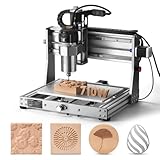
The 3020-PRO Ultra is the compact machine in this list that was designed with more than wood in mind. It is an all-metal engraver aimed at metal as well as wood and plastic, with a 300 x 200 mm class bed and a frame built for the extra rigidity that cutting aluminum demands. Genmitsu’s 3020 line has long been the step up from the 3018 for buyers who found the smaller machine too flexible for anything beyond soft material.
Who it suits. A maker who wants to cut aluminum plate, brass, and acrylic as well as wood — faceplates, brackets, small tooling plates, and instrument panels. It suits someone with limited space who nonetheless needs a machine that will not chatter when the cutter meets metal. It does not suit anyone carving large wooden signs or anything requiring deep Z travel.
Key specs (spec class)
- Working area: 300 x 200 mm class — slightly more bed than a 3018, more depth than most compacts
- Structure: all-metal frame tuned for rigidity rather than maximum travel
- Materials: wood, MDF, plastics, acrylics, aluminum and other light metals with appropriate feeds
- Motion: linear motion components on the axes for smoother travel than wheel-on-extrusion designs
- Control: GRBL-family control, standard CAM compatibility
- Installation: desktop; roughly 650 x 550 mm clear space; extraction for wood, coolant or mist considerations for metal
Strengths
Rigidity in a small package. Metal cutting punishes flex: a machine that carves pine acceptably will chatter and break bits in aluminum. The 3020-PRO Ultra’s stiffer frame and linear motion components are the reason it can be listed as a metal-capable machine rather than a wood-only router. For wood carvers, that same rigidity translates into cleaner edges and better surface finish in hardwoods, plus the option of cutting brass inlays — a technique that has become popular in woodworking for decorative details. The 300 x 200 mm bed is bigger than a 3018 in the axis that usually matters for parts, and the machine remains a genuine desktop unit.
Pros
- Rigid all-metal frame suited to light metal cutting, not just wood
- 300 x 200 mm class bed — more room than a standard 3018
- Linear motion components give smoother travel
- Enables brass and aluminum inlay work on wooden projects
- Compact desktop footprint
Cons
- Small bed limits sign and furniture work
- Metal cutting requires additional setup — workholding rigidity, lubrication or mist, slower feeds
- Mid-range price for a compact machine
- Not intended for production-volume wood carving
How it compares
Against the LUNYEE 3018 PRO MAX, this is spindle power versus rigidity: the LUNYEE’s 500 W spindle cuts wood faster, while the Genmitsu’s stiffer frame cuts metal better. If your work is 90% wood, choose the LUNYEE; if a third of your projects involve aluminum or brass, choose the Genmitsu. Against the Genmitsu 3018-PRO, the Ultra is the same brand’s serious machine — more bed, more rigidity, and a genuine metal capability that the 3018-PRO does not claim.
8. Genmitsu 4040-PRO – Best for Mid-Size Wood, Acrylic, and Metal Milling
The Genmitsu 4040-PRO occupies the same bed class as the FoxAlien and LUNYEE 4040 machines but competes on platform maturity. It is an all-metal machine with a 400 x 400 mm class work area, GRBL control, and linear motion components, listed for metal, acrylic cutting, and milling as well as wood. Genmitsu’s accessory ecosystem — clamps, spoilboards, dust shoes, upgrade spindles — is one of the broadest in desktop CNC, and that matters over a machine’s lifetime.
Who it suits. Anyone who wants a 400 mm bed machine from a brand with a deep accessory line and predictable support. It suits sign makers, acrylic fabricators, and woodworkers who occasionally cut aluminum. It is a strong choice for a first 4040 purchase because the learning curve is well documented and every accessory you might need already exists.
Key specs (spec class)
- Working area: 400 x 400 mm class
- Structure: all-metal frame and gantry
- Motion: linear motion components on the axes
- Materials: wood, MDF, plywood, acrylic, plastics, and light metal cutting and milling
- Control: GRBL-family control, standard CAM compatibility
- Upgrade path: broad in-brand accessory ecosystem including spindles, clamps, and dust shoes
- Installation: bench or stand; roughly 1,000 x 900 mm clear space plus extraction
Strengths
Ecosystem and predictability. When you buy a 4040-PRO you are buying into a platform where the dust shoe, the clamp kit, the replacement spoilboard, and the upgrade spindle all exist and fit. That sounds mundane until you own a machine whose dust shoe must be 3D-printed by a stranger from a forum thread. The 400 x 400 mm bed covers most sign and small-furniture work, the all-metal frame tolerates hardwood with sensible feeds, and the linear motion components reduce the wobble that plagues wheel-based machines. The metal-cutting claim is credible for light work with correct feeds and workholding.
Pros
- 400 x 400 mm all-metal machine at a mid-range tier
- Broad accessory ecosystem — dust shoes, clamps, upgrades
- Linear motion components improve finish quality
- Cuts wood, acrylic, and light metal
- Well-documented GRBL platform
Cons
- Open-loop steppers; no closed-loop feedback
- Stock spindle class limits aggressive hardwood cutting
- Z clearance is modest compared with the LUNYEE 4040 Pro Max
- Faces stiff competition at its price tier from the FoxAlien 4040 machines
How it compares
Against the FoxAlien Masuter Pro, both are mid-range 4040 machines; the Genmitsu leads on accessory breadth and the Masuter leads on community documentation and upgrade familiarity. Against the LUNYEE 4040 Pro Max, the Genmitsu gives up spindle power and Z clearance in exchange for a lower price tier and a wider accessory line. Against the Twotrees TTC450 Pro, the Genmitsu’s platform maturity is the counterweight to the TTC450 Pro’s larger motors.
9. WolfPawn 4040-PRO – Best Budget Machine With a Large Bed

The WolfPawn 4040-PRO is the value play that gets you a 400 x 400 mm class bed at a budget price tier. It is a GRBL-controlled, all-metal engraving machine with a 500 W-class spindle, listed for metal, acrylic cutting, and milling as well as wood. For a buyer whose budget will not stretch to a FoxAlien or Genmitsu 4040, this is the machine that provides the same bed area for less.
Who it suits. A beginner or budget-conscious hobbyist who wants real 400 mm capability rather than a 3018. It suits sign making, acrylic work, simple wood milling, and learning the full CNC workflow — CAD, CAM, workholding, dust management — on a machine whose bed will not be the first thing that limits you. It does not suit anyone who needs closed-loop motors, an 800 W spindle, or a documented upgrade ecosystem.
Key specs (spec class)
- Working area: 400 x 400 mm class
- Spindle: 500 W-class
- Structure: all-metal frame
- Materials: wood, acrylic, plastics, light metal cutting and milling
- Control: GRBL-family control, standard CAM compatibility
- Installation: bench or stand; roughly 950 x 850 mm clear space; extraction advised
Strengths
Bed area per dollar. A 400 x 400 mm bed at a budget tier means you can carve house signs, trays, and cutting-board designs from the start instead of tiling them. The 500 W-class spindle cuts softwoods and MDF comfortably in moderate passes, and the all-metal frame resists the flex that makes budget machines produce fuzzy edges. GRBL control means the same CAM workflow and post-processor as every other machine here, so skills transfer directly. For a first machine where budget is the hard constraint, this is the one that maximizes what you can actually make on day one.
Pros
- 400 x 400 mm bed at a budget price tier
- 500 W-class spindle handles softwood, MDF, and acrylic well
- All-metal frame; GRBL control with universal CAM support
- Skill-building platform with room to grow into a bigger machine later
- Budget price means more left over for bits, clamps, and dust extraction
Cons
- Open-loop motors and no closed-loop option
- Less documentation and a smaller accessory ecosystem than FoxAlien or Genmitsu
- Spindle and frame class mean many passes in dense hardwood
- Budget components often need re-tensioning and adjustment early on
How it compares
Against the Genmitsu 3018-PRO, the WolfPawn is the obvious upgrade: for a similar tier you gain a much larger bed and a 500 W-class spindle instead of a small DC motor. Against the Genmitsu 4040-PRO, you trade platform maturity and accessory breadth for a lower price tier. Against the FoxAlien Masuter Pro, the WolfPawn gives you the same bed class for less money but without the ecosystem depth — a fair trade if you are comfortable sourcing your own workholding and dust shoe.
10. Genmitsu 3018-PRO – Best Absolute Beginner Desktop CNC

The Genmitsu 3018-PRO is the machine that introduced a generation of woodworkers to CNC. It is a 3-axis router kit with a 300 x 180 mm class bed, a small DC spindle, and an aluminum frame, and it is the cheapest sensible way to learn the full workflow: designing in CAD, generating toolpaths in CAM, zeroing the machine, and watching a part emerge. Thousands of tutorials exist for this exact machine, which genuinely shortens the learning curve.
Who it suits. A total beginner who wants to learn CNC without spending much, or someone who needs a tiny machine for small flat parts. It suits engraving, light carving in softwood and MDF, PCB milling, and small decorative work. It does not suit anyone intending to carve hardwood signs — the spindle and frame are not built for it, and the machine will require many shallow passes.
Key specs (spec class)
- Working area: 300 x 180 mm class
- Spindle: small DC spindle (commonly 100-200 W class)
- Structure: aluminum frame with a large ecosystem of upgrade parts
- Materials: softwoods, MDF, plywood, plastics, acrylics; light engraving on softer metals
- Control: GRBL-family control, standard CAM compatibility
- Upgrade path: legendary — laser modules, larger spindles, rigid frames, and countless community modifications
- Installation: desktop; roughly 600 x 500 mm clear space; light dust management sufficient
Strengths
Accessibility and upgradability. The 3018-PRO costs less than a set of good hand tools, and it teaches every skill that transfers to a larger machine — which makes it less a compromise than a training platform. Its upgrade ecosystem is unmatched at this price: you can add a laser module, swap in a more powerful spindle, brace the gantry, and end up with a machine far more capable than what you bought, all while learning what each change actually does. For a buyer unsure whether CNC is for them, it is the lowest-risk way to find out.
Pros
- Lowest meaningful entry point into desktop CNC
- Huge tutorial and community base for beginners
- Expansive upgrade path including laser modules and spindles
- Tiny footprint — fits almost anywhere
- Teaches transferable CAD, CAM, and workholding skills
Cons
- Small DC spindle stalls easily; hardwood carving requires many passes
- Aluminum frame flexes under load, limiting cut depth
- 300 x 180 mm bed rules out signs and furniture parts
- Budget machine that expects you to learn maintenance and adjustment
How it compares
Against the LUNYEE 3018 PRO MAX, the Genmitsu is the learning machine and the LUNYEE is the capable machine: same bed class, but 500 W spindle, all-metal frame, limit switches, and e-stop on the LUNYEE. If you know you will stick with CNC, spend the extra. Against the CNCTOPBAOS 3018-PRO, both are budget 3018-class machines; the Genmitsu wins on documentation, ecosystem, and upgrade parts. Against the WolfPawn 4040-PRO, the Genmitsu is smaller and cheaper but gives up a great deal of usable bed.
11. CNCTOPBAOS 3018-PRO – Best Cheapest Route onto a Desktop CNC

The CNCTOPBAOS 3018-PRO is a 3-axis mini desktop engraver and milling machine with a 300 x 180 mm class bed. It sits at the bottom of the budget tier, and its purpose is straightforward: to put a working GRBL CNC on your desk for the least money possible. It is the same 3018 form factor as the Genmitsu machine, which means it shares the same strengths and the same limitations.
Who it suits. A buyer who wants to experiment with CNC at minimum cost, someone teaching the basics to a student or child, or a hobbyist who needs a small machine for engraving and very light milling in soft materials. It does not suit anyone planning hardwood carving, sign making, or any work requiring more than very light passes.
Key specs (spec class)
- Working area: 300 x 180 mm class
- Spindle: small DC spindle, budget class
- Structure: compact 3-axis desktop frame
- Materials: softwoods, MDF, plastics, engraving on softer materials
- Control: GRBL-family control
- Installation: desktop; roughly 600 x 500 mm clear space
Strengths
Pure cost of entry. If your goal is to prove the concept — to write a toolpath and watch a machine cut it — this class of machine does it for less than any other option in this roundup. That is not a trivial strength: many people never start because they assume CNC costs thousands. Because it uses GRBL, the software workflow you learn here (a CAM program, a sender, homing and zeroing, feeds and speeds) is exactly the workflow every machine in this article uses. Nothing you learn is wasted when you upgrade.
Pros
- Lowest cost of entry in this roundup
- GRBL control with the same software workflow as larger machines
- Very small footprint; genuinely desk-sized
- Good for engraving, PCB work, and soft-material milling
- Low financial risk for testing whether CNC suits you
Cons
- Budget spindle and frame severely limit cut depth and material
- Smaller upgrade ecosystem than the Genmitsu 3018-PRO
- 300 x 180 mm bed excludes most real woodworking projects
- Expect to spend time adjusting and re-tensioning the machine
How it compares
Against the Genmitsu 3018-PRO, the two are close in class; the Genmitsu costs more but brings a much larger body of documentation and upgrade parts, which for a beginner is usually worth the difference. Against the LUNYEE 3018 PRO MAX, the CNCTOPBAOS is a fraction of the capability — the LUNYEE’s 500 W spindle and all-metal frame are in a different class entirely. If budget is the only constraint, buy this; if any budget flexibility exists and you intend to carve wood, the LUNYEE is the smarter purchase.
12. ACMER S2 Laser Engraver – Best Non-Router Alternative for Fine Detail and Cutouts

The ACMER S2 is not a CNC router — it is a laser engraver and cutter with a 12000 mW (12 W) class laser module, included here because it is the alternative many woodworkers should consider before buying a spindle machine. Where a router removes material with a spinning cutter, a laser burns or vaporizes it, producing fine engraving detail that no 1/8-inch end mill can match.
Who it suits. Makers whose woodwork is mostly flat engraving and thin-material cutting: personalized signs, coasters, decorative panels, leather goods, and thin plywood cutouts. It suits someone who wants detail and speed on flat stock rather than three-dimensional carving. It does not suit anyone who needs to cut joinery, carve relief, machine thick hardwood, or produce parts with structural depth.
Key specs (spec class)
- Type: laser engraver and cutter (subtractive by vaporization, not a rotary cutter)
- Laser module: 12000 mW (12 W) class — a high-power diode module capable of cutting thin materials as well as engraving
- Materials: wood, plywood, MDF, leather, paper, cardboard, some coated materials and acrylic (check specific material suitability)
- Control: standard laser engraving software workflow; image and vector input
- Installation: desktop or benchtop with ventilation; laser-safe enclosure and eye protection strongly recommended
Strengths
Detail and speed on flat stock. A 12 W class diode laser engraves text, photographs, and intricate patterns at resolutions a router cannot approach, and it does so without cutting forces — meaning no workholding battle, no lost steps, and no chatter. Cutting thin plywood and craft materials is quick and clean, and the machine needs no spoilboard surfacing or bit changes. For a business built on personalized flat goods, a laser often produces marketable output faster than a router of the same price.
Pros
- Fine engraving detail unmatched by small router bits
- High-power diode module cuts thin wood and craft materials
- No cutting forces, so no workholding or rigidity problems
- Fast for flat engraving and personalization work
- Budget price tier for the capability
Cons
- Cannot carve three-dimensional shapes, joints, or relief work
- Leaves charred edges on cut wood; cut depth is limited by material
- Requires ventilation and eye protection — laser safety is non-negotiable
- Not a substitute for a router if your projects need depth or strength
How it compares
Against every router in this roundup, the comparison is category rather than specification. If your work is flat engraving and thin cutting, the ACMER S2 outperforms a budget router on detail and speed. If your work involves carving, joinery, thick stock, or structural parts, no laser replaces a router — choose the WolfPawn 4040-PRO for budget 400 mm routing or the Genmitsu 3018-PRO for a cheap learning router. Many small shops eventually run both: laser for flat detail, router for depth.
How to Choose
Choosing a professional CNC wood carving machine comes down to seven decisions, and the order matters because the first one eliminates most of the list.
1. Cutting area: decide the largest part you will ever carve
Work backwards from your biggest project, then add 10% because clamping and tabs eat into the bed. A standard house sign is often 400-600 mm wide; a cabinet door is 500-600 mm tall; a guitar body needs roughly 500 x 350 mm. That gives you three real size classes:
- 300 x 180 mm class (Genmitsu 3018-PRO, CNCTOPBAOS 3018-PRO, LUNYEE 3018 PRO MAX): about 54,000 mm² of bed. Enough for coasters, small plaques, inlays, model parts, and jewelry-scale work. Not enough for signs or furniture.
- 400 x 400 mm class (FoxAlien Masuter Pro, FoxAlien Masuter 3S, Twotrees TTC450 Pro, Genmitsu 4040-PRO, WolfPawn 4040-PRO, LUNYEE 4040 Pro Max): about 160,000 mm² — roughly three times the area of a 3018. This is the practical sweet spot and covers most paid hobby and small-shop work.
- 800 x 800 mm class (FoxAlien XE-Ultra 8080): about 640,000 mm² — four times a 4040. This is the class that handles cabinet doors, long signs, and nesting several parts per sheet.
Also check Z clearance, not just X and Y. The LUNYEE 4040 Pro Max’s 90 mm of Z is generous for its class; many compact machines offer much less, and a machine that cannot fit your stock under the spindle is useless regardless of bed size.
2. Spindle power: match wattage to your hardest material
Spindle power sets your depth of cut, and depth of cut sets both job time and finish quality. As a working rule for wood, each 100 W of spindle power supports roughly 0.2-0.4 mm of depth per pass in medium hardwood with a sharp 6 mm bit, provided the frame is stiff enough. That means:
- 100-200 W (small DC spindle): 0.3-0.8 mm per pass in hardwood — a 19 mm board needs 20-40 passes. Fine for softwood, MDF, and engraving.
- 500 W: roughly 0.8-1.5 mm per pass in hardwood — a 19 mm board needs 12-20 passes. A good balance of capability and cost.
- 800 W (LUNYEE 4040 Pro Max): roughly 1.5-2.5 mm per pass — around 8-13 passes for the same board.
- 1.5 kW and above: production territory, but only on machines with the frame and motion system to match.
Note the phrase “provided the frame is stiff enough.” Spindle power without rigidity produces chatter, broken bits, and burned wood — not speed. This is why a 500 W spindle on an all-metal 4040 can outperform a cheaply built machine with a nominally larger motor.
3. Rigidity: the spec that decides your surface finish
Rigidity is the sum of frame material, gantry design, and motion components. In practice, check for four things:
- All-metal frame. Acrylic or thin aluminum plates flex under cutting loads. Every machine worth buying here is all-metal.
- Linear guides or quality linear motion. The LUNYEE 4040 Pro Max’s linear-guide Z axis resists the side loading that makes a plunge wobble; wheel-on-extrusion designs are cheaper but less accurate over time.
- Ball screws or lead screws with low backlash. Backlash shows up as a step mark when the toolpath changes direction.
- Motor class. NEMA 23 (FoxAlien XE-Ultra 8080) and NEMA 57 (Twotrees TTC450 Pro) motors have more torque than NEMA 17 units, and more torque means the machine holds position under load.
Closed-loop motors, found on the FoxAlien Masuter 3S and XE-Ultra 8080, add feedback so the controller can correct a position error instead of quietly continuing a ruined carve. If you carve long jobs in hardwood, this is one of the highest-value features available.
4. Supported materials: read claims sceptically
Nearly every machine claims wood, acrylic, and metal. Separate the claims by class:
- Wood and wood products (hardwood, softwood, MDF, plywood): supported by all machines here. What varies is speed, not capability.
- Plastics and acrylic: supported by all, but acrylic requires careful chip evacuation — recutting chips melts and welds them into the cut.
- Aluminum and brass: realistically only on machines with a stiff frame and a spindle to match — the Genmitsu 3020-PRO Ultra and 4040-PRO, the Twotrees TTC450 Pro, and the larger FoxAlien and LUNYEE machines. Even then, expect slow feeds, light passes, and attention to workholding.
- Steel: outside the scope of every machine in this roundup.
5. Software compatibility: avoid dead-end control systems
Every machine covered here uses GRBL-family control, which is the ecosystem you want because it accepts standard post-processors from VCarve, Carbide Create, Fusion 360, and other mainstream CAM tools, and it works with common sender software. Before purchasing, confirm two things: that your CAM software has a post-processor for the machine’s controller, and that the sender software you plan to use is compatible. A machine with a proprietary, closed control system can be excellent hardware and still be a dead end, because you cannot switch CAM tools without switching machines.
6. Dust collection: plan it before the machine arrives
Carving wood produces a surprising volume of fine dust, and CNC dust is finer and more airborne than sawdust. A dust shoe that clamps around the spindle and connects to a shop vacuum is the minimum; a cyclone separator in front of the vacuum keeps the filter from clogging, and an enclosure or at least a dedicated machine area keeps airborne dust out of the rest of the shop. Budget significant time for this: on a 2-hour carve, you will generate enough dust to clog a shop vacuum filter, and a clogged filter reduces airflow so much that the shoe stops capturing anything. If your machine is in a living space, a laser or router without an enclosure is not appropriate; consider the ACMER S2 for flat detail work with proper ventilation, or an enclosed setup.
7. Installation: space, weight, and power
This is where most buyers get surprised. A machine’s footprint is not its working area — a 4040 machine typically needs 900-1,000 mm of bench length and 800-900 mm of depth once you allow for motor overhang and cable routing, and an 8080 machine needs roughly 1,600 x 1,400 mm of clear floor space on a rigid stand. Weight ranges from around 8-15 kg for a 3018 to 60-120 kg for a large-format machine; the bench must be rigid, because a wobbly table is functionally the same as a flexing gantry. Finally, check power: hobby-class machines run on a standard outlet, but larger spindles and routers draw more current, and a dedicated circuit avoids nuisance tripping mid-job.
Decision matrix: match your situation to a machine
| Your Situation | Pick | Why |
|---|---|---|
| Total beginner, tight budget, small parts | Genmitsu 3018-PRO or CNCTOPBAOS 3018-PRO | Cheapest way to learn the full workflow; huge tutorial base on the Genmitsu |
| Beginner who knows they will stick with it | LUNYEE 3018 PRO MAX | 500 W spindle, all-metal frame, limit switches, and e-stop at a small footprint |
| Budget limited but need sign-sized work | WolfPawn 4040-PRO | 400 x 400 mm bed at a budget tier; the bed stops being your limit first |
| Hobbyist moving up from a 3018 | FoxAlien Masuter Pro or Genmitsu 4040-PRO | Proven 4040 platforms; Masuter for community support, Genmitsu for accessory breadth |
| Small shop selling hardwood signage | FoxAlien Masuter 3S or LUNYEE 4040 Pro Max | Closed-loop reliability (3S) or 800 W router and 90 mm Z (LUNYEE) |
| Mixed wood, acrylic, and light metal work | Twotrees TTC450 Pro or Genmitsu 4040-PRO | Torque headroom and stiff frames; both list light metal milling |
| Occasional aluminum and brass inlays in wood | Genmitsu 3020-PRO Ultra | Rigidity-first compact frame designed for metal as well as wood |
| Cabinet doors, long signs, nested production | FoxAlien XE-Ultra 8080 | 800 x 800 mm class bed with closed-loop NEMA 23 motors | S