Key takeaways
- Connection: wired USB
- Shape: right-hand ergonomic, thumb rest, sculpted for palm and claw grips
- Buttons: extensive multi-button layout including a thumb-side paddle and wheel tilt
- Scroll wheel: free-spin and tactile modes, with horizontal tilt for extra binds
- Lighting: multi-zone RGB, including an underglow strip
- Software: Razer Synapse with onboard profile storage
- Sensor class: flagship-class optical sensor, more than accurate enough for any competitive use
Top 3 Picks
The short answer: the Razer Viper V4 Pro Wireless is the best Razer gaming mouse for competitive play overall — a 49 g flagship esports shape with an 8 kHz-class wireless link and 180 hours of rated battery, and it suits FPS players who want the lowest practical weight without giving up wireless freedom. The Razer Viper V3 HyperSpeed is the best budget pick: an 82 g wireless mouse that gets the fundamentals right for a fraction of flagship money. And the Razer Basilisk V3 Pro 35K is the best premium all-rounder for players who want adjustable shape, a thumb rest, and heavy customization rather than pure minimum weight.
Quick Comparison
Every mouse below is a current Razer listing. Price tiers are general market bands (budget / mid-range / premium) rather than fixed figures, because listing prices move daily.
| Product | Best for | Key specs | Price tier |
|---|---|---|---|
| Razer Basilisk V3 | All-day comfort with maximum buttons and RGB | Wired, ergonomic right-hand shape, multi-button layout, RGB, tilt wheel | Budget |
| Razer Viper V3 HyperSpeed | First serious wireless FPS mouse | Wireless, 82 g, AA-battery design, ambidextrous-leaning shape | Budget |
| Razer Basilisk V3 Pro 35K | Premium do-everything ergonomic mouse | Wireless, 140 hr battery, adjustable wheel resistance, thumb rest, RGB | Premium |
| Razer Viper V3 Pro SE | Lightweight wireless FPS on a budget | Wireless, 54 g, 95 hr battery | Mid-range |
| Razer DeathAdder Essential | Cheapest reliable wired ergonomic mouse | Wired, classic right-hand ergonomic shape, 5 buttons | Budget |
| Razer Naga V2 HyperSpeed | MMO and MOBA hotbar play | Wireless, 400 hr battery, 12-button thumb grid | Mid-range |
| Razer Cobra Pro | Compact wireless all-rounder | Wireless 2.4 GHz, 170 hr battery, RGB with lighting zones | Mid-range |
| Razer Viper V4 Pro | Top-tier esports FPS | Wireless, 49 g, 180 hr battery | Premium |
| Razer Cobra | Light wired starter mouse | Wired, 58 g, Gen-3 optical switches | Budget |
| Razer DeathAdder V3 Pro | Ergonomic FPS for palm grip | Wireless, 63 g, 90 hr battery | Premium |
| Razer DeathAdder V4 Pro (Niko Edition) | DeathAdder fans who want the newest internals | Wireless, 8 kHz polling, 57 g | Premium |
| Razer DeathAdder V3 HyperSpeed | Lightweight ergonomic wireless value | Wireless, 55 g, USB-C charging, up to 100 hr battery | Mid-range |
How We Chose
This roundup is built from published specifications, category conventions, and the way each mouse is positioned in Razer’s own lineup — not from any testing bench, because we do not test, benchmark, or own these products. The selection criteria were: sensor class (optical sensors today are all far more accurate than human hands can exploit, so the differentiator is shape and weight, not DPI headline numbers); shape and grip compatibility (right-hand ergonomic versus ambidextrous-leaning, length and hump height relative to hand size); weight (competitive FPS players generally gravitate toward 50–70 g, MMO and productivity users toward 80–120 g with more buttons); click feel (optical switches versus mechanical, and how firm the actuation is); wireless latency (2.4 GHz dongles versus wired, plus polling-rate classes); battery life (rated hours and whether the mouse charges over USB-C); software (Razer Synapse profiles, onboard memory, and macro depth); and upgrade path — whether a cheaper mouse in the same shape family exists so a buyer can start low and move up later. Every mouse listed is a real current Razer product. Prices are described only as market tiers.
1. Razer Basilisk V3 – Best for All-Day Ergonomic Multitasking
As an Amazon Associate we earn from qualifying purchases at no extra cost to you.

The Basilisk V3 is the mouse to buy if you want a single wired mouse that feels comfortable for eight-hour sessions and still has enough buttons to run a game without touching the keyboard. It is a right-handed ergonomic shape with a pronounced thumb rest, a wide body, and a scroll wheel with adjustable side-to-side tilt. It is the wired foundation of the Basilisk family, and the cheapest way into Razer’s most feature-dense shape.
Key specs
- Connection: wired USB
- Shape: right-hand ergonomic, thumb rest, sculpted for palm and claw grips
- Buttons: extensive multi-button layout including a thumb-side paddle and wheel tilt
- Scroll wheel: free-spin and tactile modes, with horizontal tilt for extra binds
- Lighting: multi-zone RGB, including an underglow strip
- Software: Razer Synapse with onboard profile storage
- Sensor class: flagship-class optical sensor, more than accurate enough for any competitive use
Strengths
The Basilisk V3’s advantage is button count without a thumb grid. A thumb paddle, wheel tilt, and two extra top buttons give you reload, melee, push-to-talk, and a utility bind without moving your left hand off WASD. The adjustable scroll wheel is genuinely useful in games with long inventories and in spreadsheet work, and the free-spin mode makes scrolling through long documents painless. Because it is wired, there is no battery to manage, no dongle to lose, and no charging cable to remember — for a desk-bound setup that is a real convenience, not a compromise.
Ergonomically, the thumb rest is the differentiator. Players who rest their thumb on the desk or drag it along the mousepad tend to find the Basilisk shape reduces fatigue over long sessions. The trade-off is weight and size: this is a large mouse by competitive standards, and its mass makes fast flick-turns feel more deliberate than on a 50–60 g esports mouse.
Pros
- Comfortable ergonomic shape with a real thumb rest
- High button count without needing a 12-key thumb grid
- Adjustable scroll wheel with tilt and free-spin
- No battery, charging, or dongle management
- Cheapest entry point into the Basilisk feature set
Cons
- Heavy compared with dedicated FPS mice
- Cable drag is a factor unless you use a bungee
- Large footprint is awkward for small hands and fingertip grips
- Right-handed only
How it compares with the nearest alternative
Against the Basilisk V3 Pro 35K, the wired V3 gives up wireless freedom, the 140-hour battery rating, and the Pro’s higher-end finish, but it keeps the same ergonomic concept for far less money. If you never plan to move your mouse between rooms and do not mind a cable, the wired V3 delivers most of the experience. Against the DeathAdder Essential, the Basilisk V3 is bigger, heavier, and far more feature-dense — the Essential is simpler and lighter, but gives up the thumb rest, the wheel tilt, and the extra binds.
2. Razer Viper V3 HyperSpeed – Best Budget Wireless FPS Mouse

The Viper V3 HyperSpeed is the answer for a player who wants a wireless competitive mouse but does not want to pay flagship prices. At 82 g it is not the lightest mouse in this roundup, but it is comfortably light enough for fast FPS play, and it inherits the Viper’s low, wide, ambidextrous-leaning shape that suits claw and fingertip grips. It runs on a standard AA battery, which is the single biggest reason it costs what it does.
Key specs
- Connection: 2.4 GHz wireless via USB dongle
- Weight: 82 g
- Power: AA battery (a lithium AA keeps weight down and runtime up)
- Shape: Viper family — low profile, symmetrical-leaning, medium length
- Buttons: standard six-button FPS layout with side buttons
- Software: Razer Synapse with onboard memory and DPI/profile switching
Strengths
The Viper shape is one of the most widely copied profiles in esports for good reason: it is low enough that your palm does not fight the hump, wide enough to support the base of your hand, and long enough for medium and large hands without forcing a palm grip. The HyperSpeed wireless link is a proper 2.4 GHz connection, not a Bluetooth fallback, so latency is in the same practical class as a wired mouse for human reaction times.
The AA battery design is a hidden advantage. There is no internal cell to degrade over years of charging cycles — you swap a battery and the mouse is effectively new again. If you fit a lithium AA rather than an alkaline, you cut a meaningful amount of weight and get far longer runtime. That makes this mouse one of the few in the roundup with essentially zero long-term battery wear.
Pros
- Wireless 2.4 GHz performance at a budget price
- Proven Viper shape that suits claw and fingertip grips
- AA battery means no charging cycles and no cell degradation
- Onboard profiles so settings travel with the mouse
- Light enough for competitive FPS without flagship pricing
Cons
- 82 g is heavy next to 50–60 g esports mice
- Alkaline AA batteries make it heavier than the spec sheet suggests
- No USB-C charging — you must keep spare batteries
- No RGB lighting if you want that aesthetic
How it compares with the nearest alternative
The natural upgrade is the Viper V3 Pro SE, which drops to 54 g, adds USB-C charging with a 95-hour rating, and refines the same general shape — at mid-range pricing. The HyperSpeed is the smarter first purchase if you are unsure whether you will stick with competitive play. Against the DeathAdder V3 HyperSpeed, the choice is shape: the DeathAdder is a right-handed ergonomic profile with a raised palm support, while the Viper is lower and flatter.
3. Razer Basilisk V3 Pro 35K – Best Premium Ergonomic All-Rounder

The Basilisk V3 Pro 35K is the mouse for someone who wants one premium device for gaming, work, and everything in between. It takes the Basilisk ergonomic shape and adds wireless freedom, a 140-hour rated battery, a high-end sensor class, and the same adjustable scroll wheel system with custom resistance. If you want a mouse that feels substantial in the hand and can be configured for a dozen different tasks, this is the flagship of that idea.
Key specs
- Connection: wireless (2.4 GHz and Bluetooth-class flexibility in the Pro family)
- Battery: up to 140 hours rated
- Shape: right-hand ergonomic with thumb rest, large footprint
- Scroll wheel: adjustable resistance plus free-spin and tilt
- Buttons: multi-button layout with thumb paddle and extra top binds
- Lighting: multi-zone RGB
- Software: Razer Synapse, onboard profiles, deep macro support
Strengths
The headline is the battery. A 140-hour rating means a heavy user charging once every couple of weeks is realistic, and a light user might go a month. That removes the single biggest friction point of wireless mice. Combine it with the adjustable scroll wheel — you can dial the wheel from a notchy, precise click to a smooth free-spin — and you have a mouse that genuinely adapts to different jobs rather than forcing you to adapt to it.
The button layout is the other reason to buy it. With a thumb paddle, wheel tilt, and additional top buttons, you can bind push-to-talk, melee, inventory, and a couple of macros without ever leaving WASD. For MMO-adjacent play and for productivity work, that is more useful than raw lightness.
The honest limitation is weight. A feature-dense ergonomic mouse with a large battery is not a 50 g esports tool. In fast flick-heavy FPS play, a lighter mouse will feel quicker. The Basilisk Pro is the pick when comfort, buttons, and battery life matter more than shaving grams.
Pros
- 140-hour rated battery is outstanding for a feature-rich wireless mouse
- Adjustable scroll wheel resistance plus free-spin and tilt
- Ergonomic shape with thumb rest for long sessions
- Rich button layout and deep Synapse macro support
- Good balance of gaming and productivity capability
Cons
- Heavy and large compared with esports-focused mice
- Premium tier pricing is a real commitment
- More features mean more setup time in software
- Right-handed only
How it compares with the nearest alternative
Against the wired Basilisk V3, the Pro 35K adds wireless operation, the long battery rating, and a higher-end sensor and finish — you are paying for freedom and refinement, not a different shape. Against the Cobra Pro, the trade is clear: Cobra Pro is smaller, lighter, and more symmetrical with 170 hours of battery, while the Basilisk Pro offers the ergonomic thumb rest and a more configurable wheel. FPS-first players usually prefer the Cobra Pro; everything-else players prefer the Basilisk Pro.
4. Razer Viper V3 Pro SE – Best Mid-Range Lightweight FPS Mouse

The Viper V3 Pro SE sits in the sweet spot for competitive FPS: 54 g, wireless, and a 95-hour battery rating at mid-range pricing. It is the mouse to buy when you have decided competitive play is your main hobby but you are not ready to spend flagship money. It keeps the low Viper profile, which means claw and fingertip players transition to it easily.
Key specs
- Connection: 2.4 GHz wireless
- Weight: 54 g
- Battery: up to 95 hours rated
- Shape: Viper family, low and wide, medium length
- Buttons: standard competitive layout, minimal extras to save weight
- Software: Razer Synapse with onboard profiles
Strengths
At 54 g with a 95-hour battery, the V3 Pro SE gets the two numbers that matter most for competitive wireless right: light enough to flick without fighting inertia, and long enough between charges that you stop thinking about battery. That combination at mid-range pricing is the reason this is the value pick of the light wireless segment.
The shape is the other strength. Razer’s Viper profile is deliberately low and flat with a gentle rear hump, which lets claw and fingertip grippers keep contact with the pad through fast vertical movements. If you have ever felt a tall mouse “catch” your palm during a downward flick, the Viper’s low profile is the fix.
The trade-offs are deliberate. To hit 54 g, Razer strips the extras: no RGB, minimal buttons, no thumb rest, no adjustable wheel. That is fine for competitive FPS and worse for MMO or productivity work.
Pros
- 54 g is genuinely competitive weight
- 95-hour battery rating removes charging anxiety
- Low Viper profile suits claw and fingertip grips
- Mid-range pricing for near-flagship essentials
- Wireless with no cable drag
Cons
- No RGB or premium finish details
- Minimal button count limits MMO and macro use
- Not a palm-grip shape for large hands
- Flagship Viper models go lighter still
How it compares with the nearest alternative
Against the Viper V3 HyperSpeed, the SE is the clear upgrade: same family shape, but 54 g versus 82 g, USB-C charging instead of AA batteries, and a 95-hour rated battery. If you already know you like the Viper profile, skip the HyperSpeed and go straight here. Against the Viper V4 Pro, you give up 5 g of weight, roughly double the battery rating, and the newest flagship internals — a jump that only matters if you are chasing the absolute minimum.
5. Razer DeathAdder Essential – Best Cheap Wired Ergonomic Mouse

The DeathAdder Essential is the lowest-cost way to get a genuinely good right-handed ergonomic mouse. It is wired, simple, and built around the classic DeathAdder silhouette that has been a default recommendation for well over a decade. If your budget is tight, your priority is comfort, and you do not need wireless or RGB, this is the honest starting point.
Key specs
- Connection: wired USB
- Shape: classic right-hand ergonomic DeathAdder profile
- Buttons: five-button layout (two main, two side, one wheel click)
- Sensor class: optical sensor that is more than accurate enough for everyday and casual competitive play
- Lighting: simple single-zone illumination
- Software: Razer Synapse support for DPI and basic bindings
Strengths
The DeathAdder shape is the reason to buy it. The raised rear hump supports the palm, the side buttons sit under the thumb naturally, and the main buttons have a wide, forgiving click surface. For players who palm grip — which is many people with medium to large hands — this is one of the most comfortable profiles available at any price.
Its simplicity is also a feature. There is no battery to charge, no wireless pairing to troubleshoot, no firmware dance before your first match. Plug it in and it works, on any machine, without software if you accept the default DPI steps. That makes it a good first gaming mouse, a good backup mouse, and a good mouse for a second PC or a work-from-home desk that occasionally plays games.
Pros
- Comfortable classic ergonomic shape
- Very low entry cost
- No battery, pairing, or charging concerns
- Works with or without software
- Reliable five-button competitive layout
Cons
- Heavier and larger than esports-focused mice
- No wireless option in this model
- Limited buttons for MMO or macro-heavy play
- Cable drag affects fast swipes without a bungee
How it compares with the nearest alternative
The DeathAdder V3 HyperSpeed is the direct upgrade: 55 g, wireless, USB-C charging, and up to 100 hours of battery in a slimmer, lighter take on the same ergonomic idea. The Essential remains the better buy if you want the absolute lowest cost and do not mind a cable. Against the Basilisk V3, the Essential is lighter and simpler but gives up the thumb rest, the wheel tilt, and the extra buttons.
6. Razer Naga V2 HyperSpeed – Best for MMO and Hotbar Gaming

The Naga V2 HyperSpeed is purpose-built for games that use a lot of abilities. Its defining feature is a 12-button thumb grid, which maps an entire action bar to your right thumb. It is wireless, and its 400-hour battery rating is by far the longest in this roundup — designed for players who leave the mouse on for marathon sessions and do not want to think about charging.
Key specs
- Connection: 2.4 GHz wireless
- Battery: up to 400 hours rated
- Buttons: 12-button thumb grid plus standard main buttons and wheel
- Shape: right-hand ergonomic, longer footprint to accommodate the thumb grid
- Swappable side plates: the Naga family traditionally offers alternative thumb layouts
- Software: Razer Synapse with deep macro and profile support
Strengths
Twelve thumb buttons change how you play an MMO. Instead of modifier chords on the keyboard, you have a full bar under your thumb, which frees your left hand for movement and lets you keep your eyes on the fight. Once the muscle memory forms — typically a couple of weeks of regular play — rotations that required three keys become single presses.
The 400-hour battery rating is the other headline. That is measured in months of typical use, not days. Combined with wireless operation, the Naga V2 HyperSpeed is the least fussy high-button-count mouse you can buy. Synapse profiles mean you can store separate layouts for different characters or games and switch between them.
The cost is weight and size. A 12-button grid adds mass and length, and this is not a mouse for fast flick shots. If you play both MMO and FPS, expect to treat this as your MMO mouse rather than your only mouse.
Pros
- 12-button thumb grid maps a full action bar
- 400-hour rated battery is exceptional
- Wireless with no cable management
- Deep macro and per-game profile support
- Clearly differentiated from every FPS mouse on this list
Cons
- Heavy and long compared with FPS mice
- Thumb grid requires a learning period and can cause mispresses early on
- Not suitable for fast flick-heavy shooters
- Larger footprint needs more desk space
How it compares with the nearest alternative
The nearest functional rival here is the Basilisk V3 Pro 35K, which offers a handful of extra binds rather than twelve. If you play a game with 30+ abilities and want one press per ability, the Naga wins outright. If you want a couple of extra binds and better FPS manners, the Basilisk Pro is the more versatile mouse. Against the Cobra Pro, the Naga trades compactness and 170-hour battery for the thumb grid — a purely use-case-driven decision.
7. Razer Cobra Pro – Best Compact Wireless All-Rounder
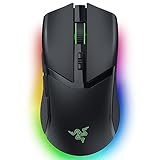
The Cobra Pro is the mouse for someone who wants a smaller, lighter wireless mouse that still looks and feels premium. It runs on 2.4 GHz wireless, has a 170-hour rated battery, and carries multi-zone RGB. Its more compact, symmetrical-leaning shape suits smaller hands and claw grips better than the large ergonomic mice on this list.
Key specs
- Connection: 2.4 GHz wireless
- Battery: up to 170 hours rated
- Shape: compact, symmetrical-leaning, suits claw and fingertip grips
- Lighting: multi-zone RGB including underglow
- Buttons: standard competitive layout plus side buttons
- Software: Razer Synapse with onboard profiles
Strengths
170 hours of rated battery is the standout number: it is nearly double the Viper V3 Pro SE’s rating and comfortably ahead of most mid-range wireless mice. For a wireless mouse with RGB lighting, that is an unusually good balance, because lighting normally costs battery life. The Cobra Pro also supports the kind of customization — polling rate, lift-off distance, DPI stages — that competitive players actually adjust.
Its size is the other reason to choose it. Players with smaller hands often find large ergonomic mice like the Basilisk and Naga unwieldy; the Cobra Pro’s compact body keeps the controls reachable without stretching. The symmetrical-leaning shape also suits players who switch between claw and fingertip grips depending on the game.
It is not the lightest mouse here and it is not the most button-rich, which is exactly what makes it a good generalist. It does a bit of everything without a glaring weakness.
Pros
- 170-hour rated battery is excellent for a wireless RGB mouse
- Compact shape works well for smaller hands
- Multi-zone RGB without gutting battery life
- Solid all-rounder for FPS and everyday gaming
- Onboard profiles for portable setups
Cons
- Not as light as dedicated esports Viper models
- Fewer extra buttons than the Basilisk or Naga
- Compact size is cramped for very large hands
- Mid-range price for hardware that is not class-leading in any one spec
How it compares with the nearest alternative
Against the Viper V3 Pro SE, the Cobra Pro offers much longer battery life and RGB, while the Viper is lighter and lower. If you value flick speed, choose the Viper; if you value fewer charges and a more compact shell, choose the Cobra Pro. Against the Cobra wired model, the Pro adds wireless, battery, RGB zones, and a broader feature set for a meaningful price step up.
8. Razer Viper V4 Pro – Best Overall for Competitive FPS

The Viper V4 Pro is the best Razer mouse for competitive play overall. At 49 g it is the lightest wireless mouse on this list, and its 180-hour rated battery is the longest among the esports-focused models. It is the mouse to buy if you are serious about FPS, want the minimum practical mass, and want to stop thinking about charging.
Key specs
- Connection: 2.4 GHz wireless
- Weight: 49 g
- Battery: up to 180 hours rated
- Shape: Viper family — low, wide, medium length
- Buttons: minimal competitive layout to save weight
- Sensor class: flagship-class optical sensor with high maximum polling rate support
- Software: Razer Synapse with onboard profiles and per-game settings
Strengths
Weight is the whole point. At 49 g the V4 Pro disappears in your hand during fast tracking and flick transitions. Going from an 80 g mouse to a 49 g mouse is a bigger difference in feel than any sensor upgrade you can buy — you feel it on the first swipe, and it reduces the fatigue that accumulates across a long scrim block or ranked session.
The 180-hour battery rating is the second win. Most esports mice trade battery life for weight; the V4 Pro does not. Charging roughly once a month under heavy use is realistic, which means the wireless convenience does not come with a nightly cable ritual.
The shape is proven. The Viper’s low, wide profile keeps your palm from fighting the hump, which matters most for claw and fingertip players who make micro-adjustments with their fingers rather than their whole arm. Combined with a high polling rate class, the result is a mouse that gets out of the way.
Pros
- 49 g is among the lightest wireless mice available
- 180-hour rated battery — best among the esports models here
- Proven low, wide Viper shape
- High polling rate class for competitive consistency
- No cable drag, no RGB tax on battery
Cons
- Premium tier pricing
- Minimal buttons limit MMO and productivity use
- No RGB
- Low profile is less comfortable for committed palm grippers with large hands
How it compares with the nearest alternative
Against the Viper V3 Pro SE, the V4 Pro is 5 g lighter and nearly doubles the battery rating, with newer internals — a difference that matters to players who obsess over mass. Against the DeathAdder V4 Pro, the decision is purely shape: the Viper is low and flat for claw and fingertip grips, while the DeathAdder is raised at the rear for palm grip. Same performance tier, different hand fit. Against the DeathAdder V3 Pro, the V4 Pro is lighter and has a much longer battery rating, at higher cost.
9. Razer Cobra – Best Light Wired Starter Mouse

The Cobra is a light, wired, no-nonsense gaming mouse built around Gen-3 optical switches. At 58 g it is lighter than several wireless mice here, and because it is wired there is no battery, no dongle, and no charging. It is the pick for a player who wants a genuinely light mouse at a budget price and does not mind a cable.
Key specs
- Connection: wired USB
- Weight: 58 g
- Switches: Gen-3 optical switches
- Shape: compact, symmetrical-leaning, suits claw and fingertip grips
- Buttons: standard competitive layout
- Lighting: RGB illumination
- Software: Razer Synapse support
Strengths
Optical switches are the technical highlight. Because they actuate with a light beam rather than a physical metal contact, they avoid the double-click failure mode that eventually afflicts many mechanical-switch mice. For a mouse you plan to keep for years, that is a durability argument, not just a marketing one. The actuation also tends to feel crisp and consistent.
At 58 g the Cobra is light enough for competitive play while remaining comfortable for everyday use. Because it is wired, it is also the simplest mouse to live with: no charging schedule, no pairing, no battery health to consider. If you use a mouse bungee to lift the cable, the practical difference between this and a wireless mouse shrinks considerably for most players.
Pros
- 58 g is genuinely light for a budget mouse
- Optical switches resist the double-click wear that kills mechanical switches
- No battery or charging to manage
- Compact shape suits smaller hands
- Low entry cost for the weight class
Cons
- Cable drag without a bungee
- No wireless option on this model
- Fewer features than the Cobra Pro
- Right-handed grips only in practice despite the symmetrical-leaning shell
How it compares with the nearest alternative
The Cobra Pro is the direct upgrade: wireless 2.4 GHz, 170-hour rated battery, multi-zone RGB, and a broader feature set. If you have ever been annoyed by a cable catching on your desk edge, the Pro is worth the step up. Against the DeathAdder Essential, the Cobra is lighter and has newer optical switches, while the Essential has the more supportive ergonomic palm shape.
10. Razer DeathAdder V3 Pro – Best Ergonomic Shape for Palm Grippers

The DeathAdder V3 Pro is the competitive mouse for palm grippers. It pairs the classic raised-hump DeathAdder shape with wireless operation, a 63 g weight, and a 90-hour rated battery. If a low, flat Viper makes your hand cramp, this is the shape that will not.
Key specs
- Connection: 2.4 GHz wireless
- Weight: 63 g
- Battery: up to 90 hours rated
- Shape: right-hand ergonomic, raised rear hump, palm-grip friendly
- Buttons: standard competitive layout
- Sensor class: flagship-class optical sensor
- Software: Razer Synapse with onboard profiles
Strengths
Shape is the reason to buy this mouse. The DeathAdder’s raised rear hump fills the palm, which supports the hand and reduces the finger strain that claw and fingertip grips can cause over a long session. At 63 g it is still light enough for competitive flick play — a much better combination of comfort and speed than most ergonomic mice achieve.
The 90-hour battery rating is solid for a wireless mouse with these internals, and it means roughly weekly or biweekly charging depending on use. The sensor is flagship class, so there is no accuracy compromise: at this level, sensor performance is far beyond what human reaction time can exploit, which is why shape and weight matter more than DPI spec sheets.
Pros
- Classic DeathAdder ergonomic shape that supports palm grip
- 63 g is light for an ergonomic wireless mouse
- 90-hour rated battery
- Flagship-class sensor
- No cable drag
Cons
- Heavier than esports-focused Viper models
- Battery rating is below the newer DeathAdder V4 Pro
- Premium pricing
- Right-handed only
How it compares with the nearest alternative
Against the DeathAdder V4 Pro, this model gives up 6 g of weight, 8 kHz polling, and a newer generation of internals — but it is the more affordable way into the same ergonomic shape, and many players will not notice the polling-rate difference in practice. Against the Viper V4 Pro, the choice is entirely about grip style: palm grip favors the DeathAdder, claw and fingertip favor the Viper.
11. Razer DeathAdder V4 Pro (Niko Edition) – Best for DeathAdder Fans Who Want the Newest Internals

The DeathAdder V4 Pro Niko Edition is the current top of the DeathAdder line. It combines the same palm-friendly ergonomic shape with a 57 g weight, 8 kHz polling, and a signature edition finish. It is the mouse to buy if you already know you love the DeathAdder shape and you want the newest performance hardware inside it.
Key specs
- Connection: 2.4 GHz wireless
- Weight: 57 g
- Polling rate: 8 kHz class
- Shape: DeathAdder ergonomic profile with raised rear hump
- Buttons: standard competitive layout
- Edition: Niko Edition finish
- Software: Razer Synapse with onboard profiles and high-polling-rate configuration
Strengths
The 8 kHz polling class is the technical differentiator. Higher polling rates report mouse position to the PC more often, which reduces the granularity of movement reporting. The practical benefit is subtle — it shows up more in consistency than in raw aim — and it increases CPU overhead slightly, but competitive players who want every variable optimized tend to value it.
At 57 g the V4 Pro is meaningfully lighter than the V3 Pro’s 63 g while keeping the ergonomic shape that palm grippers rely on. That combination — palm support plus sub-60 g weight — is unusual and is the main reason to pick this over a Viper if you grip with your palm.
The Niko Edition finish is a cosmetic differentiator, but it also signals that this is the current-generation model rather than a previous one. If you plan to keep the mouse for several years, buying the newest generation means newer firmware support for longer.
Pros
- 8 kHz polling class for maximum reporting consistency
- 57 g with a full ergonomic palm-supporting shape
- Newest DeathAdder internals
- Signature edition finish
- Wireless with no cable drag
Cons
- Premium tier pricing
- 8 kHz polling adds CPU overhead and consumes more battery
- Battery rating is not the headline feature at this weight and polling class
- Right-handed only, with limited extra buttons
How it compares with the nearest alternative
Against the DeathAdder V3 Pro, the V4 Pro is 6 g lighter and adds the 8 kHz polling class — a generational step that matters mainly if you are optimizing for consistency. Against the Viper V4 Pro, it is 8 g heavier but has the palm-supporting ergonomic hump, which for palm grippers is worth more than the weight difference. If you claw grip, the Viper is still the better fit.
12. Razer DeathAdder V3 HyperSpeed – Best Lightweight Ergonomic Wireless Value

The DeathAdder V3 HyperSpeed is the value pick for ergonomic wireless. At 55 g it is light by any standard, it charges over USB-C, and its rated battery reaches up to 100 hours. If you want the DeathAdder shape and wireless convenience without paying flagship prices, this is the mouse.
Key specs
- Connection: 2.4 GHz wireless
- Weight: 55 g
- Battery: up to 100 hours rated
- Charging: USB-C
- Shape: DeathAdder ergonomic profile, lighter and slimmer than older generations
- Buttons: standard competitive layout
- Software: Razer Synapse with onboard profiles
Strengths
The numbers here are remarkable for the price tier. At 55 g it is lighter than the Cobra Pro, lighter than the DeathAdder V3 Pro, and close to the Viper V3 Pro SE — while offering the more supportive DeathAdder ergonomic shape. With up to 100 hours of rated battery and USB-C charging, there is no AA battery to source and no long charging session.
USB-C charging is more important than it sounds. It means the same cable that charges your phone charges your mouse, so you can top up from a laptop dock, a power bank, or a wall brick. Mice that use proprietary charging docks tend to become paperweights once the dock is misplaced; USB-C removes that failure mode entirely.
The DeathAdder shape is the long-standing ergonomic reference for a reason: raised rear hump, supportive palm, and a natural thumb position for the side buttons. For palm grippers who want a light mouse, this is close to ideal, and it costs a fraction of the premium models.
Pros
- 55 g is very light for an ergonomic wireless mouse
- Up to 100 hours of rated battery
- USB-C charging with no proprietary dock
- Comfortable, proven DeathAdder shape
- Mid-range pricing for near-flagship weight and battery
Cons
- Older generation internals than the DeathAdder V4 Pro
- No 8 kHz polling class
- Fewer buttons than the Basilisk or Naga families
- Right-handed only
How it compares with the nearest alternative
Against the DeathAdder V3 Pro, the HyperSpeed is 8 g lighter, has a slightly longer rated battery, and charges over USB-C, all at a lower tier — the V3 Pro’s advantage is its flagship sensor class and premium finish. Against the Viper V3 HyperSpeed, the trade is shape and battery technology: the Viper is AA-powered with an ambidextrous-leaning profile, while the DeathAdder V3 HyperSpeed is USB-C, lighter, and ergonomic. For most palm grippers, the DeathAdder is the better choice.
How to Choose
Choosing a competitive gaming mouse is really four decisions in sequence: grip style, weight, connection, and buttons. Get the first two right and the rest is details.
Start with grip style, not sensor specs
Every mouse on this list uses an optical sensor that tracks far more accurately than a human hand can control. The practical difference between a flagship sensor and a modern mainstream one is essentially zero in match conditions. What does differ is whether the shape fits your hand, and shape is determined by grip.
- Palm grip — your whole palm contacts the mouse and your fingers lie flat. You need a raised rear hump for support. Look at the DeathAdder family (Essential, V3 HyperSpeed, V3 Pro, V4 Pro) or the larger Basilisk models. A low, flat mouse will make your hand cramp within an hour.
- Claw grip — your palm touches the rear of the mouse but your fingers arch upward. You need a medium-height hump and a length that lets you anchor the back of your hand. The Viper family (V3 HyperSpeed, V3 Pro SE, V4 Pro) and the Cobra models suit this best.
- Fingertip grip — only your fingertips contact the mouse. You need a short, light, low-profile mouse. The lightest Vipers are ideal; the Basilisk and Naga are actively wrong for this grip.
Match weight to your play style, with numbers
Weight bands are the most useful filter after shape:
- Under 60 g (Viper V4 Pro at 49 g, Viper V3 Pro SE at 54 g, DeathAdder V3 HyperSpeed at 55 g, DeathAdder V4 Pro at 57 g, Cobra at 58 g): best for fast, low-sensitivity FPS play where you move your arm a lot. Lower mass means less inertia to overcome at the start and end of a flick, which helps stopping accuracy.
- 60–70 g (DeathAdder V3 Pro at 63 g): a middle ground that keeps enough mass for stability in tracking while still feeling quick. Many players find this the sweet spot because extremely light mice can feel twitchy at high sensitivity.
- 75 g and above (Viper V3 HyperSpeed at 82 g, Basilisk and Naga models): better for high-sensitivity players who move the mouse with their wrist over small distances, and better for MMO and productivity use where a bit of mass makes precise clicking easier.
A useful rule: if you use a sensitivity low enough that a 180-degree turn takes more than about 15 cm of mousepad, go lighter. If your whole desktop is your mousepad, the weight penalty is real. If you play on a small pad at high sensitivity, a heavier mouse is not the handicap it is often made out to be.
Decide wired versus wireless honestly
Modern 2.4 GHz wireless is functionally indistinguishable from wired for human reaction times. The real trade is logistics:
- Wired (Basilisk V3, DeathAdder Essential, Cobra) — no battery, no charging, no pairing, no dongle to lose. The downside is cable drag, which a mouse bungee largely solves for a few dollars. Wired is also the cheapest route to a given weight class.
- Wireless with USB-C (Viper V3 Pro SE, Viper V4 Pro, Cobra Pro, Basilisk V3 Pro 35K, DeathAdder V3 HyperSpeed, DeathAdder V3 Pro, DeathAdder V4 Pro) — the modern default. Easy to charge from any USB-C cable, and battery ratings from 90 to 180 hours mean charging is a monthly or biweekly chore rather than a nightly one.
- Wireless with AA batteries (Viper V3 HyperSpeed) — cheapest wireless, and it sidesteps battery degradation entirely because you replace the cell rather than recharge it. Use lithium AAs to save weight.
One ownership reality: lithium-ion cells in wireless mice lose capacity over years of cycling. A mouse rated at 180 hours when new may hold noticeably less after three or four years of daily charging. An AA-powered mouse never has that problem, which is a genuine long-term argument for the Viper V3 HyperSpeed if you keep gear for a long time.
Count your buttons against your actual games
Extra buttons are only useful if you have something to bind. Map out your keybinds before you buy:
- Pure FPS: you need two side buttons and two main buttons. Anything more is weight you are carrying for nothing. The Viper and Cobra lines are designed around this.
- FPS plus utility: push-to-talk, melee, a grenade, and a map key. A Basilisk with a thumb paddle and wheel tilt covers this without a thumb grid.
- MMO, MOBA, or ARPG: if your rotation uses more than about eight abilities on short cooldowns, a 12-button thumb grid like the Naga V2 HyperSpeed changes how you play. Budget two weeks of awkward mispresses while the muscle memory forms.
- Work and play mix: wheel tilt and free-spin scrolling matter more than you expect for spreadsheets and long documents. The Basilisk models are the only ones here that offer adjustable wheel resistance.
Think about your upgrade path
Razer’s lineup is unusually friendly to incremental upgrades because shapes repeat across price tiers. You can buy into a shape family cheaply and move up later without relearning your aim:
- Viper path: Viper V3 HyperSpeed (82 g, AA) → Viper V3 Pro SE (54 g, USB-C, 95 hr) → Viper V4 Pro (49 g, 180 hr). Same low profile throughout.
- DeathAdder ergonomic path: DeathAdder Essential (wired) → DeathAdder V3 HyperSpeed (55 g, 100 hr) → DeathAdder V3 Pro (63 g, flagship internals) → DeathAdder V4 Pro (57 g, 8 kHz). Same palm-supporting hump throughout.
- Cobra compact path: Cobra (58 g, wired, optical switches) → Cobra Pro (wireless, 170 hr, RGB).
- Basilisk feature path: Basilisk V3 (wired, multi-button) → Basilisk V3 Pro 35K (wireless, 140 hr, adjustable wheel).
This matters because switching shape families resets your aim for a week or two. If you start with a Viper, upgrading within the Viper line costs you almost no adjustment.
Durability and what actually wears out
Mice fail in predictable ways, and knowing them helps you buy for the long term:
- Mechanical switch wear: traditional metal-contact switches eventually develop double-click or missed-click faults after millions of actuations. Optical switches — like the Gen-3 optical switches in the Cobra — avoid the physical contact entirely and are generally more resistant to this failure mode. If you plan to keep one mouse for five years and click heavily, this is a meaningful consideration.
- Feet/pads: the PTFE glide feet wear down and become smooth, changing the feel. They are replaceable and inexpensive, and they are the first thing to replace when a mouse starts feeling “sticky.”
- Cable and connector: on wired mice, the strain relief where the cable enters the shell is a common failure point. A bungee that keeps the cable off the desk edge reduces that stress.
- Battery capacity: as noted, rechargeable cells lose capacity over years. AA models sidestep this.
- Scroll wheel encoder: the wheel is often the second thing to fail, particularly on mice that get heavy scroll use. Free-spin modes reduce wear because they bypass the detent mechanism.
- Coating and grip surfaces: soft-touch coatings can become tacky or shiny with hand oils over years. Cleaning with a slightly damp cloth and mild soap periodically — never solvent — extends the surface life considerably.
Common mistakes to avoid
- Buying the lightest mouse you can afford without checking grip. A 49 g mouse that forces an uncomfortable grip will hurt your aim more than a 63 g mouse that fits.
- Ignoring mousepad size. A low-sensitivity competitive player needs a large pad; weight savings do nothing if you run out of pad mid-turn.
- Chasing maximum DPI. Most competitive players use somewhere in the range of 400–1600 DPI and adjust in-game sensitivity. Very high DPI settings amplify sensor noise and hand tremor.
- Leaving 8 kHz polling on all the time. High polling rates draw more power and load the CPU. Many players only enable it for competitive sessions.
- Never updating firmware. Wireless stability fixes frequently arrive as firmware updates, and they are applied through the configuration software.
- Buying an MMO mouse for FPS. A 12-button thumb grid is superb at what it does and a liability for fast flick play. Match the tool to the game.
Frequently Asked Questions
Is wireless really as fast as wired for competitive play?
Yes, in practice. Modern 2.4 GHz wireless links report input fast enough that the difference falls far below human reaction time, and professional play has moved overwhelmingly to wireless. The variable that still matters is interference: keep the dongle on an extension cable near the mouse rather than buried behind a metal PC case. If your setup has heavy 2.4 GHz congestion, a wired mouse removes that variable entirely.
How light should a competitive FPS mouse be?
Most competitive players land somewhere between 45 g and 70 g, with the sweet spot depending on sensitivity and grip. If you flick with your arm at low sensitivity, go toward the lighter end — the Viper V4 Pro at 49 g is the lightest here. If you aim with your wrist at higher sensitivity, a 60–70 g mouse often feels more stable. Lighter is not automatically better; it is better only if you can control it.
Do I need 8 kHz polling?
It helps consistency slightly at the margin and it is not a requirement. The DeathAdder V4 Pro is the model here with 8 kHz-class polling. Note that higher polling rates increase CPU overhead and reduce battery life, and the benefit is far smaller than the difference between a good and bad shape. If your aim problem is inconsistency, shape and grip are almost always the cause.
Which Razer mouse is best for MMO play?
The Razer Naga V2 HyperSpeed, without much debate, because of its 12-button thumb grid and 400-hour rated battery. It maps an entire action bar to your right thumb, which frees your left hand for movement. Just accept that it is a specialist: for fast FPS play, a lighter mouse like a Viper will be better.
How long do wireless gaming mouse batteries actually last?
Rated battery life is measured under specific conditions, usually with lighting off and moderate polling. Expect real-world life somewhat below the rating if you use RGB or a high polling rate. Across this list, ratings run from 90 hours (DeathAdder V3 Pro) to 400 hours (Naga V2 HyperSpeed), with the Viper V4 Pro at 180 hours. Even the lowest figure here translates to roughly a week or two of heavy use.
Are optical switches better than mechanical switches?
For durability, generally yes. Optical switches actuate with a beam of light rather than metal contacts touching, which avoids the double-click failure that eventually affects many mechanical switches. For feel, it is subjective — some players prefer the crisper snap of a mechanical switch. The Razer Cobra is the budget model here built around Gen-3 optical switches.
What is the best cheap Razer gaming mouse for a beginner?
For a wired starter, the DeathAdder Essential gives you a proven ergonomic shape at the lowest cost, and the Cobra gives you a lighter body with optical switches for a bit more. For wireless, the Viper V3 HyperSpeed is the cheapest wireless option here at 82 g with AA power. Any of the three is a sound first gaming mouse.
Should I replace mouse feet or the whole mouse when it starts feeling slow?
Replace the feet first. Glide feet wear smooth and are inexpensive to swap, and they are the most common cause of a mouse that suddenly feels sluggish on the pad. If the mouse also develops double-clicking or a failing scroll wheel, that is a switch or encoder issue, and at that point a replacement is usually the better value — especially if you choose a model with optical switches next time.
The Bottom Line, by Situation
If you play competitive FPS above all else, buy the Razer Viper V4 Pro — 49 g, 180-hour rated battery, and the low Viper shape that suits claw and fingertip grips. If you are on a tight budget, start with the Razer Viper V3 HyperSpeed for wireless or the Razer DeathAdder Essential if a cable is fine, then upgrade within the same shape family later. If you palm grip and want an ergonomic shape with wireless freedom, the Razer DeathAdder V3 HyperSpeed is the best value, with the DeathAdder V4 Pro as the premium step. If you want one premium mouse for gaming and work, choose the Razer Basilisk V3 Pro 35K for its 140-hour battery, adjustable wheel, and button count. If you play MMO, MOBA, or ARPG, the Razer Naga V2 HyperSpeed and its 12-button thumb grid is the only mouse here designed for that job. And if you have smaller hands or want a compact, long-lasting wireless all-rounder, the Razer Cobra Pro at 170 hours of rated battery is the one to take.