Key takeaways
- Panel type: IPS for color and viewing angles, VA for contrast on a budget, OLED for contrast and motion at a premium.
- Refresh rate: 60 to 100Hz is fine for office use; 144Hz and above benefits gaming.
- Curvature: curved panels suit gaming and immersion, flat ones suit precise design work.
- Connectivity: USB-C with power delivery and a KVM switch suit laptop-based setups; confirm wattage listed by the maker for charging your laptop.
- Ergonomics: height, tilt and swivel adjustment, plus VESA mount compatibility for monitor arms.
- HDR: many monitors advertise HDR, but only high-brightness or OLED models deliver convincing results.
For a 34-inch ultrawide, the Dell UltraSharp U3425WE suits office and productivity buyers, the Alienware AW3423DWF and AW3425DW suit gamers who want OLED, and budget-minded buyers can look at models such as the LG 34WP65C, Gigabyte M34WQ or Samsung’s Odyssey G5. The category covers very different needs, so this guide sorts monitors by use and explains the specs that decide the choice.
Our top picks



As an Amazon Associate we earn from qualifying purchases at no extra cost to you.
What a 34-inch ultrawide offers
Most 34-inch ultrawides use a 21:9 aspect ratio, and most have a 3440×1440 resolution, often called UWQHD. They give a field of view roughly like two side-by-side monitors without the bezel. Some models are curved, which reviewers say helps immersion at typical desk distances, while others are flat and favored for design or office work. Panel type (IPS, VA or OLED), refresh rate and connectivity are the main differentiators.
At a glance
| Model | Best for | Key stated specs | Limits |
|---|---|---|---|
| Dell UltraSharp U3425WE | Office, multitasking, hybrid work | 34-inch curved IPS Black, 3440×1440, up to 120Hz, Thunderbolt hub and KVM per Dell | Premium tier for an IPS; not tuned for competitive gaming |
| Alienware AW3423DWF | Gamers wanting QD-OLED color and contrast | 34-inch curved QD-OLED, 3440×1440, 165Hz per Dell | OLED care considerations; text clarity differs from IPS |
| Alienware AW3425DW | Gamers wanting a faster QD-OLED | 34-inch curved QD-OLED, up to 240Hz per Dell | Premium tier |
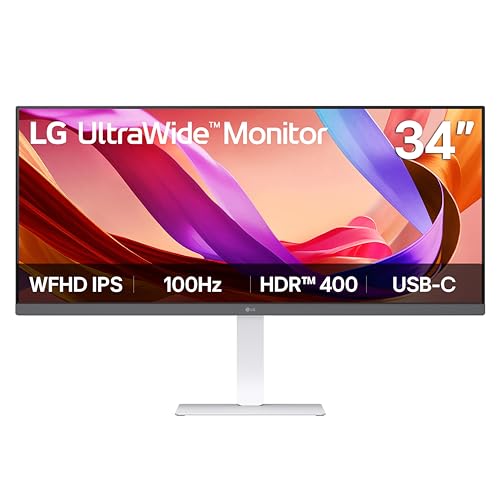
| LG UltraWide 34WP65C and similar | Budget productivity with a curved VA panel | 34-inch curved VA, 3440×1440, up to 160Hz on some LG versions per LG | Contrast and viewing angles typical of VA; features vary by region |
| Gigabyte M34WQ | Value IPS gaming and productivity | 34-inch flat IPS, 3440×1440, 144Hz class per Gigabyte, KVM function | Basic stand and HDR |
| Samsung Odyssey G5 (34-inch) | Budget curved gaming | 34-inch curved VA, 3440×1440, up to 165Hz per Samsung | VA panels can show smearing in dark scenes |
| ASUS ROG Swift PG34WCDM | Gamers wanting WOLED ultrawide | 34-inch curved WOLED ultrawide, 240Hz per ASUS | Premium tier; OLED care |
The monitors in more detail
Dell U3425WE: the productivity pick
This model pairs a curved IPS Black panel with a Thunderbolt hub, ethernet and a built-in KVM switch that lets you share one keyboard and mouse between two computers. Dell lists a refresh rate up to 120Hz, which is smooth for general use. Reviewers often point to color accuracy and the one-cable laptop docking as its strengths. It is not the fastest for competitive games, but suits creative and office work well.
Alienware AW3423DWF and AW3425DW: OLED gaming
The AW3423DWF used a QD-OLED panel and a 165Hz refresh rate, and was widely reviewed as a major step for ultrawide gaming because of its contrast and color. The AW3425DW is the newer version with a higher refresh rate listed by Dell. Both curve at a rate meant for immersion, and both need the usual OLED care of avoiding static images for long periods. Reviewers often point out that text can appear less sharp on some QD-OLED layouts, which matters for office work.
ASUS ROG Swift PG34WCDM: WOLED alternative
ASUS lists this as a 34-inch curved WOLED with a high refresh rate. It fits buyers who prefer WOLED’s brightness characteristics and want features from ASUS’s gaming ecosystem.
Budget curved VA options
The LG 34WP65C, the Samsung Odyssey G5 and similar VA monitors offer deep contrast and high refresh rates at lower cost. VA panels typically produce darker blacks than IPS but can show smearing in dark scenes, according to many reviewers. They suit mixed use in dim rooms.
Gigabyte M34WQ: flat IPS value
This flat IPS model suits buyers who dislike curves and want a KVM function and good color at a modest price tier. It is not meant to compete with OLEDs on contrast.
Specs that matter
- Panel type: IPS for color and viewing angles, VA for contrast on a budget, OLED for contrast and motion at a premium.
- Refresh rate: 60 to 100Hz is fine for office use; 144Hz and above benefits gaming.
- Curvature: curved panels suit gaming and immersion, flat ones suit precise design work.
- Connectivity: USB-C with power delivery and a KVM switch suit laptop-based setups; confirm wattage listed by the maker for charging your laptop.
- Ergonomics: height, tilt and swivel adjustment, plus VESA mount compatibility for monitor arms.
- HDR: many monitors advertise HDR, but only high-brightness or OLED models deliver convincing results.
Compatibility and desk notes
- A 34-inch ultrawide is about 31 to 32 inches wide, so measure your desk and any wall shelves.
- Not all games and apps support 21:9. Some show black bars or stretched menus.
- Check that your computer’s ports support the monitor’s resolution and refresh rate. HDMI versions vary in the bandwidth they offer.
- For laptops, USB-C or Thunderbolt with DisplayPort Alt Mode lets one cable handle video, data and charging. Confirm the maker’s stated capabilities.
- For OLED models, follow the maker’s burn-in guidance and warranty terms.
Pick X if …
| Pick this | If you |
|---|---|
| Dell U3425WE | want an office and laptop-docking monitor with sharp IPS color |
| Alienware AW3423DWF or AW3425DW | want OLED gaming on a 34-inch ultrawide |
| ASUS PG34WCDM | prefer WOLED and ASUS’s gaming features |
| LG 34WP65C or Samsung Odyssey G5 | have a modest budget and like a curved VA picture |
| Gigabyte M34WQ | want a flat IPS at a lower cost and a KVM function |
Alternatives
- Two 27-inch monitors: more screen area and flexibility, with a bezel in the middle.
- A 38-inch or 40-inch ultrawide: more vertical resolution for productivity, at higher cost and desk demands.
- A 32-inch 4K monitor: sharper text for design and coding, though without the wide field of view.
Budget tiers in plain terms
Budget ultrawides use VA or basic IPS panels with modest HDR and simple stands. Mid-range models add better IPS panels, USB-C, KVM switches and more adjustable stands. Premium models use OLED or IPS Black panels, high refresh rates, Thunderbolt hubs and tighter quality control. Think about how many hours per day you will use the monitor and for what, then spend where it matters: color accuracy for creative work, refresh rate for games, ports for laptops.
Productivity setups
- Use Windows Snap layouts or a window manager to divide the screen into columns, which makes the width useful.
- A monitor arm frees desk space and lets you set an ergonomic height. Confirm that the monitor supports VESA mounting and that the arm weight range covers it.
- Place the top of the screen near eye level and sit about an arm’s length away.
- For video calls, mount the webcam centered above the screen.
Gaming setups
Look up each game’s ultrawide support before buying, and use a graphics card that can drive 3440×1440 at your target frame rate. Variable refresh rate support listed by the monitor helps smooth gameplay, and consoles typically do not support 21:9 output, so ultrawides are mainly for PC use.
Frequently Asked Questions
What resolution is a 34-inch ultrawide?
Most are 3440×1440, often called UWQHD. Some models use 2560×1080, which is lower in detail. Check the spec sheet before buying because the difference is noticeable.
Is curved or flat better for a 34-inch ultrawide?
Curved suits gaming and immersion at typical desk distances, and flat suits design work where straight lines matter. Both are common, and comfort is personal.
Is an ultrawide good for gaming?
Yes, in games that support 21:9, though a few titles do not and show black bars. A high-refresh panel and a capable GPU matter more than width alone.
Can I use a 34-inch ultrawide for work?
Yes. It lets you keep several windows side by side. Monitors with USB-C power delivery and a KVM switch make laptop setups simpler.
Should I get OLED for a 34-inch ultrawide?
OLED offers striking contrast and motion, but static content can cause burn-in over long periods, and text can look different from IPS. If you work with static windows all day, IPS may be a better fit.
What graphics card do I need?
3440×1440 has about 34 percent more pixels than standard QHD, so a mid-range or better GPU is typical for high frame rates. Check game requirements and the monitor’s maximum refresh rate.
More from Amazon
Programs that pair well with the guide above. Offers and eligibility are set by Amazon and may change.
Free shipping on eligible items, Prime Video and more. Eligible new members can start with a free trial.
Start a Prime free trialAd-free music streaming. Eligible new subscribers can start with a free trial.
Try Music Unlimited freeA Prime membership for ages 18-24 with a trial period. Eligibility is set by Amazon.
See Prime for Young AdultsAudiobooks and podcasts to listen to on the go. Eligible new members can start with a free trial.
Try Audible freeAs an Amazon Associate we earn from qualifying purchases.