Our Short List of 3
All 4 Picks at a Glance
| Product | Specs | Action |
|---|---|---|
 Epson EX3280 (ASIN: B08P58JXJ9) | Check price on Amazon | |
 ViewSonic PA503HD (ASIN: B0CJ4LMLY8) | Check price on Amazon | |
 ViewSonic PS502X (ASIN: B0BY93686L) | Check price on Amazon | |
 BenQ MS535A (ASIN: B07DVQCPS6) | Check price on Amazon |
Key takeaways
- Compare business projectors for lit meeting rooms: brightness, resolution, keystone, throw and connections across Epson, ViewSonic and BenQ office models.
As an Amazon Associate we earn from qualifying purchases.
A business projector is judged in the least forgiving room in the building: lights on, blinds half open, a spreadsheet on the wall, and a back row that still needs to read the smallest figure in the table. Home cinema machines are built for darkness and drama. Business machines are built for legibility at two in the afternoon, for presenters who arrive with different laptops, and for rooms that were never designed around a projector at all. This guide covers four projectors whose own product pages position them for office, meeting room, or education use, and it judges them on the points that decide whether they work in that setting: stated brightness, native resolution, setup correction, throw distance, connections, speaker output, and weight.
Every model below had its specifications taken from its Amazon product page, and its page had to show the model as a current listing with no statement that it is unavailable. The four survivors split into two pairs. The Epson EX3280 and the BenQ MS535A are compact lamp projectors in the XGA and SVGA classes, built to travel between rooms and to present documents and slides. The ViewSonic PA503HD brings a native Full HD panel for finer text, and the ViewSonic PS502X is a short throw machine for small rooms where the projector has to sit close to the wall. None of them is a streaming box or a home theater flagship, and that is the point: each one is a tool for getting work onto a wall where other people can read it.
Disclosure: This article contains affiliate links. If you buy through these links, we may earn a commission at no additional cost to you.
Brightness Comes First in a Lit Room
Brightness is the specification that decides whether a business projector works with the lights on, and it is the first number to check on any listing. All four projectors here sit in the same bright band on paper: the Epson EX3280 states 3,600 lumens of both color and white brightness, the BenQ MS535A states 3,600 lumens, and both ViewSonic models state 4,000 lumens. Figures in this range are aimed at rooms with ambient light rather than at darkened theaters, and the product descriptions say so directly, each one describing presentations that stay clear in well-lit spaces or rooms where the lights must stay on.
Two cautions belong with those numbers. First, brightness is shared across the whole image, so the same projector looks dimmer as the picture grows. A model that is comfortable at a modest meeting-room image size can look washed out when it is stretched across a training-room wall. Second, makers do not all measure brightness the same way, so treat the lumen figure as a class marker rather than a laboratory result. Epson states color and white brightness as separate, equal figures for the EX3280, which matters for business work because slides and charts are mostly color content on white backgrounds, and a projector whose color output falls well behind its white output will make those slides look dull even when plain text looks sharp.
The practical rule is to match the projector to the largest image and the brightest room it will honestly face, then leave headroom. A huddle room with two windows is a different job from a boardroom with blackout blinds, and both are different again from a classroom with fluorescent tubes that nobody can switch off.
Resolution: Read the Native Panel, Not the Accepted Signal
Resolution decides how fine the text on the wall can be, and the honest figure is the native panel resolution stated in the product information, not the largest signal the projector can accept. These four models span the business range. The BenQ MS535A is an SVGA machine that supports a 1080p input signal, which means it will show a modern laptop feed scaled down to its panel. The Epson EX3280 and the ViewSonic PS502X are XGA models at 1024 by 768, a shape that suits documents and older presentation material. The ViewSonic PA503HD is the only native Full HD model here, at 1920 by 1080, and its page describes that panel as providing sharper images and enhanced legibility.
For most slide decks, charts, and web pages shown at meeting-room distances, XGA remains serviceable, which is why it persists in office lines. The case for the Full HD panel is dense content: detailed spreadsheets, dashboards with small figures, design drawings, and code or data tables that an audience must actually read rather than glance at. If your meetings regularly put fine print on the wall, the PA503HD is the natural pick of this group. If your meetings are slide-led and the projector travels, the lighter XGA and SVGA machines give up little that the audience will notice.
Setup Correction and Throw Distance
Business projectors are aimed by hand, in borrowed rooms, minutes before a meeting. The features that save those minutes are keystone correction, zoom, and a throw distance that matches the room. The BenQ MS535A provides vertical keystone correction and a retractable adjustment foot, the classic pairing for leveling a picture from a meeting table. The ViewSonic PA503HD adds an automatic vertical keystone feature and a 1.1x optical zoom, so the image size can be adjusted a little without moving the machine. The Epson EX3280 sits at the simpler end: Epson’s comparison material for the model lists no optical zoom and no automatic keystone, so placement has to be done more carefully, square to the wall and at the right distance.
The PS502X solves the placement problem from the other direction. Its 0.61 short throw lens produces a 100-inch image from about 4.3 feet away, which keeps the presenter out of the beam, removes shadows cast across the screen, and makes it the natural choice for small meeting rooms, huddle spaces, and classrooms where a standard projector would have to sit in the middle of the table or the audience. Short throw is a genuine room feature, not a novelty: in a small room it is often the difference between a projector that fits the space and one that fights it.
Whichever model you choose, sensible practice is the same. Position the projector as square to the wall as the room allows, use optical zoom before digital correction, and treat keystone as the final adjustment, because heavy correction softens the image it straightens.
Connections, Sound, and the Machines Themselves
A business projector meets a different laptop every week, so connections matter more than smart features. HDMI is the essential port, and every model here has it. The BenQ MS535A and both ViewSonic models provide two HDMI ports, which suits a room where a laptop and a streaming device or a second presenter stay connected. The Epson EX3280 provides one HDMI port, enough for a single presenter feed and for the streaming devices its description names. The two ViewSonic models also provide a USB-A port that can power an HDMI wireless dongle, which removes a trailing power adapter from the table. The BenQ adds a Kensington lock slot, a small detail that matters in shared rooms and classrooms where equipment walks away.
Sound is the second everyday test. Video clips and calls are routine in meetings now, and the projector is often the only speaker in the room. The PS502X leads this group with a built-in 16W speaker. The EX3280 carries a 2W built-in speaker, adequate for speech in a small room and a reason to plan on the room’s own audio, or the laptop’s, for anything larger. Weight splits the group the same way it always does: the MS535A at 5.24 pounds and the EX3280 at 5.2 pounds are bag-friendly travelers, the PA503HD at 6 pounds is still an easy carry, and the PS502X at 9 pounds is better thought of as a room fixture that occasionally moves.
Epson EX3280 (ASIN: B08P58JXJ9)
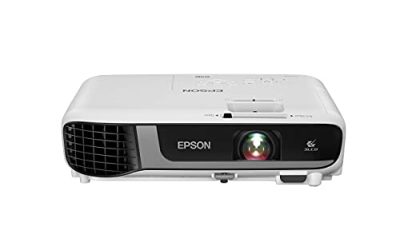
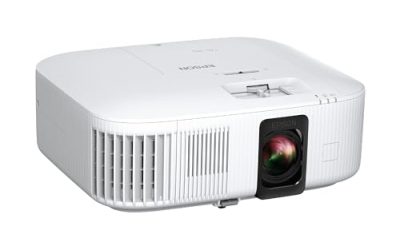
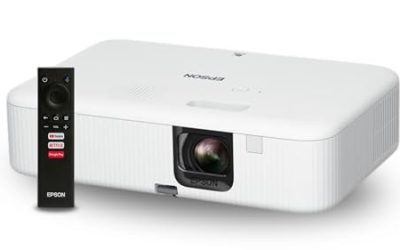
The EX3280 is Epson’s compact entry in this group: a 3-chip 3LCD projector with XGA resolution, 3,600 lumens of color brightness and 3,600 lumens of white brightness, a contrast ratio of 15,000:1, one HDMI port, and a built-in 2W speaker. It weighs 5.2 pounds and measures 11.9 by 9.3 by 3.2 inches. Its product description aims it squarely at presentations, spreadsheets, and videos shown in well-lit spaces, from home offices to large video conference rooms, and notes its use for video conferencing over a connected feed.
Choose the EX3280 if your work is slide-led, your rooms are lit, and the projector will move between them in a bag. Its equal color and white brightness figures suit chart-heavy material, and its size and weight suit a presenter who carries their own equipment. Accept its limits in return: one HDMI port, a modest speaker, and no optical zoom, so the image size is set by where you place it.
ViewSonic PA503HD (ASIN: B0CJ4LMLY8)
The PA503HD is the Full HD model in this group, and its page describes it as a 4,000 ANSI lumen lamp projector intended for home and business use. Its native resolution is 1920 by 1080, with a stated contrast ratio of 22,000:1, images up to 300 inches, two HDMI ports, and a USB-A port that can power an HDMI dongle. Automatic vertical keystone and a 1.1x optical zoom handle setup, and it weighs 6 pounds in a white case measuring 13.3 by 12.2 by 4.5 inches.
Choose the PA503HD if the wall in your meetings carries fine text, detailed figures, or drawings that the back row must read, because the native Full HD panel is the one specification in this group that directly buys legibility. It is also the pick for a fixed meeting room, where its size is no penalty and its dual HDMI ports simplify a permanent setup.
ViewSonic PS502X (ASIN: B0BY93686L)
The PS502X is a high brightness XGA short throw projector positioned by its maker for education and office use. It states 4,000 lumens, a screen resolution of 1024 by 768, a 0.61 short throw lens that fills a 100-inch image from about 4.3 feet, two HDMI ports, a USB-A port, and a built-in 16W speaker, in a black case weighing 9 pounds and measuring 9.2 by 12.2 by 4.5 inches. An energy-saving Eco mode reduces power consumption and extends lamp life, and the page notes compatibility with an optional interactive module for annotation.
Choose the PS502X if your room is small. No other model here can sit that close to the wall, keep the presenter clear of the beam, and still fill a large image, and its speaker is the strongest in the group for calls and clips. Accept that it is the heaviest model here and that its XGA panel, like the Epson’s, is a document panel rather than a fine-detail one.
BenQ MS535A (ASIN: B07DVQCPS6)
The MS535A is BenQ’s meeting-room workhorse in this group: a DLP projector with an SVGA panel that supports 1080p input, 3,600 lumens, a 15,000:1 contrast ratio, two HDMI ports, vertical keystone correction, a retractable adjustment foot, and a Kensington lock. BenQ’s material for the model highlights an Infographic Mode intended to show text and graphics in detail, a SmartEco mode, and a stated lamp life of up to 15,000 hours. It weighs 5.24 pounds and measures 13.1 by 8.4 by 3.9 inches, and its box contents include a VGA cable alongside the remote and power cord, a nod to the older laptops still circulating in offices.
Choose the MS535A if the projector will live a hard daily life in meeting rooms, be set up quickly by whoever arrives first, and be judged on reliability and running economy rather than on panel fineness. Its SVGA panel is the coarsest here, so keep it for slides and documents rather than for dense spreadsheets.
How to Choose Among These Four
Start with the room, not the specification sheet. A small room with a short wall distance points to the PS502X. A fixed room with fine content points to the PA503HD. A projector that travels between lit rooms with slide decks points to the EX3280 or the MS535A, with the Epson ahead on color brightness for chart-heavy work and the BenQ ahead on setup speed, lamp life, and the security slot.
Then check the unglamorous details before ordering. Confirm the native resolution in the product information rather than the input support in the title. Count the HDMI ports your room actually needs. Measure the distance from the likely projector position to the wall and compare it with the throw the model needs for your image size. Plan the audio: a 2W speaker and a boardroom do not mix. And pack the kit that makes any of these machines work in a strange room: a long HDMI cable, the adapters your team’s laptops need, and a spare set of remote batteries. A business projector chosen on those points will still be earning its place long after the first presentation.
More from Amazon
Programs that pair well with the guide above. Offers and eligibility are set by Amazon and may change.
Free shipping on eligible items, Prime Video and more. Eligible new members can start with a free trial.
Start a Prime free trialAd-free music streaming. Eligible new subscribers can start with a free trial.
Try Music Unlimited freeA Prime membership for ages 18-24 with a trial period. Eligibility is set by Amazon.
See Prime for Young AdultsAudiobooks and podcasts to listen to on the go. Eligible new members can start with a free trial.
Try Audible freeAs an Amazon Associate we earn from qualifying purchases.