Our Short List of 3
All 4 Picks at a Glance
| Product | Specs | Action |
|---|---|---|
 Epson Home Cinema 2350 |
| Check price on Amazon |
 BenQ HT2060 |
| Check price on Amazon |
 Optoma UHD38x |
| Check price on Amazon |
 Anker Nebula Cosmos Laser 4K |
| Check price on Amazon |
Our Top Picks
A home projector turns an ordinary wall into the biggest screen in the house, and the current generation of home machines is easier to live with than the projectors of even a few years ago. Built-in streaming, autofocus, LED and laser light sources that last for years, and brightness levels that survive a lamp left on in the corner have moved projectors out of the dedicated cinema room and into everyday living rooms, bedrooms and family spaces.
This guide compares four home projectors that cover the main ways people actually use them: a bright 3LCD model with streaming built in, a colour-focused 1080p LED machine for film nights, a true 4K model aimed at gamers, and a laser-powered smart projector that sets itself up. Along the way it explains the specifications that matter, the ones that can be ignored, and how to match a projector to your room, your screen size and your sources.
As an Amazon Associate we earn from qualifying purchases.
What Makes a Good Home Projector
Brightness and room light
Brightness is the specification that decides where a projector can live. Manufacturers quote it in lumens, and for home models the honest working range runs from roughly 1,500 lumens for a darkened room up to 4,000 lumens for a bright, do-everything machine. A projector used after dark on a screen of around 100 inches can look superb at the lower end of that range. The same projector asked to fight afternoon sun through uncurtained windows will look washed out no matter how good its contrast is on paper.
For a living room that is never fully dark, look toward the brighter end of the range and pair the projector with a screen that helps, such as a grey or ambient-light-rejecting surface. For a bedroom or a dedicated dark room, brightness matters less and contrast, colour and quiet operation matter more.
Resolution: 1080p or 4K
Full HD 1080p remains a sensible choice for screens up to about 120 inches viewed from a normal sofa distance, and the best 1080p models put their budget into colour accuracy and contrast rather than pixel count. 4K models come in two flavours: pixel-shifting designs that accept a 4K signal and render a visibly sharper image than 1080p, and true 4K DLP designs built around a 4K DMD chip. Either way, a 4K projector rewards large screens and 4K sources such as UHD streaming and current game consoles.
Light source: lamp, LED or laser
Traditional lamps are cheap to buy and expensive to own, dimming over a few thousand hours and eventually needing replacement. LED and laser light sources typically run to 20,000 hours or more, hold their brightness far better, switch on almost instantly and need no warm-up or cool-down ritual. For a projector that will be used daily like a television, a solid-state light source is the calmer long-term choice.
Smart features and setup help
Built-in Android TV or Google TV removes the need for a separate streaming stick, while autofocus, automatic keystone correction and screen-fit tools let a projector move between rooms without a long setup routine each time. Lens shift and a real optical zoom remain the better tools where they exist, because they correct the picture without the slight softening that digital keystone correction introduces.
The Picks at a Glance
| Projector | Resolution | Light source | Brightness | Best for |
|---|---|---|---|---|
| Epson Home Cinema 2350 | 4K PRO-UHD (pixel-shift) | Lamp, 3LCD | 2,800 lumens | Bright living rooms and streaming |
| BenQ HT2060 | 1080p | LED, DLP | 2,300 ANSI lumens | Colour-focused film nights |
| Optoma UHD38x | True 4K UHD | Lamp, DLP | 4,000 lumens | Big-screen gaming |
| Anker Nebula Cosmos Laser 4K | 4K UHD | Laser, DLP | 2,200 ANSI lumens | Move-it-anywhere smart projection |
Epson Home Cinema 2350
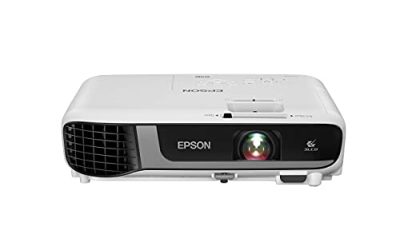
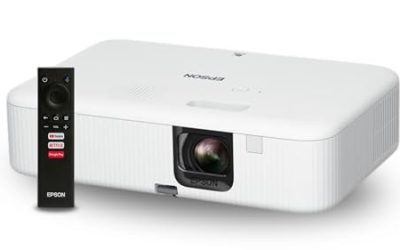
The Home Cinema 2350 is Epson’s answer for households that want one projector to handle films, sport and streaming in a normal living room. Its three-chip 3LCD engine produces equal colour and white brightness of 2,800 lumens, which means colours stay saturated in rooms that are not fully dark, and there is no rainbow-effect artefacting of the kind some viewers notice on single-chip DLP machines.
The 2350 uses Epson’s 4K PRO-UHD pixel-shifting to put a visibly sharper picture on screen than a standard 1080p model, accepts HDR10 and HLG content, and runs Android TV onboard, so the major streaming apps are available without extra hardware. A 10-watt built-in speaker covers casual viewing, and Bluetooth allows a soundbar or speaker to be added wirelessly. Vertical lens shift and a wide zoom range make placement forgiving, and the low-latency mode suits casual and mid-level gaming.
Choose the 2350 if the projector will live in a shared family room, work during the day for sport, and serve as the household’s main big screen rather than a dark-room specialist.
BenQ HT2060
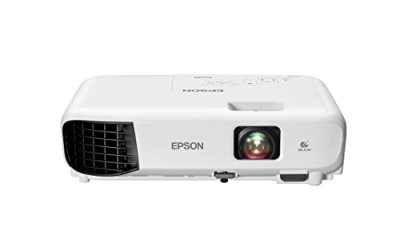
The HT2060 takes the opposite approach to the brightness race: it is a native 1080p DLP projector built around colour. Its LED light source is rated for long life with no lamp changes, and BenQ quotes coverage of 98 percent of both the Rec.709 and DCI-P3 colour gamuts, with HDR10 and HLG support. For film content, which is overwhelmingly mastered in those colour spaces, that coverage translates into accurate, rich colour rather than raw punch.
Installation flexibility is a strength. Vertical lens shift, 2D keystone correction and a 1.3x zoom let the HT2060 sit on a shelf, a table or a ceiling mount without fighting the room. Gamers are well served too, with a quoted 8.3ms input lag at 1080p and 120Hz, and 16.7ms at 1080p and 60Hz. Dual HDMI 2.0 inputs and an S/PDIF output make it easy to route sound to a 5.1 system, while the twin 5-watt chambered speakers handle dialogue clearly when no external audio is connected.
Choose the HT2060 if films come first, the room can be darkened, and you would rather have accurate colour and a lamp-free light source than the highest possible pixel count.
Optoma UHD38x
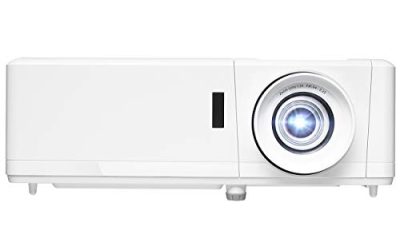
The UHD38x is built for players. It is a true 4K UHD DLP projector rated at 4,000 lumens, bright enough to keep a large image punchy in a room with some ambient light, and its Enhanced Gaming mode quotes a 4.2ms response time at 1080p with refresh support up to 240Hz at that resolution. That combination of size, brightness and speed is something no television at a comparable screen size attempts.
For film and streaming duties it supports HDR10 and HLG, and the high brightness gives HDR content the headroom it needs to avoid looking flat. The lamp-based light source is the trade-off to accept: lamps deliver this brightness at an accessible level, but they dim with age and will eventually need replacing, unlike the LED and laser models in this guide.
Choose the UHD38x if competitive and casual gaming share the screen with films, and you want the largest, brightest 4K picture your room can take.
Anker Nebula Cosmos Laser 4K
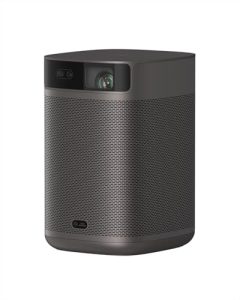
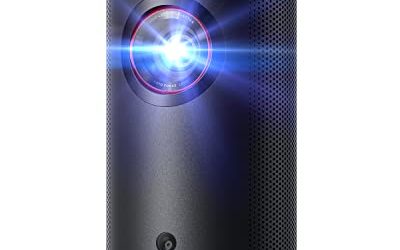
The Cosmos Laser 4K is the projector for homes where the screen is wherever the evening happens. Its laser light source produces 2,200 ANSI lumens with 4K UHD resolution, and the setup is largely automatic: autofocus, auto keystone correction and screen-fit routines square the picture up in seconds after the unit is moved.
An Android TV dongle is included in the package, so streaming apps, Wi-Fi casting and Bluetooth audio are part of the deal without extra boxes. The laser engine also means instant on and off, consistent brightness over years of use, and no lamp budget to plan for. In a dark or dim room it throws a convincing cinema-sized image; in a bright room it is better kept to moderate screen sizes, where its brightness goes further.
Choose the Cosmos Laser 4K if the projector will move between the living room, a bedroom and perhaps the garden wall in summer, and you value quick setup over a fixed installation.
How to Choose Between Them
Start with the room, not the specification sheet. A bright, multi-use living room points to the Epson Home Cinema 2350 or the Optoma UHD38x, whose higher lumen ratings hold up when the lights stay on. A room you can darken for film nights rewards the BenQ HT2060’s colour accuracy and contrast-first design. A projector that travels points to the Nebula Cosmos Laser 4K and its automatic setup.
Then consider the source you will watch most. Streaming households should value the built-in platforms on the Epson and the Anker. Console and PC gamers should weigh input lag and refresh rate, where the Optoma and the BenQ lead. Film collectors with a disc library and an AV receiver will care more about colour gamut coverage and lens shift than about onboard apps.
Finally, think about the light source as an ownership decision. LED and laser models ask more of the budget in some ranges but remove lamp replacements from the picture entirely, while lamp models deliver maximum brightness for the money and simply need a lamp budget kept in reserve.
Setting Up a Home Projector Well
Screen size follows viewing distance. A useful rule is to sit roughly one and a half times the screen width away for films, which for most sofas means a screen between 92 and 120 inches. Bigger is not automatically better: an oversized screen spreads the projector’s brightness thin and makes low-resolution sources look rough.
A dedicated screen almost always beats a bare wall. Even an entry-level fixed-frame or pull-down screen gives a flatter, more consistent surface with a defined border that improves perceived contrast. If a wall is the only option, a smooth, matte, light-grey finish outperforms glossy white paint.
Sound deserves a plan. Every projector here has a built-in speaker adequate for news, sport and casual viewing, but film soundtracks repay a soundbar or a proper speaker system. Use the projector’s Bluetooth, HDMI ARC where available, or an optical output such as the BenQ’s S/PDIF to feed external audio, and keep the audio source close to the screen rather than next to the projector at the back of the room.
Ventilation and placement matter for longevity. Projectors exhaust warm air, so leave clearance around the vents, avoid enclosed cabinets without airflow, and if you ceiling-mount, confirm the mount is rated for the projector’s weight and that the lens can be centred on the screen to minimise keystone correction.
Frequently Asked Questions
How many lumens does a home projector need?
For a darkened room and a screen around 100 inches, roughly 1,500 to 2,200 lumens is comfortable. For a living room with lamps on or daylight in the space, look for 2,800 lumens and above, and help the projector with a suitable screen and curtains where possible.
Is 1080p enough, or should I buy 4K?
On screens up to about 120 inches at typical sofa distances, a good 1080p projector with strong colour and contrast looks excellent with film content. 4K earns its place on larger screens, at closer seating distances, and for gaming and UHD streaming, where the extra detail is visible.
LED, laser or lamp: which light source is best at home?
LED and laser sources last far longer, hold brightness better and start instantly, which suits daily television-style use. Lamp projectors remain the brightness-per-budget leaders, at the cost of eventual lamp replacement. For most households buying today, a solid-state light source is the lower-hassle option.
Can a projector replace a television?
For many households, yes, provided the room’s light is managed and a sound solution is added. Projectors with built-in streaming, instant-on laser or LED engines and automatic setup behave much like a television in daily use, while delivering a far larger picture.
Do I need a screen, or is a wall fine?
A wall works, and a smooth matte wall in a neutral shade can look surprisingly good. A screen still improves flatness, brightness uniformity and perceived contrast, and it gives the image a clean edge. Treat the wall as a starting point and a screen as the first upgrade.
Conclusion
The best homeobie projectors are the ones matched to a real room and a real routine. The Epson Home Cinema 2350 is the all-rounder for bright family rooms, the BenQ HT2060 is the film-first 1080p choice with colour to spare, the Optoma UHD38x is the gamer’s route to a huge true 4K picture, and the Anker Nebula Cosmos Laser 4K is the flexible smart option that sets up wherever the evening lands. Decide by light, screen size and light source, and any of the four will turn an ordinary wall into the best seat in the house.
More from Amazon
Programs that pair well with the guide above. Offers and eligibility are set by Amazon and may change.
Free shipping on eligible items, Prime Video and more. Eligible new members can start with a free trial.
Start a Prime free trialAd-free music streaming. Eligible new subscribers can start with a free trial.
Try Music Unlimited freeA Prime membership for ages 18-24 with a trial period. Eligibility is set by Amazon.
See Prime for Young AdultsAudiobooks and podcasts to listen to on the go. Eligible new members can start with a free trial.
Try Audible freeAs an Amazon Associate we earn from qualifying purchases.